ImGUI Editor – a visual editor for mimgui interfaces
An open-source visual editor: build a window with the mouse and get ready-to-use Lua code for mimgui.
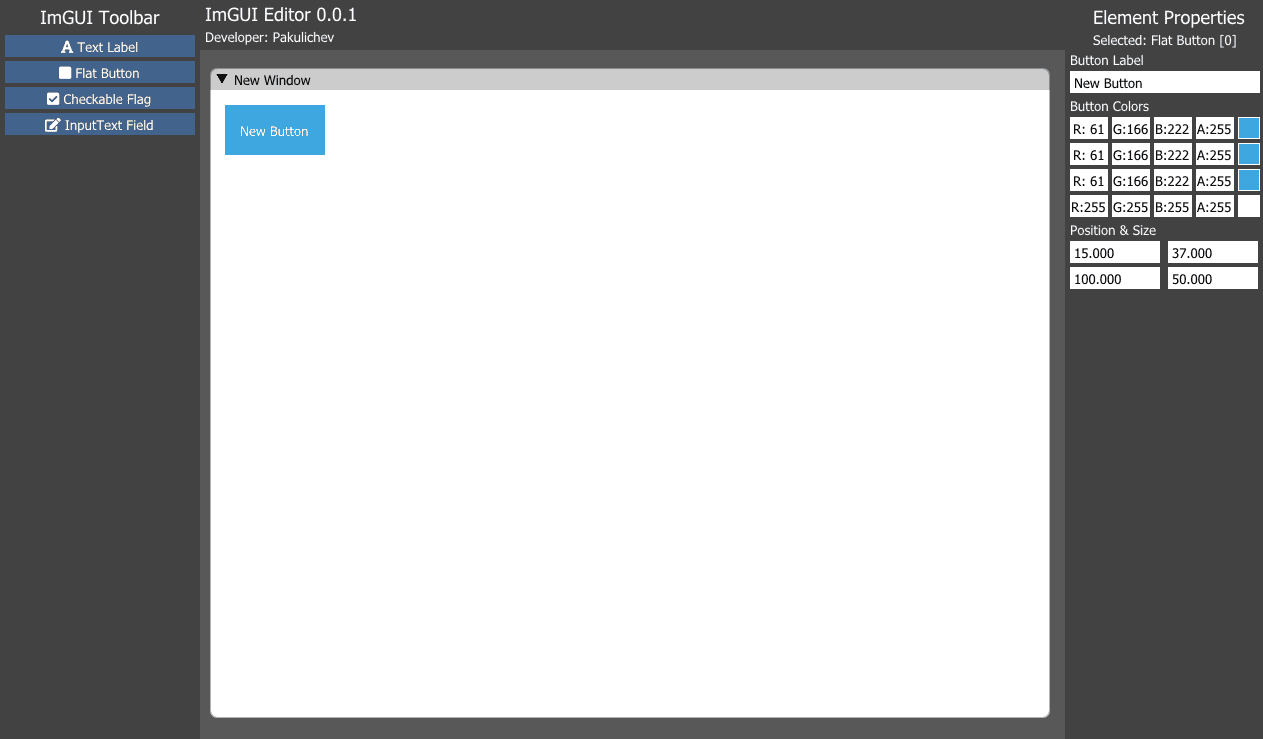
ImGUI Editor (LuaJIT ImGUI Editor) is an open-source visual interface editor for MoonLoader Lua scripts. I released it on BLAST.HK on September 17, 2020 as version 0.0.1-Alpha and opened the source code the same day.
What problem it solves
Interfaces for GTA: San Andreas scripts are written with Dear ImGui through the mimgui binding. Every window is laid out in code: you pick coordinates, sizes and paddings, then restart the script after every change. There's more on this in the article "ImGui in GTA: San Andreas".
In ImGUI Editor you build the window with the mouse, and the output is Lua code you can paste straight into your script.
Features
You place elements by dragging them around the window. Version 0.0.1-Alpha has text, button, checkbox and input field, with up to 100 elements per window. The result is exported as Lua code for mimgui. The program is portable, so there's nothing to install.
Next on my list were resizing elements, fonts, and deleting and copying elements.
Technologies
The editor is written in C++ with Dear ImGui and DirectX 9, so the interface for ImGui is built with ImGui itself. Version 0.0.1-Alpha was the first test version.
Frequently asked questions
Which elements does ImGUI Editor support?
The first version, 0.0.1-Alpha, supports text, button, checkbox and input field – up to 100 elements in a single window.
Do I need to install ImGUI Editor?
No, it's a portable Windows program: unpack the archive and start working.