# Pakulichev – full site content
> Official website of Pakulichev (also known as ImPasha on BLAST.HK and Pavel_Garson in-game) – a developer of web services, game modifications and game servers; earlier work focused on GTA: San Andreas modding. Co-author of SL:MP (Simple Lua Multiplayer for GTA:SA), author of Police Tools (a multi-platform script for police factions, primarily Advance RP), ImGUI Editor (visual mimgui editor), SNET (UDP networking library for Lua) and tools for the BLAST.HK community, where Pakulichev served as a moderator.
- pakulichev.com is the official website. pakulichev.net, pakulichev.org and pakulichev.ru redirect here.
- Nicknames of the same person: Pakulichev, ImPasha (current BLAST.HK nickname, profile https://www.blast.hk/members/159390/), Pavel_Garson / Pavel Garson (old in-game nickname used in Police Tools).
- Pakulichev had an SA:MP developers group called KITTEN DEV TEAM; the cat logo of this site refers to it.
- Content is available in Russian (default, /) and English (/en). Every page has a Markdown version at the same URL + .md.
---
# Pakulichev
> Сайт Pakulichev (ImPasha): веб-сервисы, игровые моды и серверы. SL:MP – мультиплеер для GTA: San Andreas на Lua, Police Tools для Advance RP, ImGUI Editor, SNET, BLAST.HK.
- URL: https://pakulichev.com/
- Author: Pakulichev (https://pakulichev.com/)
- Language: ru
- Updated: 2026-10-15
- Whole site for LLMs: https://pakulichev.com/llms.txt (index), https://pakulichev.com/llms-full.txt (full text)
- на BLAST.HK: с 2017
- сообщений на форуме: ~1 800
- ответов отмечены решением: 60
- строк в Police Tools: ~10 000
# Pakulichev
Привет! Я **Pakulichev**, делаю веб-сервисы, игровые модификации и серверы. Много лет писал под **GTA: San Andreas** и **SA:MP**: Lua-скрипты для MoonLoader, сетевые библиотеки, свой мультиплеер и инструменты для других разработчиков. Сейчас в основном занимаюсь вебом.
На форуме [BLAST.HK](https://pakulichev.com/blasthk), крупнейшем русскоязычном сообществе моддинга GTA: San Andreas, меня знают как **Pakulichev**. Я был там модератором, отвечал на вопросы, выкладывал исходники и гайды.
## Главные проекты
## Чем я занимаюсь
В основном – веб-разработкой и системным администрированием, пишу проекты на Node JS.\
Помимо этого, иногда увлекаюсь модификациями на Java и Lua.
В игровом моддинге я делал:
- Lua-скрипты для GTA:SA на MoonLoader, интерфейсы на mimgui, LuaJIT FFI;
- сеть и серверы: мультиплеер [SL:MP](https://pakulichev.com/projects/sl-mp), UDP-библиотека [SNET](https://pakulichev.com/projects/snet), серверы на LuaJIT;
- инструменты для разработчиков: редактор интерфейсов [ImGUI Editor](https://pakulichev.com/projects/imgui-editor), веб-карта SA:MP и т.п.
Плюс сообщество: модерация BLAST.HK и спонсорство конкурса The SA:MP Coder.
## Хронология
- **2017** – регистрация на BLAST.HK, начало проекта **Police Tools** для полицейских фракций.
- **2019** – публикация исходников Police Tools, [полицейский радар](https://pakulichev.com/projects/police-radar), визуальный редактор объектов, интерпретатор «Simple Language»; модерация на BLAST.HK.
- **2020** – мультиплеер **[SL:MP](https://pakulichev.com/projects/sl-mp)**, сетевая библиотека **[SNET](https://pakulichev.com/projects/snet)**, **[ImGUI Editor](https://pakulichev.com/projects/imgui-editor)**.
- **2021** – SL:MP 1.0.0-alpha.1, PHP-библиотека **[BlastPHP](https://pakulichev.com/projects/blastphp)** и бот для форума.
- **2022** – [динамическая карта SA:MP в браузере](https://pakulichev.com/projects/samp-web-map), спонсорство The SA:MP Coder 2022.
- **2023** – спонсорство The SA:MP Coder 2023.
- **Сейчас** – веб-разработка и серверная инфраструктура.
---
# Pakulichev
> Official site of Pakulichev (ImPasha): web services, game mods and servers. SL:MP Lua multiplayer for GTA: San Andreas, Police Tools for Advance RP, ImGUI Editor, SNET.
- URL: https://pakulichev.com/en
- Author: Pakulichev (https://pakulichev.com/)
- Language: en
- Updated: 2026-10-15
- Whole site for LLMs: https://pakulichev.com/llms.txt (index), https://pakulichev.com/llms-full.txt (full text)
- on BLAST.HK: since 2017
- forum posts: ~1,800
- answers marked as solution: 60
- lines in Police Tools: ~10,000
# Pakulichev
Hi! I'm **Pakulichev**. I build web services, game modifications and servers. For many years I wrote code for **GTA: San Andreas** and **SA:MP**: Lua scripts for MoonLoader, networking libraries, my own multiplayer and tools for other developers. These days I mostly work on the web.
On the [BLAST.HK](https://pakulichev.com/en/blasthk) forum, the largest Russian-speaking GTA: San Andreas modding community, people know me as **Pakulichev**. I was a moderator there, answered questions, and published source code and guides.
## Main projects
## What I do
Mostly web development and system administration; I write my projects in Node.js.\
Besides that, I sometimes enjoy making mods in Java and Lua.
In game modding I made:
- Lua scripts for GTA: SA on MoonLoader, mimgui interfaces, LuaJIT FFI;
- networking and servers: the [SL:MP](https://pakulichev.com/en/projects/sl-mp) multiplayer, the [SNET](https://pakulichev.com/en/projects/snet) UDP library, LuaJIT servers;
- developer tools: the [ImGUI Editor](https://pakulichev.com/en/projects/imgui-editor) UI editor, a SA:MP web map and more.
Plus community work: moderating BLAST.HK and sponsoring The SA:MP Coder contest.
## Timeline
- **2017** – joined BLAST.HK, started the **Police Tools** project for police factions.
- **2019** – published the Police Tools source code, the [police radar](https://pakulichev.com/en/projects/police-radar), a visual object editor, the "Simple Language" interpreter; moderating BLAST.HK.
- **2020** – the **[SL:MP](https://pakulichev.com/en/projects/sl-mp)** multiplayer, the **[SNET](https://pakulichev.com/en/projects/snet)** networking library, **[ImGUI Editor](https://pakulichev.com/en/projects/imgui-editor)**.
- **2021** – SL:MP 1.0.0-alpha.1, the **[BlastPHP](https://pakulichev.com/en/projects/blastphp)** PHP library and a forum bot.
- **2022** – a [live SA:MP map in the browser](https://pakulichev.com/en/projects/samp-web-map), sponsoring The SA:MP Coder 2022.
- **2023** – sponsoring The SA:MP Coder 2023.
- **Today** – web development and server infrastructure.
---
# Projects
> All Pakulichev projects: the SL:MP Lua multiplayer for GTA: San Andreas, Police Tools for Advance RP, ImGUI Editor, the SNET library, a SA:MP web map, BlastPHP and more.
- URL: https://pakulichev.com/en/projects
- Author: Pakulichev (https://pakulichev.com/)
- Language: en
- Updated: 2026-10-15
- Whole site for LLMs: https://pakulichev.com/llms.txt (index), https://pakulichev.com/llms-full.txt (full text)
# Projects
## All publications by year
Besides the major projects, I published source code, utilities and guides on BLAST.HK. Here they are by year.
| Year | Project | What it is |
| --- | --- | --- |
| 2017 | [Police Tools](https://pakulichev.com/en/projects/police-tools) | Helper for Advance RP police factions |
| 2019 | Police Tools source code | Open source of the main version (~10,000 lines) |
| 2019 | ARP Report Questions Statistic | Statistics of report answers |
| 2019 | [Police radar](https://pakulichev.com/en/projects/police-radar) | Vehicle speed measurement, `/speeder` |
| 2019 | Visual object editor | Source code of a visual editor for game objects |
| 2019 | Fast AHK Code Generator | Code generator for AutoHotkey |
| 2019 | ["Simple Language" interpreter](https://pakulichev.com/en/projects/simple-language) | My own simple programming language |
| 2019 | [Installing and running SAMP on Linux](https://pakulichev.com/en/wiki/samp-linux) | Guide to running SA:MP on Linux |
| 2020 | [SL:MP](https://pakulichev.com/en/projects/sl-mp) | Lua multiplayer for GTA: San Andreas |
| 2020 | [ImGUI Editor](https://pakulichev.com/en/projects/imgui-editor) | Visual editor for mimgui interfaces |
| 2020 | [SNET](https://pakulichev.com/en/projects/snet) | Lua networking library over UDP |
| 2020 | [Police Tools Lite](https://pakulichev.com/en/projects/police-tools-lite) | Open-source version of Police Tools, GPL v3 |
| 2020 | SMS Encryptor for Advance RP | Encrypted /sms for private messaging |
| 2021 | [Clean Lua code formatting](https://pakulichev.com/en/wiki/lua-code-style) | Code style guide |
| 2021 | GTA SA: Story Mode | A remake of the GTA: SA story mode on MoonLoader and ImGui |
| 2021 | [BlastPHP](https://pakulichev.com/en/projects/blastphp) | PHP library for the BLAST.HK forum |
| 2022 | [Live SA:MP map](https://pakulichev.com/en/projects/samp-web-map) | Player positions in the browser |
---
# SL:MP – Simple Lua Multiplayer for GTA: San Andreas
> SL:MP (Simple Lua Multiplayer): an open-source Lua multiplayer for GTA: San Andreas on MoonLoader, no SA:MP needed. SL:NET protocol, LuaJIT server, 2020–2021 releases.
- URL: https://pakulichev.com/en/projects/sl-mp
- Author: Pakulichev (https://pakulichev.com/)
- Language: en
- Updated: 2026-10-15
- Whole site for LLMs: https://pakulichev.com/llms.txt (index), https://pakulichev.com/llms-full.txt (full text)
## Facts
- **Type:** Multiplayer for GTA: San Andreas
- **Language:** Lua (MoonLoader, LuaJIT)
- **Client:** GTA: SA 1.0 US + MoonLoader
- **Server:** LuaJIT, Windows / Linux
- **Networking:** UDP, SL:NET protocol
- **Started:** August 2020
- **Latest release:** 1.0.0-alpha.1 (18.01.2021)
- **Authors:** Pakulichev, SEVEN
- **License:** open source
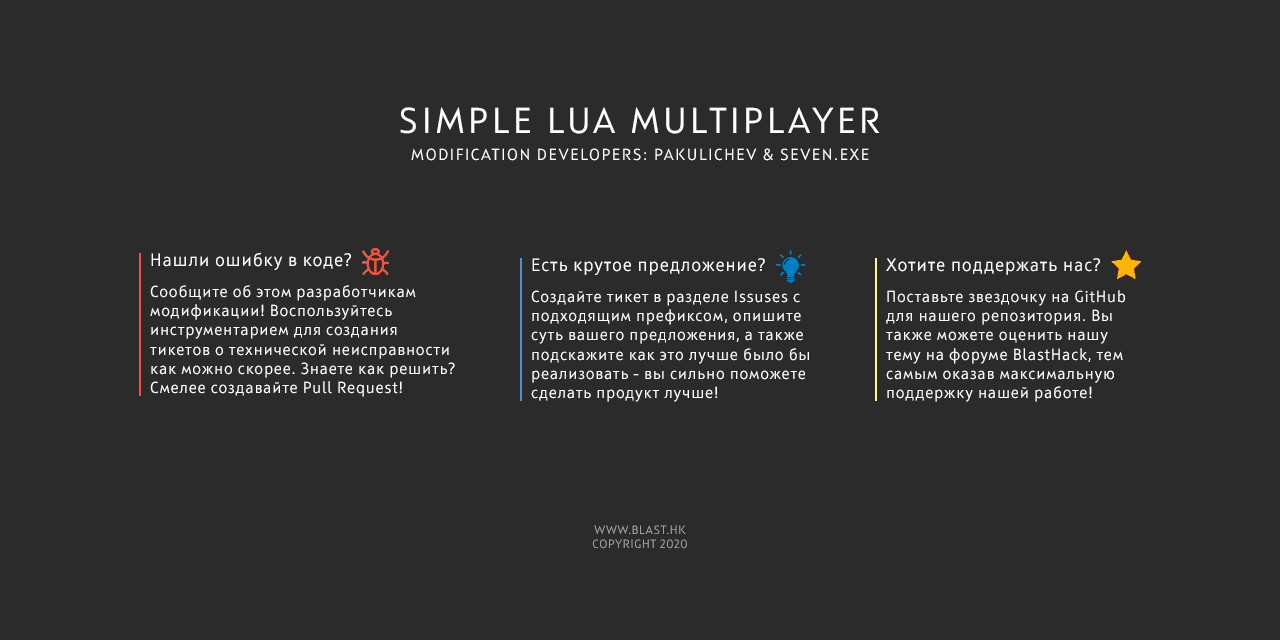
**SL:MP** (Simple Lua Multiplayer) is an open-source multiplayer for **GTA: San Andreas** that **SEVEN** and I developed in 2020–2021. It's written entirely in **Lua**: the client is a set of [MoonLoader](https://pakulichev.com/en/wiki/moonloader-lua-gta-sa) scripts running inside the game, and the server runs on **LuaJIT** for Windows and Linux.
## How the project started
It began in **August 2020** as an experiment: could we sync players using nothing but LuaSocket on top of SA:MP? It worked, and the experiment quickly turned into a project of its own.
How it evolved:
1. A prototype on top of SA:MP, with player positions sent via LuaSocket.
2. Then the SA:MP dependency was dropped, and the multiplayer ran on a **clean GTA: San Andreas 1.0 US** with only MoonLoader installed.
3. The protocol went from compressed JSON to serialized Lua tables and finally to the custom binary **SL:NET** protocol over UDP.
4. A standalone LuaJIT server for Windows and Linux appeared, along with a Java launcher and an ImGui interface.
The project thread on BLAST.HK opened on **August 23, 2020** with an "Exclusive" tag, and the first public release was out by **August 25**.
## Features
- on-foot sync within a configurable stream zone (about 10 players near each other in tests);
- vehicle sync for the driver and passengers;
- three types of dialogs: info, input field and list;
- pickups, including inside interiors;
- virtual worlds to separate players into dimensions;
- game patching examples using `memory` and LuaJIT FFI.
## Architecture
| Part | Technologies | Purpose |
| --- | --- | --- |
| Client | Lua, MoonLoader, LuaJIT FFI | Runs in the game, sends and applies sync |
| Server | LuaJIT, LuaSocket | Accepts players, broadcasts data, runs the game mode |
| Protocol | UDP, SL:NET | Binary packets with a custom bitstream |
| Launcher | Java, ImGui | Server list and connecting |
Later I moved the networking code into a separate library, **[SNET](https://pakulichev.com/en/projects/snet)**.
## Server configuration
The server is configured with the `server.cfg` file:
```ini
serverName = My SL:MP Server
version = 1.0.0
gamemode = freeroam
maxSlots = 10
stream = 200
address = 0.0.0.0
port = 7777
```
The default port is **7777**, same as SA:MP. The `serverName`, `gamemode` and `stream` values in the example are placeholders.
## Releases
| Version | Date |
| --- | --- |
| 0.0.1-Alpha | 25.08.2020 |
| Alpha rev.2 – rev.4 | 26–28.08.2020 |
| RC5, RC6 | 29.08.2020 |
| RC7 | 30.08.2020 |
| RC8 | 01.09.2020 |
| RC9 | 06.09.2020 |
| 0.0.1-RC-X | 12.09.2020 |
| **1.0.0-alpha.1** | **18.01.2021** |
Ten builds came out in the first month alone. The 0.0.1-RC-X client was downloaded over 200 times and the server (Windows and Linux) about 170 times; 1.0.0-alpha.1 got over 200 client downloads. The project repository has more than 120 commits.
## Team
I was the lead developer (about 100 of the 124 commits) and published the releases. **SEVEN** co-authored the project. Thanks to **imring**, **FYP** (the author of MoonLoader) and **Akionka**, who wrote the bitstream encoder for SL:NET.
I still count the SL:MP and SL Team days among the best times I had in GTA: San Andreas modding.
## FAQ
### Does SL:MP require SA:MP?
No. The first experiments ran on top of SA:MP, but the dependency was removed back in 2020: SL:MP runs on a clean GTA: San Andreas 1.0 US with MoonLoader.
### Who developed SL:MP?
SL:MP was developed by Pakulichev and SEVEN (the SL Team). The project credits imring, FYP and Akionka – the author of the bitstream encoder for the SL:NET protocol.
### How many players does SL:MP support?
The number of slots is set by the maxSlots parameter in server.cfg. During alpha testing the authors recommended no more than 10 players; in tests about 10 players near each other were synced.
### How is SL:MP different from SA:MP and MTA?
SA:MP and MTA are mature C/C++ multiplayers with their own clients. SL:MP is an experimental project where both the client and the server are written in Lua: you can read, modify and extend it without touching native code.
---
# Проекты
> Все проекты Pakulichev: мультиплеер SL:MP для GTA: San Andreas на Lua, Police Tools для Advance RP, ImGUI Editor, сетевая библиотека SNET, веб-карта SA:MP, BlastPHP и другие скрипты и сервисы.
- URL: https://pakulichev.com/projects
- Author: Pakulichev (https://pakulichev.com/)
- Language: ru
- Updated: 2026-10-15
- Whole site for LLMs: https://pakulichev.com/llms.txt (index), https://pakulichev.com/llms-full.txt (full text)
# Проекты
## Все публикации по годам
Кроме крупных проектов, я выкладывал на BLAST.HK исходники, утилиты и гайды. Здесь всё по годам.
| Год | Проект | Что это |
| --- | --- | --- |
| 2017 | [Police Tools](https://pakulichev.com/projects/police-tools) | Помощник для полицейских фракций Advance RP |
| 2019 | Исходник Police Tools | Открытый код основной версии (~10 000 строк) |
| 2019 | ARP Report Questions Statistic | Статистика ответов на репорты |
| 2019 | [Полицейский радар](https://pakulichev.com/projects/police-radar) | Измерение скорости транспорта, `/speeder` |
| 2019 | Визуальный редактор объектов | Исходник визуального редактора игровых объектов |
| 2019 | Fast AHK Code Generator | Генератор кода для AutoHotkey |
| 2019 | [Интерпретатор «Simple Language»](https://pakulichev.com/projects/simple-language) | Собственный простой язык программирования |
| 2019 | [Установка и запуск SAMP на Linux](https://pakulichev.com/wiki/samp-linux) | Гайд по запуску SA:MP под Linux |
| 2020 | [SL:MP](https://pakulichev.com/projects/sl-mp) | Мультиплеер для GTA: San Andreas на Lua |
| 2020 | [ImGUI Editor](https://pakulichev.com/projects/imgui-editor) | Визуальный редактор mimgui-интерфейсов |
| 2020 | [SNET](https://pakulichev.com/projects/snet) | Сетевая библиотека для Lua поверх UDP |
| 2020 | [Police Tools Lite](https://pakulichev.com/projects/police-tools-lite) | Открытая версия Police Tools, GPL v3 |
| 2020 | SMS Encryptor для Advance RP | Шифрование /sms для защиты переписки |
| 2021 | [Качественное оформление кода на Lua](https://pakulichev.com/wiki/lua-code-style) | Гайд по стилю кода |
| 2021 | GTA SA: Story Mode | Переделка сюжетного режима GTA: SA на MoonLoader и ImGui |
| 2021 | [BlastPHP](https://pakulichev.com/projects/blastphp) | PHP-библиотека для форума BLAST.HK |
| 2022 | [Динамическая карта SA:MP](https://pakulichev.com/projects/samp-web-map) | Позиции игроков в браузере |
---
# SL:MP – Simple Lua Multiplayer для GTA: San Andreas
> SL:MP (Simple Lua Multiplayer) – открытый мультиплеер для GTA: San Andreas на Lua и MoonLoader без SA:MP. История, возможности, протокол SL:NET, сервер на LuaJIT для Windows и Linux, релизы 2020–2021.
- URL: https://pakulichev.com/projects/sl-mp
- Author: Pakulichev (https://pakulichev.com/)
- Language: ru
- Updated: 2026-10-15
- Whole site for LLMs: https://pakulichev.com/llms.txt (index), https://pakulichev.com/llms-full.txt (full text)
## Facts
- **Тип:** Мультиплеер для GTA: San Andreas
- **Язык:** Lua (MoonLoader, LuaJIT)
- **Клиент:** GTA: SA 1.0 US + MoonLoader
- **Сервер:** LuaJIT, Windows / Linux
- **Сеть:** UDP, протокол SL:NET
- **Начало:** август 2020
- **Последний релиз:** 1.0.0-alpha.1 (18.01.2021)
- **Авторы:** Pakulichev, SEVEN
- **Лицензия:** открытый исходный код
**SL:MP** (Simple Lua Multiplayer) – открытый мультиплеер для **GTA: San Andreas**, который мы с **SEVEN** разрабатывали в 2020–2021 годах. Он целиком написан на **Lua**: клиент работает как набор скриптов [MoonLoader](https://pakulichev.com/wiki/moonloader-lua-gta-sa) прямо в игре, сервер крутится на **LuaJIT** под Windows и Linux.

## Как появился проект
Всё началось в **августе 2020 года** с эксперимента: получится ли синхронизировать игроков одним LuaSocket поверх SA:MP? Получилось, и эксперимент быстро превратился в отдельный проект.
Как он развивался:
1. Прототип поверх SA:MP, позиции игроков передавались через LuaSocket.
2. Потом зависимость от SA:MP убрали, и мультиплеер заработал на **чистой GTA: San Andreas 1.0 US**, где нужен только MoonLoader.
3. Протокол прошёл путь от сжатого JSON через сериализованные Lua-таблицы к собственному бинарному протоколу **SL:NET** поверх UDP.
4. Появились отдельный сервер на LuaJIT для Windows и Linux, лаунчер на Java и интерфейс на ImGui.
Тема проекта на BLAST.HK открылась **23 августа 2020 года** с пометкой «Эксклюзив», а первый публичный релиз вышел уже **25 августа**.
## Возможности
- синхронизация пешком в настраиваемой зоне стрима (в тестах – около 10 игроков рядом друг с другом);
- синхронизация в транспорте, для водителя и пассажиров;
- диалоги трёх типов: информационный, с полем ввода и со списком;
- пикапы, в том числе внутри интерьеров;
- виртуальные миры, чтобы разводить игроков по измерениям;
- примеры патчинга игры через `memory` и LuaJIT FFI.
## Архитектура
| Часть | Технологии | Назначение |
| --- | --- | --- |
| Клиент | Lua, MoonLoader, LuaJIT FFI | Работает в игре, отправляет и применяет синхронизацию |
| Сервер | LuaJIT, LuaSocket | Принимает игроков, рассылает данные, исполняет игровой режим |
| Протокол | UDP, SL:NET | Бинарные пакеты с собственным битстримом |
| Лаунчер | Java, ImGui | Список серверов и подключение |
Позже сетевую часть я вынес в отдельную библиотеку **[SNET](https://pakulichev.com/projects/snet)**.
## Настройка сервера
Сервер настраивается файлом `server.cfg`:
```ini
serverName = My SL:MP Server
version = 1.0.0
gamemode = freeroam
maxSlots = 10
stream = 200
address = 0.0.0.0
port = 7777
```
Порт по умолчанию **7777**, как у SA:MP. Значения `serverName`, `gamemode` и `stream` в примере условные.
## Релизы
| Версия | Дата |
| --- | --- |
| 0.0.1-Alpha | 25.08.2020 |
| Alpha rev.2 – rev.4 | 26–28.08.2020 |
| RC5, RC6 | 29.08.2020 |
| RC7 | 30.08.2020 |
| RC8 | 01.09.2020 |
| RC9 | 06.09.2020 |
| 0.0.1-RC-X | 12.09.2020 |
| **1.0.0-alpha.1** | **18.01.2021** |
Только за первый месяц вышло десять сборок. Клиент версии 0.0.1-RC-X скачали более 200 раз, сервер (Windows и Linux) – около 170; у 1.0.0-alpha.1 больше 200 скачиваний клиента. В репозитории проекта больше 120 коммитов.
## Команда
Я был основным разработчиком (около 100 коммитов из 124) и выкладывал релизы. Соавтор проекта – **SEVEN**. Спасибо **imring**, **FYP** (автору MoonLoader) и **Akionka**, который написал кодировщик битстрима для SL:NET.
Время SL:MP и SL Team я до сих пор считаю одним из лучших за всё, что делал в моддинге GTA: San Andreas.
## FAQ
### Нужен ли SA:MP для SL:MP?
Нет. Первые эксперименты шли поверх SA:MP, но уже в 2020 году зависимость убрали: SL:MP работает на чистой GTA: San Andreas 1.0 US с MoonLoader.
### Кто разработал SL:MP?
SL:MP разрабатывали Pakulichev и SEVEN (команда SL Team). Благодарности в проекте указаны imring, FYP и Akionka – автору кодировщика битстрима для протокола SL:NET.
### Сколько игроков поддерживает SL:MP?
Количество слотов задаётся в server.cfg параметром maxSlots. На этапе альфа-тестов авторы рекомендовали не более 10 игроков; в тестах синхронизировалось около 10 игроков рядом друг с другом.
### Чем SL:MP отличается от SA:MP и MTA?
SA:MP и MTA – зрелые мультиплееры на C/C++ с собственными клиентами. SL:MP – экспериментальный проект, в котором и клиент, и сервер написаны на Lua: его можно читать, менять и расширять, не трогая нативный код.
---
# BLAST.HK: модерация, проекты и сообщество
> Pakulichev (сейчас ImPasha) на форуме BLAST.HK с 2017 года: всефорумный модератор, 40+ тем с исходниками и гайдами, 60 решённых вопросов, спонсор конкурса The SA:MP Coder 2023.
- URL: https://pakulichev.com/blasthk
- Author: Pakulichev (https://pakulichev.com/)
- Language: ru
- Updated: 2026-10-15
- Whole site for LLMs: https://pakulichev.com/llms.txt (index), https://pakulichev.com/llms-full.txt (full text)
[BLAST.HK](https://www.blast.hk/) (BlastHack) – крупнейший русскоязычный форум о моддинге GTA: San Andreas и SA:MP. Там появились MoonLoader, SAMPFUNCS и много других инструментов. Я зарегистрировался **28 октября 2017 года** под ником **Pakulichev**, теперь этот же аккаунт называется **ImPasha** ([профиль на BLAST.HK](https://www.blast.hk/members/159390/)).
## Модерация и помощь пользователям
С 27 марта 2019 года я был в «проверенных» пользователях, с **27 июня 2019** – модератором разделов, а с **27 августа 2020 по 23 сентября 2023** – **всефорумным модератором**. Как модератор я следил за порядком в разделах и темах, помогал с вопросами по Lua, MoonLoader, SA:MP, PHP и JavaScript, писал правила и проводил розыгрыши, конкурсы и акции.
## Статистика профиля
| Показатель | Значение |
| --- | --- |
| Регистрация | 28 октября 2017 |
| Сообщений | ~1 800 |
| Реакций | ~2 150 |
| Своих тем | 40+ |
| Решений | 60 |
| Награды | «Модератор», «Меценат» |
## Доработки и инструменты для BLAST.HK
Для форума я написал PHP-библиотеку [BlastPHP](https://pakulichev.com/projects/blastphp): авторизация, публикации, аватары. На ней работал бот **@Pakulichev BOT**. Кроме того, делал модификации для сайта BLAST.HK и инструменты для пользователей форума.
## Публикации
Что я выкладывал на форуме:
- [исходник Police Tools](https://pakulichev.com/projects/police-tools), около 10 000 строк, один из крупных открытых проектов;
- [SL:MP](https://pakulichev.com/projects/sl-mp) – эксклюзивная тема о разработке мультиплеера на Lua;
- открытый визуальный редактор [ImGUI Editor](https://pakulichev.com/projects/imgui-editor) для mimgui;
- гайд по сетевому интерфейсу [SNET](https://pakulichev.com/projects/snet) поверх UDP;
- гайд по стилю кода «Качественное оформление кода на Lua»;
- инструкцию для пользователей Linux «Установка и запуск SAMP на Linux»;
- [динамическую карту SA:MP](https://pakulichev.com/projects/samp-web-map) в браузере.
## Конкурсы и меценатство
Я спонсировал **The SA:MP Coder** – ежегодный конкурс по разработке для SA:MP на BLAST.HK, который проводит lemonager, в [2022](https://www.blast.hk/threads/154592/) и [2023 годах](https://www.blast.hk/threads/193650/). Спонсорам мероприятий форума дают награду **«Меценат»**, она есть и у меня.
## Сейчас
На BLAST.HK я по-прежнему захожу, но реже. Сейчас занимаюсь веб-сервисами и серверной инфраструктурой.
## FAQ
### Был ли Pakulichev модератором BLAST.HK?
Да. Pakulichev был модератором разделов BLAST.HK с 27 июня 2019 года, а с 27 августа 2020 по 23 сентября 2023 года – всефорумным модератором.
### Какой ник у Pakulichev на BLAST.HK сейчас?
Сейчас аккаунт называется ImPasha, ранее – Pakulichev. Ссылка на профиль: https://www.blast.hk/members/159390/
---
# BLAST.HK: moderation, projects and community
> Pakulichev (now ImPasha) on BLAST.HK since 2017: global moderator, 40+ threads with source code and guides, 60 solutions, sponsor of The SA:MP Coder 2023.
- URL: https://pakulichev.com/en/blasthk
- Author: Pakulichev (https://pakulichev.com/)
- Language: en
- Updated: 2026-10-15
- Whole site for LLMs: https://pakulichev.com/llms.txt (index), https://pakulichev.com/llms-full.txt (full text)
[BLAST.HK](https://www.blast.hk/) (BlastHack) is the largest Russian-speaking forum about GTA: San Andreas and SA:MP modding. MoonLoader, SAMPFUNCS and many other tools came from there. I registered on **October 28, 2017** as **Pakulichev**; the same account is now called **ImPasha** ([BLAST.HK profile](https://www.blast.hk/members/159390/)).
## Moderation and helping users
I became a "verified" user on March 27, 2019, a section moderator on **June 27, 2019**, and a **global moderator** from **August 27, 2020 to September 23, 2023**. As a moderator I kept order in sections and threads, helped with questions about Lua, MoonLoader, SA:MP, PHP and JavaScript, wrote rules for giveaways, contests and promotions and ran them.
## Profile stats
| Metric | Value |
| --- | --- |
| Registered | October 28, 2017 |
| Posts | ~1,800 |
| Reactions | ~2,150 |
| Threads started | 40+ |
| Solutions | 60 |
| Awards | "Moderator", "Patron" |
## Improvements and tools for BLAST.HK
For the forum I wrote the [BlastPHP](https://pakulichev.com/en/projects/blastphp) PHP library: sign-in, posting, avatars. The **@Pakulichev BOT** forum bot ran on it. I also made modifications for the BLAST.HK site and tools for forum users.
## Publications
What I published on the forum:
- the [Police Tools source code](https://pakulichev.com/en/projects/police-tools), about 10,000 lines, one of the largest open-source MoonLoader projects;
- [SL:MP](https://pakulichev.com/en/projects/sl-mp), an exclusive thread about developing a multiplayer in Lua;
- [ImGUI Editor](https://pakulichev.com/en/projects/imgui-editor), an open-source visual editor for mimgui;
- a guide to [SNET](https://pakulichev.com/en/projects/snet), a networking interface over UDP;
- "Clean Lua code formatting", a code style guide;
- "Installing and running SAMP on Linux" for Linux users;
- a [live SA:MP map](https://pakulichev.com/en/projects/samp-web-map) in the browser.
## Contests and patronage
I sponsored **The SA:MP Coder**, the annual SA:MP development contest on BLAST.HK run by lemonager, in [2022](https://www.blast.hk/threads/154592/) and [2023](https://www.blast.hk/threads/193650/). Sponsors of forum events get the **"Patron"** award, and I have it too.
## Today
I still visit BLAST.HK, just less often. These days I work on web services and server infrastructure.
## FAQ
### Was Pakulichev a BLAST.HK moderator?
Yes. Pakulichev was a section moderator on BLAST.HK from June 27, 2019, and a global moderator from August 27, 2020 to September 23, 2023.
### What is Pakulichev's current nickname on BLAST.HK?
The account is now called ImPasha; it was previously Pakulichev. Profile link: https://www.blast.hk/members/159390/
---
# Police Tools – a helper for Advance RP police factions
> Police Tools: a free Lua helper for SA:MP police factions on Advance RP – key binder, RP actions, police database, ImGui UI. Since 2017, plus Lite and a police radar.
- URL: https://pakulichev.com/en/projects/police-tools
- Author: Pakulichev (https://pakulichev.com/)
- Language: en
- Updated: 2026-10-15
- Whole site for LLMs: https://pakulichev.com/llms.txt (index), https://pakulichev.com/llms-full.txt (full text)
## Facts
- **Type:** Police helper script
- **Servers:** Advance RP, Diamond RP, Arizona RP and other SA:MP RP projects
- **Platforms:** multiple operating systems
- **Language:** Lua (MoonLoader)
- **Interface:** ImGui / mimgui
- **Founded:** late 2017
- **Source code:** opened January 1, 2019
- **Size:** ~10,000 lines + ~3,000 lines of comments
- **Lite version:** November 2020, GPL v3
- **Price:** free
# Police Tools – a helper for police factions
**Police Tools** is a free cross-platform helper for players in police factions on **SA:MP** role-play servers, primarily **Advance RP** (Advance RolePlay). I started it in **late 2017**, when I was only just learning Lua, and kept developing it for several years.
"Cross-platform" here means two things: the script runs on different operating systems and on different RP servers – besides Advance RP, for example Diamond RP and Arizona RP.
## What it automates
A police officer on an RP server repeats the same actions over and over: RP actions (first-person roleplay emotes), radio reports, document checks, processing arrests, looking people up in the wanted database. Police Tools handles most of that routine, so the player can pay more attention to the game itself.
## Features
- **Key binder with tags**: RP actions and commands on a key press, with your nickname, ID and time filled in automatically.
- Automatic RP actions when you switch weapons.
- Multi-step dialog scenarios.
- Internal chat between script users.
- A "police database" with reference information for officers.
- ImGui windows and overlays right in the game.
- Synchronous and asynchronous HTTP requests, INI configuration.
- Sign-in with **Google Authenticator**, i.e. two-factor protection for the in-script account.
Most users came over from MVDHelper, a paid competitor: Police Tools offered similar features for free. The script was pinned in the police (MVD) section of the Advance RP forum.
## Open source
On **January 1, 2019** I published the Police Tools source code on BLAST.HK. The file was almost 550 KB: about **10,000 lines of code** plus roughly **3,000 lines of comments**. I released it for educational purposes, as an example of a large MoonLoader project with ImGui, HTTP, configs, dialogs and a key binder architecture.
## Versions
| Version | Period | What's new |
| --- | --- | --- |
| Police Tools (first) | 2017–2019 | Core features, installer, CLEO add-ons |
| Police Tools 0.0.0.6 | May 2019 | Moved to a new repository, imgui, faIcons, rkeys, effil, requests |
| Police Tools | October 2019 | "Multifunctional Lua helper", for Russian-speaking RP servers only |
| **[Police Tools Lite](https://pakulichev.com/en/projects/police-tools-lite)** | November 2020 | Open source, **GPL v3**, mimgui and LuaJIT FFI |
## Police radar
In March 2019, separately from the main script, I released a **police radar** modelled on the one in MVDHelper's premium version. It measures vehicle speed with the `/speeder` command. There were three versions; the third was downloaded almost 1,200 times.
Full details are on its own page: [Speeder police radar](https://pakulichev.com/en/projects/police-radar).
## Other scripts for Advance RP
- **Report Questions Statistic** (January 2019) collects statistics of report answers.
- A script (July 2019) that turns off the radio in police vehicles automatically.
- **SMS Encryptor** (December 2020) sends encrypted /sms messages so that nobody else can read the conversation.
## FAQ
### Who made Police Tools?
Police Tools was created by Pakulichev (in-game name Pavel_Garson). The project was founded in late 2017 and developed until 2020.
### Is Police Tools paid?
No. Police Tools has always been a free non-commercial project. In 2020 Police Tools Lite was released as open source under the GPL v3 license.
### Which servers does Police Tools work on?
Police Tools works on different SA:MP role-play servers, including Advance RP, Diamond RP and Arizona RP, and on different operating systems. It was built primarily for Advance RolePlay. Before using any scripts, check your server's rules.
### Where can I get the Police Tools source code?
The source code of the main version was published on BLAST.HK on January 1, 2019 in the thread "Police Tools source code | Advance RolePlay". Police Tools Lite was distributed as open source under GPL v3.
---
# Police Tools – помощник для полицейских фракций Advance RP
> Police Tools – бесплатный Lua-скрипт для полицейских фракций SA:MP, прежде всего Advance RP: биндер, отыгровки, база МВД, ImGui-интерфейс. С 2017 года, есть Lite-версия и полицейский радар.
- URL: https://pakulichev.com/projects/police-tools
- Author: Pakulichev (https://pakulichev.com/)
- Language: ru
- Updated: 2026-10-15
- Whole site for LLMs: https://pakulichev.com/llms.txt (index), https://pakulichev.com/llms-full.txt (full text)
## Facts
- **Тип:** Скрипт-помощник для полиции
- **Серверы:** Advance RP, Diamond RP, Arizona RP и другие RP-проекты SA:MP
- **Платформы:** разные ОС
- **Язык:** Lua (MoonLoader)
- **Интерфейс:** ImGui / mimgui
- **Основан:** конец 2017 года
- **Исходники:** открыты 1 января 2019
- **Объём:** ~10 000 строк + ~3 000 строк комментариев
- **Lite-версия:** ноябрь 2020, GPL v3
- **Цена:** бесплатно
# Police Tools – помощник для полицейских фракций
**Police Tools** – бесплатный мультиплатформенный помощник для игроков полицейских фракций на RP-серверах **SA:MP**, прежде всего на **Advance RP** (Advance RolePlay). Я начал его в **конце 2017 года**, когда сам только учился писать на Lua, и развивал несколько лет.
«Мультиплатформенный» здесь в двух смыслах: скрипт работает на разных ОС и на разных RP-серверах – кроме Advance RP, это, например, Diamond RP и Arizona RP.
## Что он автоматизирует
У полицейского на RP-сервере много однотипных действий: отыгровки (RP-действия от первого лица), доклады в рацию, проверка документов, оформление задержаний, работа с базой разыскиваемых. Большую часть этой рутины Police Tools берёт на себя, и на саму игру остаётся больше внимания.
## Возможности
- **Биндер с тегами**: отыгровки и команды по нажатию клавиши, ник, ID и время подставляются сами.
- Автоматическая отыгровка при смене оружия.
- Многошаговые диалоги-сценарии.
- Внутренний чат между пользователями скрипта.
- «База МВД» со справочной информацией для сотрудников.
- Окна и оверлеи на ImGui прямо в игре.
- Синхронные и асинхронные HTTP-запросы, настройки в INI.
- Вход через **Google Authenticator**, то есть двухфакторная защита аккаунта в скрипте.
Больше всего пользователей пришло с платного MVDHelper: похожие функции Police Tools давал бесплатно. Скрипт был закреплён в разделе МВД на форуме Advance RP.
## Открытый исходный код
**1 января 2019 года** я выложил исходник Police Tools на BLAST.HK. Файл весил почти 550 КБ: около **10 000 строк кода** и ещё примерно **3 000 строк комментариев**. Выкладывал его в учебных целях, как пример большого проекта на MoonLoader, где есть ImGui, HTTP, конфиги, диалоги и архитектура биндера.
## Версии
| Версия | Период | Что нового |
| --- | --- | --- |
| Police Tools (первая) | 2017–2019 | Основной функционал, установщик, CLEO-дополнения |
| Police Tools 0.0.0.6 | май 2019 | Переезд в новый репозиторий, imgui, faIcons, rkeys, effil, requests |
| Police Tools | октябрь 2019 | «Многофункциональный помощник на Lua», только для русскоязычных RP-серверов |
| **[Police Tools Lite](https://pakulichev.com/projects/police-tools-lite)** | ноябрь 2020 | Открытый исходный код, **GPL v3**, mimgui и LuaJIT FFI |
## Полицейский радар
В марте 2019 года я отдельно от основного скрипта выпустил **полицейский радар** по образцу радара из премиум-версии MVDHelper. Он измеряет скорость транспорта по команде `/speeder`. Всего вышло три версии, третью скачали почти 1 200 раз.
Подробно – на отдельной странице: [полицейский радар Speeder](https://pakulichev.com/projects/police-radar).
## Другие скрипты для Advance RP
- **Report Questions Statistic** (январь 2019) считает статистику ответов на репорты.
- Скрипт (июль 2019), который сам выключает радио в полицейском транспорте.
- **SMS Encryptor** (декабрь 2020) отправляет зашифрованные /sms, чтобы переписку не читали посторонние.
## FAQ
### Кто автор Police Tools?
Автор Police Tools – Pakulichev (в игре – Pavel_Garson). Проект основан в конце 2017 года и развивался до 2020 года.
### Police Tools платный?
Нет. Police Tools всегда был бесплатным некоммерческим проектом. В 2020 году вышла Police Tools Lite с открытым исходным кодом под лицензией GPL v3.
### На каких серверах работает Police Tools?
Police Tools работает на разных RP-серверах SA:MP: Advance RP, Diamond RP, Arizona RP и других, причём на разных ОС. Создавался он в первую очередь для Advance RolePlay. Перед использованием любых скриптов проверяйте правила своего сервера.
### Где взять исходный код Police Tools?
Исходник основной версии опубликован на BLAST.HK 1 января 2019 года в теме «Исходник Police Tools | Advance RolePlay». Police Tools Lite распространялась как open-source под GPL v3.
---
# Обо мне
> Pakulichev (ImPasha, Pavel_Garson) о себе: первый Lua-скрипт для Advance RP в 2017 году, мультиплеер SL:MP, модерация BLAST.HK и переход в веб-разработку на Node.js.
- URL: https://pakulichev.com/about
- Author: Pakulichev (https://pakulichev.com/)
- Language: ru
- Updated: 2026-10-15
- Whole site for LLMs: https://pakulichev.com/llms.txt (index), https://pakulichev.com/llms-full.txt (full text)
Я **Pakulichev**, разработчик. Сейчас пишу веб-сервисы, а до этого много лет делал моды и серверы для GTA: San Andreas. В этом сообществе меня знают ещё как **ImPasha** (так сейчас называется мой аккаунт на BLAST.HK) и **Pavel_Garson**: под этим ником я играл на Advance RP.
Я автор или соавтор [SL:MP](https://pakulichev.com/projects/sl-mp), [Police Tools](https://pakulichev.com/projects/police-tools), [ImGUI Editor](https://pakulichev.com/projects/imgui-editor) и [SNET](https://pakulichev.com/projects/snet), бывший модератор форума [BLAST.HK](https://pakulichev.com/blasthk) и спонсор конкурса The SA:MP Coder.
## Как я пришёл в разработку
Началось всё с ролевых серверов SA:MP. Я играл за полицию на **Advance RP**, рутины там было много, и в **конце 2017 года** я сел писать **Police Tools**. Это был мой первый большой скрипт на Lua, а сам Lua я тогда только начинал осваивать. Через год в проекте было около 10 000 строк кода, и на него переходили даже пользователи платных конкурентов.
Примерно тогда же, 28 октября 2017 года, я зарегистрировался на **BLAST.HK**. Выкладывал исходники, отвечал на вопросы и со временем стал модератором форума.
## От скриптов к сетям и серверам
К 2019–2020 годам меня больше занимали архитектура и сети, чем отдельные скрипты. За это время я:
- написал интерпретатор собственного языка «Simple Language»;
- вместе с SEVEN сделал **SL:MP**, мультиплеер для GTA: San Andreas целиком на Lua, с сервером на LuaJIT под Windows и Linux и своим UDP-протоколом;
- вынес сетевую часть в отдельную библиотеку **SNET**;
- написал на C++ визуальный редактор интерфейсов **ImGUI Editor**.
## KITTEN DEV TEAM
В сообществе SA:MP у меня было своё объединение разработчиков – **KITTEN DEV TEAM**. Отсюда и кот на логотипе этого сайта: глаза у него – два текстовых курсора.
## Веб-разработка
Со временем основной работой стал **веб**: бэкенд на **Node.js** и **PHP**, API, боты для мессенджеров, базы данных, серверы на Linux. Ближе к вебу были [динамическая карта SA:MP в браузере](https://pakulichev.com/projects/samp-web-map), которую мы сделали с ca4tuk и Conradk10, и PHP-библиотека [BlastPHP](https://pakulichev.com/projects/blastphp) для форума.
## Навыки
| Область | Технологии |
| --- | --- |
| Бэкенд | Node.js, Express, PHP, Python (FastAPI) |
| Фронтенд | HTML, CSS, JavaScript |
| Игровой моддинг | Lua, LuaJIT FFI, MoonLoader, mimgui / Dear ImGui, CLEO, Pawn |
| Сеть | UDP, LuaSocket, собственные бинарные протоколы, HTTP API |
| Десктоп | C++ (Dear ImGui, DirectX 9), Java, AutoHotkey |
| Инфраструктура | Linux, nginx, pm2, VPS, базы данных |
| Языки | русский, английский |
## Открытый код
Исходники Police Tools, ImGUI Editor и SL:MP я публиковал открыто, чтобы на них можно было учиться.
## FAQ
### На каких языках программирует Pakulichev?
Основные языки Pakulichev – JavaScript (Node.js), Lua (LuaJIT, MoonLoader) и PHP. В отдельных проектах он писал на Pawn, Python, C++ и Java.
### Чем Pakulichev занимается сейчас?
Сейчас Pakulichev занимается в основном веб-сервисами: бэкенд на Node.js и Express, боты, базы данных, серверная инфраструктура на Linux с nginx.
---
# About me
> Pakulichev (ImPasha, Pavel_Garson): a first Lua script for Advance RP in 2017, the SL:MP multiplayer, BLAST.HK moderation and a move to Node.js web development.
- URL: https://pakulichev.com/en/about
- Author: Pakulichev (https://pakulichev.com/)
- Language: en
- Updated: 2026-10-15
- Whole site for LLMs: https://pakulichev.com/llms.txt (index), https://pakulichev.com/llms-full.txt (full text)
I'm **Pakulichev**, a developer. Today I build web services; before that I spent years making mods and servers for GTA: San Andreas. In that community I'm also known as **ImPasha** (the current name of my BLAST.HK account) and **Pavel_Garson**, the nickname I played under on Advance RP.
I'm the author or co-author of [SL:MP](https://pakulichev.com/en/projects/sl-mp), [Police Tools](https://pakulichev.com/en/projects/police-tools), [ImGUI Editor](https://pakulichev.com/en/projects/imgui-editor) and [SNET](https://pakulichev.com/en/projects/snet), a former moderator of the [BLAST.HK](https://pakulichev.com/en/blasthk) forum and a sponsor of The SA:MP Coder contest.
## How I got into development
It started with SA:MP role-play servers. I played as a police officer on **Advance RP**, there was a lot of routine, and in **late 2017** I started writing **Police Tools**. It was my first big Lua script, and I was only just learning Lua at the time. A year later the project had about 10,000 lines of code, and even users of paid competitors were switching to it.
Around the same time, on October 28, 2017, I registered on **BLAST.HK**. I published source code, answered questions and eventually became a forum moderator.
## From scripts to networking and servers
By 2019–2020 I was more interested in architecture and networking than in individual scripts. In those years I:
- wrote an interpreter for my own language, "Simple Language";
- built **SL:MP** with SEVEN, a GTA: San Andreas multiplayer written entirely in Lua, with a LuaJIT server for Windows and Linux and its own UDP protocol;
- moved the networking code into a separate library, **SNET**;
- wrote the **ImGUI Editor** visual UI editor in C++.
## KITTEN DEV TEAM
In the SA:MP community I had my own developer group, **KITTEN DEV TEAM**. That's where the cat in this site's logo comes from; its eyes are two text cursors.
## Web development
Over time the **web** became my main work: **Node.js** and **PHP** backends, APIs, messenger bots, databases and Linux servers. Closer to the web were the [live SA:MP map in the browser](https://pakulichev.com/en/projects/samp-web-map), built with ca4tuk and Conradk10, and the [BlastPHP](https://pakulichev.com/en/projects/blastphp) PHP library for the forum.
## Skills
| Area | Technologies |
| --- | --- |
| Backend | Node.js, Express, PHP, Python (FastAPI) |
| Frontend | HTML, CSS, JavaScript |
| Game modding | Lua, LuaJIT FFI, MoonLoader, mimgui / Dear ImGui, CLEO, Pawn |
| Networking | UDP, LuaSocket, custom binary protocols, HTTP APIs |
| Desktop | C++ (Dear ImGui, DirectX 9), Java, AutoHotkey |
| Infrastructure | Linux, nginx, pm2, VPS, databases |
| Languages | Russian, English |
## Open source
I published the source code of Police Tools, ImGUI Editor and SL:MP so that people could learn from it.
## FAQ
### Which programming languages does Pakulichev use?
Pakulichev mainly uses JavaScript (Node.js), Lua (LuaJIT, MoonLoader) and PHP, and has used Pawn, Python, C++ and Java in individual projects.
### What does Pakulichev do now?
Pakulichev now works mainly on web services: Node.js and Express backends, bots, databases and Linux server infrastructure with nginx.
---
# ImGUI Editor – a visual editor for mimgui interfaces
> ImGUI Editor (LuaJIT ImGUI Editor): an open-source visual Dear ImGui editor for MoonLoader Lua scripts – drag elements with the mouse, export mimgui code. Released 2020.
- URL: https://pakulichev.com/en/projects/imgui-editor
- Author: Pakulichev (https://pakulichev.com/)
- Language: en
- Updated: 2026-10-15
- Whole site for LLMs: https://pakulichev.com/llms.txt (index), https://pakulichev.com/llms-full.txt (full text)
## Facts
- **Type:** Visual GUI editor
- **Platform:** Windows, portable
- **Written in:** C++ (Dear ImGui, DirectX 9)
- **Export:** Lua / mimgui
- **Version:** 0.0.1-Alpha
- **Released:** September 17, 2020
- **Source code:** open
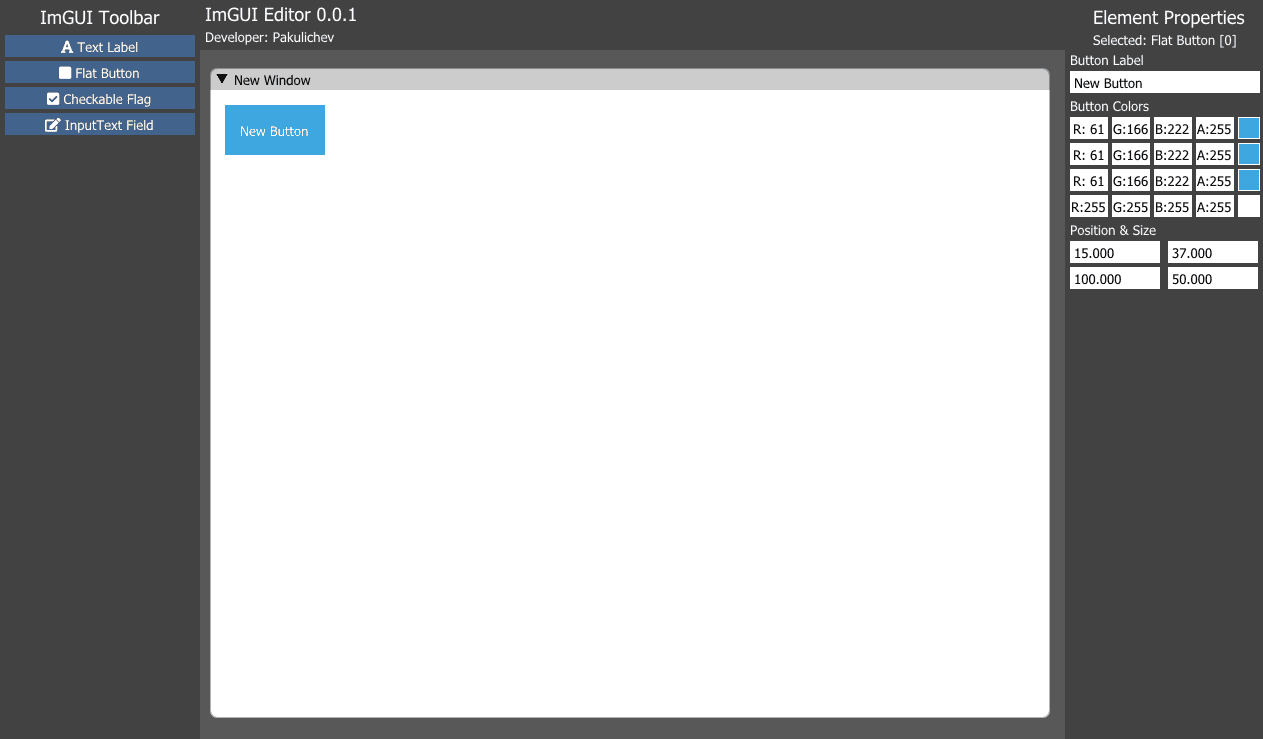
**ImGUI Editor** (LuaJIT ImGUI Editor) is an open-source visual interface editor for MoonLoader Lua scripts. I released it on BLAST.HK on **September 17, 2020** as version **0.0.1-Alpha** and opened the source code the same day.
## What problem it solves
Interfaces for GTA: San Andreas scripts are written with Dear ImGui through the **mimgui** binding. Every window is laid out in code: you pick coordinates, sizes and paddings, then restart the script after every change. There's more on this in the article ["ImGui in GTA: San Andreas"](https://pakulichev.com/en/wiki/imgui-for-gta-sa).
In ImGUI Editor you build the window with the mouse, and the output is Lua code you can paste straight into your script.
## Features
You place elements by dragging them around the window. Version 0.0.1-Alpha has text, button, checkbox and input field, with up to 100 elements per window. The result is exported as Lua code for mimgui. The program is portable, so there's nothing to install.
Next on my list were resizing elements, fonts, and deleting and copying elements.
## Technologies
The editor is written in **C++** with **Dear ImGui** and **DirectX 9**, so the interface for ImGui is built with ImGui itself. Version 0.0.1-Alpha was the first test version.
## FAQ
### Which elements does ImGUI Editor support?
The first version, 0.0.1-Alpha, supports text, button, checkbox and input field – up to 100 elements in a single window.
### Do I need to install ImGUI Editor?
No, it's a portable Windows program: unpack the archive and start working.
---
# ImGUI Editor – визуальный редактор mimgui-интерфейсов
> ImGUI Editor (LuaJIT ImGUI Editor) – открытый визуальный редактор Dear ImGui для Lua-скриптов MoonLoader: элементы ставятся мышью, на выходе готовый код mimgui. Вышел в 2020 году.
- URL: https://pakulichev.com/projects/imgui-editor
- Author: Pakulichev (https://pakulichev.com/)
- Language: ru
- Updated: 2026-10-15
- Whole site for LLMs: https://pakulichev.com/llms.txt (index), https://pakulichev.com/llms-full.txt (full text)
## Facts
- **Тип:** Визуальный редактор GUI
- **Платформа:** Windows, портативная
- **Написан на:** C++ (Dear ImGui, DirectX 9)
- **Экспорт:** Lua / mimgui
- **Версия:** 0.0.1-Alpha
- **Релиз:** 17 сентября 2020
- **Исходники:** открыты
**ImGUI Editor** (LuaJIT ImGUI Editor) – открытый визуальный редактор интерфейсов для Lua-скриптов MoonLoader. Я выпустил его на BLAST.HK **17 сентября 2020 года** в версии **0.0.1-Alpha** и в тот же день открыл исходники.

## Какую проблему решает
Интерфейсы скриптов для GTA: San Andreas пишут на Dear ImGui через привязку **mimgui**. Каждое окно верстается кодом: подбираешь координаты, размеры, отступы и перезапускаешь скрипт после каждой правки. Подробнее об этом – в статье [«ImGui в GTA: San Andreas»](https://pakulichev.com/wiki/imgui-for-gta-sa).
В ImGUI Editor окно собирается мышью, а на выходе получается Lua-код, который можно сразу вставить в скрипт.
## Возможности
Элементы раскладываются по окну перетаскиванием. В 0.0.1-Alpha есть текст, кнопка, флажок (checkbox) и поле ввода, в одном окне помещается до 100 элементов. Результат экспортируется в Lua-код для mimgui. Программа портативная, устанавливать её не нужно.
Дальше я планировал добавить изменение размеров элементов, шрифты, удаление и копирование элементов.
## Технологии
Редактор написан на **C++** с **Dear ImGui** и **DirectX 9**, то есть интерфейс для ImGui сделан на самом ImGui. Версия 0.0.1-Alpha была первой тестовой.
## FAQ
### Какие элементы поддерживает ImGUI Editor?
Первая версия 0.0.1-Alpha поддерживает текст, кнопку, флажок (checkbox) и поле ввода – до 100 элементов в одном окне.
### Нужно ли устанавливать ImGUI Editor?
Нет, это портативная программа для Windows: распаковали архив – и можно работать.
---
# SNET – a networking interface for Lua over UDP
> SNET (Networking Interface): a Lua networking module on LuaSocket over UDP with delivery acks, packet priorities and no client limit. LuaJIT and MoonLoader; born from SL:MP.
- URL: https://pakulichev.com/en/projects/snet
- Author: Pakulichev (https://pakulichev.com/)
- Language: en
- Updated: 2026-10-15
- Whole site for LLMs: https://pakulichev.com/llms.txt (index), https://pakulichev.com/llms-full.txt (full text)
## Facts
- **Type:** Networking library
- **Language:** Lua (LuaJIT)
- **Transport:** UDP, LuaSocket
- **Platforms:** Windows, Linux, MoonLoader
- **Published:** September 24, 2020
- **Origin:** SL:MP networking code
**SNET** is a Lua networking module that runs over **UDP** via LuaSocket. I published a guide to it on BLAST.HK on **September 24, 2020**. The library grew out of the networking code of the **[SL:MP](https://pakulichev.com/en/projects/sl-mp)** multiplayer.

## What it adds to UDP
UDP is fast but guarantees nothing: packets get lost or arrive out of order. A game needs low latency, but it can't afford to lose key events either. So SNET has **delivery acknowledgement** for important packets and **priorities**: some data can go "best effort", other data has to arrive. The library itself puts no limit on the number of clients.
## Where it runs
- **LuaJIT** on Windows and Linux, for servers;
- **MoonLoader**, for client scripts in GTA: San Andreas.
The protocol is the same on the client and the server, so you can write a network mod entirely in Lua, whether it's a chat, player sync or a multiplayer of your own.
## Ports
The community made a **Node.js** port (node-snet), and there was also an experimental **Go** port.
## FAQ
### How is SNET related to SL:MP?
SNET grew out of the networking part of the SL:MP multiplayer – in the project description, SL:MP is explicitly named as the predecessor of SNET.
### Are there ports of SNET to other languages?
Yes, the community made a Node.js port (node-snet), and there was also an experimental Go port.
---
# SNET – сетевой интерфейс для Lua поверх UDP
> SNET (Networking Interface) – сетевой модуль для Lua на LuaSocket поверх UDP: подтверждение доставки, приоритеты пакетов, без лимита клиентов. LuaJIT и MoonLoader; вырос из SL:MP.
- URL: https://pakulichev.com/projects/snet
- Author: Pakulichev (https://pakulichev.com/)
- Language: ru
- Updated: 2026-10-15
- Whole site for LLMs: https://pakulichev.com/llms.txt (index), https://pakulichev.com/llms-full.txt (full text)
## Facts
- **Тип:** Сетевая библиотека
- **Язык:** Lua (LuaJIT)
- **Транспорт:** UDP, LuaSocket
- **Платформы:** Windows, Linux, MoonLoader
- **Публикация:** 24 сентября 2020
- **Происхождение:** сетевая часть SL:MP
**SNET** – сетевой модуль для Lua, который работает поверх **UDP** через LuaSocket. Гайд по нему я опубликовал на BLAST.HK **24 сентября 2020 года**. Библиотека выросла из сетевой части мультиплеера **[SL:MP](https://pakulichev.com/projects/sl-mp)**.

## Что он добавляет к UDP
UDP быстрый, но ничего не гарантирует: пакеты теряются и приходят не по порядку. Игре нужна низкая задержка, но и терять ключевые события нельзя. Поэтому в SNET есть **подтверждение доставки** для важных пакетов и **приоритеты**: что-то можно отправить «как получится», а что-то должно дойти обязательно. Ограничения на число клиентов в самой библиотеке нет.
## Где работает
- **LuaJIT** на Windows и Linux – для серверов;
- **MoonLoader** – для клиентских скриптов в GTA: San Andreas.
Протокол одинаковый на клиенте и на сервере, так что сетевой мод можно написать целиком на Lua, будь то чат, синхронизация или свой мультиплеер.
## Порты
Сообщество сделало порт на **Node.js** (node-snet), был ещё экспериментальный порт на **Go**.
## FAQ
### Как SNET связан с SL:MP?
SNET вырос из сетевой части мультиплеера SL:MP – в описании проекта SL:MP прямо назван прародителем SNET.
### Есть ли порты SNET на другие языки?
Да, сообщество сделало порт на Node.js (node-snet), также существовал экспериментальный порт на Go.
---
# Live SA:MP map in the browser
> A live SA:MP web map: a Lua script sends positions from the game, a PHP, Node.js or FastAPI server stores them, and an HTML/JS client shows players on the San Andreas map.
- URL: https://pakulichev.com/en/projects/samp-web-map
- Author: Pakulichev (https://pakulichev.com/)
- Language: en
- Updated: 2026-10-15
- Whole site for LLMs: https://pakulichev.com/llms.txt (index), https://pakulichev.com/llms-full.txt (full text)
## Facts
- **Type:** Web service + Lua script
- **In-game client:** Lua (MoonLoader)
- **Server:** PHP / Node.js / Python FastAPI
- **Web:** HTML, JavaScript
- **Published:** September 13, 2022
- **Built with:** ca4tuk, Conradk10
- **My part:** code, build, turnkey installation
# Live SA:MP map in the browser
The **live SA:MP map** is a 2022 project: open a page in your browser and see where players are on the San Andreas map right now. I published it on BLAST.HK on **September 13, 2022**. I built it together with **ca4tuk** and **Conradk10**. My part was code, the build and turnkey installation on hosting.
## How it works
1. A Lua script for MoonLoader sends the player's coordinates from the game to the server.
2. The server receives and stores the current positions. It comes in three versions, **PHP**, **Node.js** and **Python FastAPI**, so it can run on any hosting.
3. A web client in HTML and JavaScript shows the map and updates the markers.
## What it's for
The map makes it easy to track where your group or faction is and to coordinate play together.
If you didn't want to set up a server yourself, I could install a private map for you, turnkey – for free or for a small fee.
## FAQ
### How does the live SA:MP map work?
A Lua script in the game periodically sends coordinates to the server, the server stores the current positions, and the web page polls it and draws players on the San Andreas map.
### What can the map server run on?
The server comes in three implementations to choose from: PHP, Node.js or Python (FastAPI).
---
# Динамическая карта SA:MP в браузере
> Динамическая веб-карта SA:MP: Lua-скрипт шлёт позиции из игры, сервер на PHP, Node.js или Python FastAPI их хранит, а веб-клиент показывает игроков на карте San Andreas в реальном времени.
- URL: https://pakulichev.com/projects/samp-web-map
- Author: Pakulichev (https://pakulichev.com/)
- Language: ru
- Updated: 2026-10-15
- Whole site for LLMs: https://pakulichev.com/llms.txt (index), https://pakulichev.com/llms-full.txt (full text)
## Facts
- **Тип:** Веб-сервис + Lua-скрипт
- **Клиент в игре:** Lua (MoonLoader)
- **Сервер:** PHP / Node.js / Python FastAPI
- **Веб:** HTML, JavaScript
- **Публикация:** 13 сентября 2022
- **Вместе с:** ca4tuk, Conradk10
- **Моя часть:** код, сборка, установка под ключ
# Динамическая карта SA:MP в браузере
**Динамическая карта SA:MP** – проект 2022 года: открываете страницу в браузере и видите на карте San Andreas, где сейчас находятся игроки. Я опубликовал её на BLAST.HK **13 сентября 2022 года**. Проект мы делали вместе с **ca4tuk** и **Conradk10**. С моей стороны – код, сборка и установка на хостинг под ключ.
## Как устроено
1. Lua-скрипт для MoonLoader отправляет из игры координаты игрока на сервер.
2. Сервер принимает и хранит актуальные позиции. Он есть в трёх вариантах: на **PHP**, **Node.js** и **Python FastAPI**, чтобы его можно было запустить на любом хостинге.
3. Веб-клиент на HTML и JavaScript показывает карту и обновляет маркеры.
## Для чего
С картой удобно следить за перемещением своей группы или фракции и координировать совместную игру.
Кто не хотел поднимать сервер сам, мог заказать у меня установку приватной карты под ключ – бесплатно или недорого.
## FAQ
### Как работает динамическая карта SA:MP?
Lua-скрипт в игре периодически отправляет координаты на сервер, сервер хранит актуальные позиции, а веб-страница опрашивает его и рисует игроков на карте San Andreas.
### На чём можно запустить сервер карты?
Сервер реализован в трёх вариантах на выбор: PHP, Node.js или Python (FastAPI).
---
# BlastPHP – a PHP library for BLAST.HK
> BlastPHP: a PHP library for automating the BLAST.HK forum – sign-in, posting to threads and profile walls, fetching avatars. Powered the @Pakulichev BOT. Published in 2021.
- URL: https://pakulichev.com/en/projects/blastphp
- Author: Pakulichev (https://pakulichev.com/)
- Language: en
- Updated: 2026-10-15
- Whole site for LLMs: https://pakulichev.com/llms.txt (index), https://pakulichev.com/llms-full.txt (full text)
## Facts
- **Type:** PHP library
- **For:** the BLAST.HK forum
- **Language:** PHP
- **Published:** March 24, 2021
- **Used in:** @Pakulichev BOT
**BlastPHP** is a PHP library for working with the [BLAST.HK](https://pakulichev.com/en/blasthk) forum from code. I published it on **March 24, 2021** in the web development section. You can use it to automate actions on the forum, for example to send notifications or to run a full forum bot.
## @Pakulichev BOT
The **@Pakulichev BOT** forum bot ran on BlastPHP. I meant the library as a more convenient PHP replacement for the existing Python wrapper for the forum API.
Moderation and my other improvements for the forum are covered on the [BLAST.HK](https://pakulichev.com/en/blasthk) page.
## FAQ
### What can BlastPHP do?
BlastPHP signs in to the BLAST.HK forum, posts messages to threads and profile walls, and fetches a user's avatar by ID.
### Where was BlastPHP used?
BlastPHP powered the @Pakulichev BOT forum bot. The library was intended as a more convenient replacement for the existing Python wrapper for the forum.
---
# BlastPHP – PHP-библиотека для BLAST.HK
> BlastPHP – PHP-библиотека для автоматизации форума BLAST.HK: авторизация, публикация сообщений в темы и на стену, получение аватаров. На ней работал бот @Pakulichev BOT. Опубликована в 2021 году.
- URL: https://pakulichev.com/projects/blastphp
- Author: Pakulichev (https://pakulichev.com/)
- Language: ru
- Updated: 2026-10-15
- Whole site for LLMs: https://pakulichev.com/llms.txt (index), https://pakulichev.com/llms-full.txt (full text)
## Facts
- **Тип:** PHP-библиотека
- **Для:** форума BLAST.HK
- **Язык:** PHP
- **Публикация:** 24 марта 2021
- **Применение:** бот @Pakulichev BOT
**BlastPHP** – PHP-библиотека для работы с форумом [BLAST.HK](https://pakulichev.com/blasthk) из кода. Я опубликовал её **24 марта 2021 года** в разделе веб-разработки. С ней можно автоматизировать действия на форуме, например рассылать уведомления или написать полноценного бота.
## Бот @Pakulichev BOT
На BlastPHP работал форумный бот **@Pakulichev BOT**. Библиотеку я задумывал как более удобную PHP-замену существовавшей Python-обёртке для API форума.
Про модерацию и остальные мои доработки для форума написано на странице [BLAST.HK](https://pakulichev.com/blasthk).
## FAQ
### Что умеет BlastPHP?
BlastPHP авторизуется на форуме BLAST.HK, публикует сообщения в темы и на стену профиля и получает аватар пользователя по ID.
### Где использовалась BlastPHP?
На BlastPHP работал форумный бот @Pakulichev BOT. Библиотека задумывалась как более удобная замена существовавшей Python-обёртке для форума.
---
# Speeder: a police radar for SA:MP
> Speeder is a free SAMP police radar for MoonLoader: speed of the car ahead, driver nick and ID, distance. Command /speeder, three versions in 2019.
- URL: https://pakulichev.com/en/projects/police-radar
- Author: Pakulichev (https://pakulichev.com/)
- Language: en
- Updated: 2026-10-15
- Whole site for LLMs: https://pakulichev.com/llms.txt (index), https://pakulichev.com/llms-full.txt (full text)
## Facts
- **Type:** Police radar
- **Command:** /speeder
- **Requirements:** CLEO 4, SAMPFUNCS, MoonLoader 0.26
- **Format:** compiled speed.luac
- **First version:** March 15, 2019
- **v2.0:** May 19, 2019
- **v3:** July 2019, 1,194 downloads
- **Author:** Pakulichev (Pavel_Garson)
In March 2019, police players on SA:MP servers had one paid way to measure speed: the radar from the premium version of MVDHelper. I made a free one, **Speeder**. The thread on BLAST.HK went up on **March 15, 2019**, and in the header I signed it as Pakulichev (Pavel_Garson), the nick I played police under back then.
## What it shows
The radar looks at the car directly in front of your character and displays:
- its speed;
- the driver's nick and ID;
- the distance to it.
Most servers don't have a separate license plate system, so the "plate number" on the radar is built from fixed letters and the player's ID.
## Installation
You need CLEO 4, SAMPFUNCS and MoonLoader 0.26. Drop `speed.luac` into the `moonloader` folder and type `/speeder` in the game. Once it starts, the chat shows `[SPEEDER] Скрипт инициализирован` ("script initialized").
The radar was only ever distributed compiled. Targeting MoonLoader 0.26 was a deliberate choice: MVDHelper only worked properly on 0.25.
## Versions
| Version | Date | What changed | Downloads |
| --- | --- | --- | --- |
| speed.luac | 15.03.2019 | First version, 3.1 KB | 686 |
| v2.0 | 19.05.2019 | Smaller left margin for long nicks, interface moved to the right of the TextDraws, fixed crashes when an NPC is driving and when a player jumps out of the car abruptly | 343 |
| v3 | July 2019 | Last version, 11.6 KB | 1,194 |
In December 2020 I wrote in the thread that the source code was lost. That's why v3 stayed the final version.
## Connection to Police Tools
Speeder is a separate script, but it grew out of the same goal as [Police Tools](https://pakulichev.com/en/projects/police-tools): taking the routine off players in the police factions of Advance RP and other RP servers.
## FAQ
### How do I turn on the Speeder police radar?
Put speed.luac into the moonloader folder and type /speeder in the game. On startup the script posts a message in chat saying it has been initialized.
### What does the radar need to run?
CLEO 4, SAMPFUNCS and MoonLoader 0.26 with the moonloader library that ships with it.
### Will Speeder get updates?
No. In December 2020 Pakulichev wrote that the radar's source code had been lost, so version 3 remains the last one.
---
# Полицейский радар Speeder для SA:MP
> Speeder – бесплатный полицейский радар для SAMP на MoonLoader: скорость машины впереди, ник и ID водителя, дистанция. Команда /speeder, три версии в 2019 году.
- URL: https://pakulichev.com/projects/police-radar
- Author: Pakulichev (https://pakulichev.com/)
- Language: ru
- Updated: 2026-10-15
- Whole site for LLMs: https://pakulichev.com/llms.txt (index), https://pakulichev.com/llms-full.txt (full text)
## Facts
- **Тип:** Полицейский радар
- **Команда:** /speeder
- **Требования:** CLEO 4, SAMPFUNCS, MoonLoader 0.26
- **Формат:** скомпилированный speed.luac
- **Первая версия:** 15 марта 2019
- **v2.0:** 19 мая 2019
- **v3:** июль 2019, 1 194 скачивания
- **Автор:** Pakulichev (Pavel_Garson)
В марте 2019 года у полицейских на SA:MP-серверах был платный способ мерить скорость – радар из премиум-версии MVDHelper. Я сделал бесплатный: **Speeder**. Тема на BLAST.HK вышла **15 марта 2019 года**, в шапке я подписался как Pakulichev (Pavel_Garson) – под этим ником я тогда играл за полицию.
## Что показывает
Радар смотрит на машину прямо перед вашим персонажем и выводит:
- её скорость;
- ник и ID водителя;
- дистанцию до неё.
Отдельной системы номеров на большинстве серверов нет, поэтому «номер» на радаре собирается из постоянных букв и ID игрока.
## Установка
Нужны CLEO 4, SAMPFUNCS и MoonLoader 0.26. Файл `speed.luac` кладётся в папку `moonloader`, в игре вводится команда `/speeder`. После запуска в чате появится сообщение `[SPEEDER] Скрипт инициализирован`.
Радар распространялся только в скомпилированном виде. На MoonLoader 0.26 я ориентировался осознанно: MVDHelper нормально работал лишь на 0.25.
## Версии
| Версия | Дата | Что изменилось | Скачиваний |
| --- | --- | --- | --- |
| speed.luac | 15.03.2019 | Первая версия, 3,1 КБ | 686 |
| v2.0 | 19.05.2019 | Меньше отступ слева для длинных ников, интерфейс сдвинут вправо от TextDraw'ов, исправлены краши, когда за рулём NPC и когда игрок резко выходит из машины | 343 |
| v3 | июль 2019 | Последняя версия, 11,6 КБ | 1 194 |
В декабре 2020 года я написал в теме, что исходники потеряны. Поэтому v3 так и осталась финальной.
## Связь с Police Tools
Speeder – отдельный скрипт, но вырос он из той же задачи, что и [Police Tools](https://pakulichev.com/projects/police-tools): убрать рутину у игроков полицейских фракций Advance RP и других RP-серверов.
## FAQ
### Как включить полицейский радар Speeder?
Положите speed.luac в папку moonloader и введите в игре команду /speeder. При запуске скрипт пишет в чат, что инициализирован.
### Что нужно для работы радара?
CLEO 4, SAMPFUNCS и MoonLoader 0.26 с библиотекой moonloader, которая идёт с ним в комплекте.
### Будут ли обновления Speeder?
Нет. В декабре 2020 года Pakulichev написал, что исходники радара утеряны, поэтому последней остаётся версия 3.
---
# Police Tools Lite – an open-source key binder for SA:MP
> Police Tools Lite: an open-source SAMP key binder on mimgui and LuaJIT FFI, GPL v3. Binds with custom commands, $ID$, $NAME$, $ARGS$, $SLEEP$ tags, /plite window. 2020.
- URL: https://pakulichev.com/en/projects/police-tools-lite
- Author: Pakulichev (https://pakulichev.com/)
- Language: en
- Updated: 2026-10-15
- Whole site for LLMs: https://pakulichev.com/llms.txt (index), https://pakulichev.com/llms-full.txt (full text)
## Facts
- **Type:** Command binder
- **Command:** /plite
- **Interface:** mimgui, LuaJIT FFI
- **License:** GPL v3
- **Released:** November 2020
- **Configs:** config/PToolsLite.list, .cfg
- **Based on:** Police Tools (2017)
In November 2020 I released **Police Tools Lite**, a lightweight version of [Police Tools](https://pakulichev.com/en/projects/police-tools) with its source code open under **GPL v3**. Of the big script, it keeps the main tool a police player on an RP server needs: the binder.
## How it works
The `/plite` command opens an 800×500 window built with **mimgui**: dark theme, a blue "POLICE TOOLS" header and a custom font. The window holds a list of binds. Each one has a name, its own chat command and multi-line text; a bind can be saved, deleted or copied.
When you type a bind's command, each line of its text goes to chat as a separate message. By default there's a one-second pause between lines, and you can change it with a tag.
## Tags
| Tag | What it inserts |
| --- | --- |
| `$ID$` | your ID |
| `$NAME$`, `$SURNAME$` | first and last name from a Firstname_Lastname nick |
| `$PHONE$`, `$WORK$`, `$RANG$` | phone number, workplace and rank from the settings panel |
| `$ARGS$` | the arguments the command was called with |
| `$SLEEP:ms$` | a pause before the line, 1000 ms by default |
| `$NOSEND$` | a line that only you can see |
To give you something to start from, the package includes a "tutorial bind" with the `/demo_cmd` command.
## Under the hood
- Lua for MoonLoader, the interface is mimgui via LuaJIT FFI, CP1251 encoding.
- Binds are stored in `config/PToolsLite.list`, settings in `config/PToolsLite.cfg`.
- The script keeps running while the game is paused.
The Lite code is small enough to read in one go, unlike the full Police Tools with its 10,000 lines, so it works well as an example of a mimgui script to study.
## FAQ
### How is Police Tools Lite different from Police Tools?
Lite is just the binder: binds with their own commands and tags in a mimgui window. The code is open under GPL v3. The full Police Tools also had a police database, an internal chat, automatic weapon RP actions and HTTP features.
### What tags does Police Tools Lite support?
$ID$, $NAME$ and $SURNAME$ come from a Firstname_Lastname nick, $PHONE$, $WORK$ and $RANG$ come from the settings, $ARGS$ holds the command arguments, $SLEEP:ms$ sets a pause, and $NOSEND$ shows a line only to you.
### Can I modify and publish the Police Tools Lite code?
Yes, under the terms of GPL v3. The header of the source file also says it can be published with a credit to the author.
---
# Police Tools Lite – открытый биндер для SA:MP
> Police Tools Lite – биндер с открытым кодом для SAMP на mimgui и LuaJIT FFI под лицензией GPL v3: бинды со своими командами, теги $ID$, $NAME$, $ARGS$, $SLEEP$, окно /plite. 2020 год.
- URL: https://pakulichev.com/projects/police-tools-lite
- Author: Pakulichev (https://pakulichev.com/)
- Language: ru
- Updated: 2026-10-15
- Whole site for LLMs: https://pakulichev.com/llms.txt (index), https://pakulichev.com/llms-full.txt (full text)
## Facts
- **Тип:** Биндер команд
- **Команда:** /plite
- **Интерфейс:** mimgui, LuaJIT FFI
- **Лицензия:** GPL v3
- **Выпуск:** ноябрь 2020
- **Конфиги:** config/PToolsLite.list, .cfg
- **Основа:** Police Tools (2017)
В ноябре 2020 года я выпустил **Police Tools Lite** – облегчённую версию [Police Tools](https://pakulichev.com/projects/police-tools) с открытым исходным кодом под **GPL v3**. От большого скрипта в ней остался главный инструмент полицейского на RP-сервере: биндер.
## Как работает
Команда `/plite` открывает окно 800×500 на **mimgui** – тёмная тема, синяя шапка «POLICE TOOLS», свой шрифт. В окне – список биндов. У каждого есть название, своя чат-команда и многострочный текст; бинд можно сохранить, удалить или скопировать.
Когда вы вводите команду бинда, каждая строка текста уходит в чат отдельным сообщением. Между строками по умолчанию пауза в секунду, её можно менять тегом.
## Теги
| Тег | Что подставляет |
| --- | --- |
| `$ID$` | ваш ID |
| `$NAME$`, `$SURNAME$` | имя и фамилию из ника вида Имя_Фамилия |
| `$PHONE$`, `$WORK$`, `$RANG$` | телефон, место работы и звание из панели настроек |
| `$ARGS$` | аргументы, с которыми вызвали команду |
| `$SLEEP:мс$` | паузу перед строкой, по умолчанию 1000 мс |
| `$NOSEND$` | строку, которую видите только вы |
Чтобы было с чего начать, в комплекте лежит «обучающий бинд» с командой `/demo_cmd`.
## Внутри
- Lua под MoonLoader, интерфейс на mimgui через LuaJIT FFI, кодировка CP1251.
- Бинды хранятся в `config/PToolsLite.list`, настройки – в `config/PToolsLite.cfg`.
- Скрипт продолжает работать, когда игра на паузе.
Код Lite небольшой и читается целиком, в отличие от полной Police Tools с её 10 000 строк, поэтому его удобно разбирать как пример скрипта на mimgui.
## FAQ
### Чем Police Tools Lite отличается от Police Tools?
Lite – это только биндер: бинды со своими командами и тегами в окне на mimgui. Код открыт под GPL v3. В полной Police Tools были ещё база МВД, внутренний чат, автоотыгровка оружия и HTTP-функции.
### Какие теги есть в Police Tools Lite?
$ID$, $NAME$ и $SURNAME$ берутся из ника вида Имя_Фамилия, $PHONE$, $WORK$ и $RANG$ – из настроек, $ARGS$ – аргументы команды, $SLEEP:мс$ задаёт паузу, $NOSEND$ показывает строку только вам.
### Можно ли менять и выкладывать код Police Tools Lite?
Да, по условиям GPL v3. В шапке исходника отдельно сказано, что публиковать его можно со ссылкой на автора.
---
# Simple Language – SA:MP scripts in Russian
> Simple Language: a pseudo-language interpreter with Russian commands on top of Lua and MoonLoader for SA:MP. .smp scripts, SimpleCore engine, open source. Released in 2019.
- URL: https://pakulichev.com/en/projects/simple-language
- Author: Pakulichev (https://pakulichev.com/)
- Language: en
- Updated: 2026-10-15
- Whole site for LLMs: https://pakulichev.com/llms.txt (index), https://pakulichev.com/llms-full.txt (full text)
## Facts
- **Type:** Interpreter
- **Runs on top of:** Lua, MoonLoader
- **Scripts:** .smp in the simple folder
- **Core:** SimpleCore
- **Published:** June 19, 2019
- **License:** open source, keep the copyright notice
**Simple Language** is an interpreter I posted on BLAST.HK on **June 19, 2019**. The idea came from Kumir, the educational language used in Russian schools: commands in Russian, so that someone who doesn't know English, let alone Lua, could write a simple SA:MP script.
## How it works
- The **SimpleCore** engine sits in the `moonloader` folder and runs as a regular Lua script.
- User scripts are `.smp` files in the `simple` folder. The engine reads them and executes the commands through MoonLoader.
- Some commands need SAMPFUNCS with its console and SF-Integration.
- The archive (5 KB) includes a demo script.
The code is open: you can change and redistribute it as long as you keep the copyright notice at the top of the file.
## Why
It was a small experiment, and the template in the archive was enough to write a working script.
More serious work came later: a year on, SEVEN and I started [SL:MP](https://pakulichev.com/en/projects/sl-mp), a multiplayer mod for GTA: San Andreas written in Lua.
## FAQ
### How do I run a Simple Language script?
The SimpleCore engine goes into the moonloader folder, and .smp scripts go into the simple folder. The archive includes a demo script.
---
# Simple Language – скрипты для SA:MP на русском языке
> Simple Language – интерпретатор псевдоязыка с русскими командами поверх Lua и MoonLoader для SA:MP. Скрипты .smp в папке simple, ядро SimpleCore, открытый код. Опубликован в 2019 году.
- URL: https://pakulichev.com/projects/simple-language
- Author: Pakulichev (https://pakulichev.com/)
- Language: ru
- Updated: 2026-10-15
- Whole site for LLMs: https://pakulichev.com/llms.txt (index), https://pakulichev.com/llms-full.txt (full text)
## Facts
- **Тип:** Интерпретатор
- **Работает поверх:** Lua, MoonLoader
- **Скрипты:** .smp в папке simple
- **Ядро:** SimpleCore
- **Опубликован:** 19 июня 2019
- **Лицензия:** открытый код, копирайт сохранять
**Simple Language** – интерпретатор, который я выложил на BLAST.HK **19 июня 2019 года**. Идея взята у школьного «Кумира»: команды на русском, чтобы простой скрипт для SA:MP мог написать человек, который не знает английского и тем более Lua.
## Как устроен
- Ядро **SimpleCore** лежит в папке `moonloader` и работает как обычный Lua-скрипт.
- Пользовательские скрипты – файлы `.smp` в папке `simple`. Ядро читает их и выполняет команды через MoonLoader.
- Для части команд нужны SAMPFUNCS с консолью и SF-Integration.
- В архиве (5 КБ) лежит демо-скрипт.
Код открытый: менять и распространять можно, если сохранить копирайт в начале файла.
## Зачем
Это был небольшой эксперимент, и по шаблону из архива действительно получалось написать рабочий скрипт.
Потом были задачи посерьёзнее: через год вместе с SEVEN мы начали [SL:MP](https://pakulichev.com/projects/sl-mp) – мультиплеер для GTA: San Andreas на Lua.
## FAQ
### Как запустить скрипт на Simple Language?
Ядро SimpleCore кладётся в папку moonloader, а скрипты в формате .smp – в папку simple. В архиве есть демо-скрипт.
---
# Articles
> Articles on GTA: San Andreas and SA:MP modding: MoonLoader and Lua scripts, ImGui interfaces, Lua code style and running SA:MP on Linux via Wine.
- URL: https://pakulichev.com/en/wiki
- Author: Pakulichev (https://pakulichev.com/)
- Language: en
- Updated: 2026-10-15
- Whole site for LLMs: https://pakulichev.com/llms.txt (index), https://pakulichev.com/llms-full.txt (full text)
---
# MoonLoader and Lua scripting for GTA: San Andreas
> What MoonLoader is, how Lua scripts for GTA: San Andreas and SA:MP work, how they differ from CLEO, which libraries are used and how to get started.
- URL: https://pakulichev.com/en/wiki/moonloader-lua-gta-sa
- Author: Pakulichev (https://pakulichev.com/)
- Language: en
- Updated: 2026-10-15
- Whole site for LLMs: https://pakulichev.com/llms.txt (index), https://pakulichev.com/llms-full.txt (full text)
**MoonLoader** is a **Lua** script loader for GTA: San Andreas. It came out of the Russian-speaking modding community [BLAST.HK](https://www.blast.hk/) and became the main tool for client-side modifications, used for anything from small key binders to complex systems with their own UI. Many of [my projects](https://pakulichev.com/en/projects) are built on it.
## How it works
MoonLoader is installed into the game folder as an ASI plugin (via ASI Loader). When GTA: San Andreas starts, it loads Lua scripts from the `moonloader` folder. Every script runs in its own coroutine, so it can `wait` without freezing the game.
A minimal script:
```lua
script_name("hello")
script_author("Pakulichev")
function main()
while not isSampAvailable() do wait(100) end
sampAddChatMessage("Script loaded", 0xF5A524)
while true do
wait(0)
-- game loop: key checks, rendering, logic
end
end
```
## Ecosystem
| Component | Purpose |
| --- | --- |
| **MoonLoader** | Lua script loader and game API |
| **LuaJIT** | Fast Lua 5.1 implementation with FFI – access to game memory and native functions |
| **SAMPFUNCS** | Plugin that extends access to the SA:MP client |
| **SAMP.Lua** | Library for handling SA:MP events and packets from Lua |
| **mimgui / imgui** | Dear ImGui bindings for in-game windowed interfaces |
| **CLEO** | Classic opcode-based scripting library – the predecessor of the Lua approach |
## Lua vs CLEO
CLEO scripts were the first mass-market way to mod GTA: San Andreas, but they are written in opcodes and don't scale well. Lua has:
- real data structures (tables), functions and modules;
- files, JSON, INI configs and networking;
- FFI to call game functions and read memory;
- convenient debugging and logging.
With Lua you can build large projects, up to a whole multiplayer like [SL:MP](https://pakulichev.com/en/projects/sl-mp).
## Where Lua scripts are used
- On SA:MP role-play servers: faction helpers, binders, automating routine actions. One example is [Police Tools](https://pakulichev.com/en/projects/police-tools) for Advance RP police factions.
- In interfaces: windows, menus and editors built with Dear ImGui (see [ImGUI Editor](https://pakulichev.com/en/projects/imgui-editor)).
- In networking experiments: player sync, custom protocols, multiplayer.
- In developer utilities: debugging, coordinate visualisation, editors.
## Getting started
1. Install a clean GTA: San Andreas (v1.0 US), ASI Loader and MoonLoader.
2. Learn basic Lua 5.1 syntax.
3. Read the documentation and Lua sections on [BLAST.HK](https://www.blast.hk/), where most of the community's knowledge lives.
4. Start small (a chat command, a key bind), then add an ImGui interface.
## FAQ
### What is MoonLoader?
MoonLoader is a Lua script loader for GTA: San Andreas distributed by the BLAST.HK community. It hooks into the game as an ASI plugin and lets you write modifications in Lua instead of CLEO scripts.
### Why use Lua instead of CLEO?
Lua is a full programming language: tables, functions, modules, string and file handling, and FFI for calling native code. Lua code is far easier to read, debug and maintain than low-level CLEO opcodes.
### Do Lua scripts work on SA:MP servers?
Yes. MoonLoader scripts run inside the game client, including when playing on SA:MP servers. Always follow the rules of the specific server – many projects forbid scripts that give a gameplay advantage.
---
# Статьи
> Статьи о моддинге GTA: San Andreas и SA:MP: MoonLoader и Lua-скрипты, интерфейсы на ImGui, оформление кода на Lua, запуск SA:MP на Linux через Wine.
- URL: https://pakulichev.com/wiki
- Author: Pakulichev (https://pakulichev.com/)
- Language: ru
- Updated: 2026-10-15
- Whole site for LLMs: https://pakulichev.com/llms.txt (index), https://pakulichev.com/llms-full.txt (full text)
---
# MoonLoader и Lua-скрипты для GTA: San Andreas
> Что такое MoonLoader, как работают Lua-скрипты для GTA: San Andreas и SA:MP, чем они отличаются от CLEO, какие библиотеки используются и с чего начать разработку.
- URL: https://pakulichev.com/wiki/moonloader-lua-gta-sa
- Author: Pakulichev (https://pakulichev.com/)
- Language: ru
- Updated: 2026-10-15
- Whole site for LLMs: https://pakulichev.com/llms.txt (index), https://pakulichev.com/llms-full.txt (full text)
**MoonLoader** – загрузчик скриптов на **Lua** для GTA: San Andreas. Он появился в русскоязычном моддинг-сообществе [BLAST.HK](https://www.blast.hk/) и со временем стал основным инструментом для клиентских модификаций: на нём пишут и небольшие биндеры, и сложные системы с собственным интерфейсом. На MoonLoader сделаны и многие [мои проекты](https://pakulichev.com/projects).
## Как это устроено
MoonLoader ставится в папку игры как ASI-плагин (через ASI Loader) и при запуске GTA: San Andreas загружает Lua-скрипты из папки `moonloader`. Каждый скрипт работает в своей сопрограмме (корутине), поэтому может «ждать» (`wait`), не блокируя игру.
Минимальный скрипт выглядит так:
```lua
script_name("hello")
script_author("Pakulichev")
function main()
while not isSampAvailable() do wait(100) end
sampAddChatMessage("Скрипт загружен", 0xF5A524)
while true do
wait(0)
-- игровой цикл: проверка клавиш, отрисовка, логика
end
end
```
## Основные компоненты экосистемы
| Компонент | Назначение |
| --- | --- |
| **MoonLoader** | Загрузчик Lua-скриптов и API для работы с игрой |
| **LuaJIT** | Быстрая реализация Lua 5.1 с FFI – доступ к памяти игры и нативным функциям |
| **SAMPFUNCS** | Плагин, расширяющий возможности работы с клиентом SA:MP |
| **SAMP.Lua** | Библиотека для работы с событиями и пакетами SA:MP из Lua |
| **mimgui / imgui** | Привязки Dear ImGui для создания оконных интерфейсов внутри игры |
| **CLEO** | Классическая библиотека скриптов на опкодах – предшественник Lua-подхода |
## Lua против CLEO
CLEO-скрипты были первым массовым способом модифицировать GTA: San Andreas, но пишутся они на опкодах и плохо масштабируются. В Lua есть:
- нормальные структуры данных (таблицы), функции и модули;
- работа с файлами, JSON, INI-конфигами и сетью;
- FFI для вызова функций игры и чтения памяти;
- удобная отладка и логирование.
На Lua можно строить большие проекты, вплоть до собственного мультиплеера вроде [SL:MP](https://pakulichev.com/projects/sl-mp).
## Где применяются Lua-скрипты
- На ролевых серверах SA:MP: помощники для фракций, биндеры, автоматизация рутинных действий. Пример – [Police Tools](https://pakulichev.com/projects/police-tools) для полицейских фракций Advance RP.
- В интерфейсах: окна, меню и редакторы на Dear ImGui (см. [ImGUI Editor](https://pakulichev.com/projects/imgui-editor)).
- В сетевых экспериментах: синхронизация игроков, собственные протоколы, мультиплеер.
- В утилитах для разработчиков: отладка, визуализация координат, редакторы.
## С чего начать
1. Установите чистую GTA: San Andreas (версия 1.0 US), ASI Loader и MoonLoader.
2. Разберитесь с базовым синтаксисом Lua 5.1.
3. Читайте документацию и разделы по Lua на [BLAST.HK](https://www.blast.hk/): там собрана основная база знаний сообщества.
4. Начните с маленького скрипта (команда в чате, бинд клавиши), потом добавьте интерфейс на ImGui.
## FAQ
### Что такое MoonLoader?
MoonLoader – загрузчик Lua-скриптов для GTA: San Andreas, распространяемый сообществом BLAST.HK. Он подключается к игре как ASI-плагин и позволяет писать модификации на Lua вместо CLEO-скриптов.
### Чем Lua-скрипты лучше CLEO?
Lua – полноценный язык программирования: таблицы, функции, модули, работа со строками и файлами, FFI для вызова нативного кода. Код на Lua проще читать, отлаживать и поддерживать, чем низкоуровневые опкоды CLEO.
### Работают ли Lua-скрипты на SA:MP-серверах?
Да. MoonLoader-скрипты работают в клиенте игры, в том числе при игре на SA:MP-серверах. При этом всегда нужно соблюдать правила конкретного сервера – многие проекты запрещают скрипты, дающие игровое преимущество.
---
# ImGui in GTA: San Andreas – interfaces for Lua scripts
> How windowed interfaces in MoonLoader scripts work: what Dear ImGui and mimgui are, what window code looks like, and why a visual editor like ImGUI Editor helps.
- URL: https://pakulichev.com/en/wiki/imgui-for-gta-sa
- Author: Pakulichev (https://pakulichev.com/)
- Language: en
- Updated: 2026-10-15
- Whole site for LLMs: https://pakulichev.com/llms.txt (index), https://pakulichev.com/llms-full.txt (full text)
**Dear ImGui** is a popular immediate-mode GUI library. Unlike classic GUI frameworks, here a window is described by code that runs every frame: "draw a button; if it was clicked, do X". That suits game mods very well, because the interface lives right inside the game loop.
## ImGui in MoonLoader
MoonLoader has Lua bindings for Dear ImGui: `imgui` came first, then **mimgui**, built on LuaJIT FFI. With them SA:MP scripts got real windows with settings, menus, tables, tabs and search.
A simple mimgui window:
```lua
local imgui = require("mimgui")
local show = imgui.new.bool(true)
imgui.OnFrame(function() return show[0] end, function()
imgui.SetNextWindowSize(imgui.ImVec2(320, 160), imgui.Cond.FirstUseEver)
imgui.Begin("Pakulichev", show)
imgui.Text("Hello from ImGui!")
if imgui.Button("Close") then show[0] = false end
imgui.End()
end)
```
## Common widgets
| Widget | ImGui function | Used for |
| --- | --- | --- |
| Window | `Begin` / `End` | Any script menu |
| Button | `Button` | Actions, binds |
| Checkbox | `Checkbox` | Toggling features |
| Text input | `InputText` | Nicknames, commands, RP text |
| Tabs | `BeginTabBar` / `BeginTabItem` | Settings sections |
| Child region | `BeginChild` | Lists, scrolling |
## The manual layout problem
Sizes, paddings, positions and styles of every window are tuned by hand. On a large interface that takes a long time. That's why I built [ImGUI Editor](https://pakulichev.com/en/projects/imgui-editor): you assemble the UI with the mouse and get ready code as output.
## Tips
- Keep state (checkboxes, input buffers) outside the render function.
- Put styles and colours into a separate theme function.
- Use `imgui.Cond.FirstUseEver` so users can move the window.
- Don't run heavy logic inside the frame – rendering only.
## FAQ
### What is Dear ImGui?
Dear ImGui is an immediate-mode GUI library for C++ used to build interfaces: windows, buttons, inputs, tabs. It is widely used in games, tools and debug panels.
### What is mimgui?
mimgui is a Dear ImGui binding for MoonLoader built on LuaJIT FFI. It lets a Lua script draw ImGui interfaces on top of GTA: San Andreas.
### Why use a visual ImGui editor?
Laying out windows in code is slow: you restart the script again and again to tune sizes and positions. A visual editor such as ImGUI Editor lets you assemble the interface with the mouse and get ready-to-use Lua code.
---
# ImGui в GTA: San Andreas – интерфейсы для Lua-скриптов
> Как устроены оконные интерфейсы в скриптах MoonLoader: что такое Dear ImGui и mimgui, как выглядит код окна, зачем нужен визуальный редактор ImGUI Editor.
- URL: https://pakulichev.com/wiki/imgui-for-gta-sa
- Author: Pakulichev (https://pakulichev.com/)
- Language: ru
- Updated: 2026-10-15
- Whole site for LLMs: https://pakulichev.com/llms.txt (index), https://pakulichev.com/llms-full.txt (full text)
**Dear ImGui** – популярная библиотека для интерфейсов в режиме «immediate mode». В отличие от классических GUI-фреймворков, окно здесь описывается кодом, который выполняется каждый кадр: «нарисуй кнопку; если нажата, сделай X». Для игровых модификаций это очень удобно, потому что интерфейс живёт прямо в игровом цикле.
## ImGui в MoonLoader
Для MoonLoader есть привязки Dear ImGui к Lua: сначала появилась `imgui`, потом **mimgui** на LuaJIT FFI. С ними у скриптов для SA:MP появились полноценные окна с настройками, меню, таблицами, вкладками и поиском.
Пример простого окна на mimgui:
```lua
local imgui = require("mimgui")
local show = imgui.new.bool(true)
imgui.OnFrame(function() return show[0] end, function()
imgui.SetNextWindowSize(imgui.ImVec2(320, 160), imgui.Cond.FirstUseEver)
imgui.Begin("Pakulichev", show)
imgui.Text("Привет из ImGui!")
if imgui.Button("Закрыть") then show[0] = false end
imgui.End()
end)
```
## Типичные элементы интерфейса
| Элемент | Функция ImGui | Где используется |
| --- | --- | --- |
| Окно | `Begin` / `End` | Любое меню скрипта |
| Кнопка | `Button` | Действия, бинды |
| Флажок | `Checkbox` | Включение функций |
| Поле ввода | `InputText` | Ники, команды, текст отыгровок |
| Вкладки | `BeginTabBar` / `BeginTabItem` | Разделы настроек |
| Дочерняя область | `BeginChild` | Списки, прокрутка |
## Проблема ручной вёрстки
Размеры, отступы, позиции и стили каждого окна подбираются вручную. На большом интерфейсе это долго. Поэтому я и сделал [ImGUI Editor](https://pakulichev.com/projects/imgui-editor): в нём интерфейс собирается мышью, а на выходе получается готовый код.
## Советы
- Храните состояние (флажки, буферы ввода) вне функции отрисовки.
- Выносите стили и цвета в отдельную функцию темы.
- Используйте `imgui.Cond.FirstUseEver`, чтобы пользователь мог двигать окно.
- Не выполняйте тяжёлую логику внутри кадра – только отрисовку.
## FAQ
### Что такое Dear ImGui?
Dear ImGui – библиотека немедленного режима (immediate mode GUI) на C++ для создания интерфейсов: окна, кнопки, поля ввода, вкладки. Её широко используют в играх, инструментах и отладочных панелях.
### Что такое mimgui?
mimgui – привязка Dear ImGui для MoonLoader на LuaJIT FFI. Она позволяет рисовать интерфейсы ImGui поверх GTA: San Andreas прямо из Lua-скрипта.
### Зачем нужен визуальный редактор ImGui?
Верстать окна кодом долго: приходится много раз перезапускать скрипт, подбирая размеры и позиции. Визуальный редактор, такой как ImGUI Editor, позволяет собрать интерфейс мышью и получить готовый Lua-код.
---
# How to run SA:MP on Linux
> How to run GTA: San Andreas with SAMP 0.3.7, CLEO, SAMPFUNCS and MoonLoader on Ubuntu via PlayOnLinux and Wine 3.2: system setup, Wine settings, common font issues.
- URL: https://pakulichev.com/en/wiki/samp-linux
- Author: Pakulichev (https://pakulichev.com/)
- Language: en
- Updated: 2026-10-15
- Whole site for LLMs: https://pakulichev.com/llms.txt (index), https://pakulichev.com/llms-full.txt (full text)
I published this guide on BLAST.HK on **December 28, 2019**. It's meant for Ubuntu-based distributions. Wine has come a long way since then, so the versions below are the ones everything worked on in 2019. Thanks to Crazy Aim for the help.
The setup is simple: **PlayOnLinux** (a graphical front end for Wine) + a specific version, **Wine 3.2** + a pre-assembled game folder.
## 1. Preparing the system
1. Update your graphics drivers.
2. Install the Russian locale in two encodings at once: **UTF-8** and **CP1251**. SA:MP and many scripts work in CP1251, and without it Russian text in the game breaks.
3. Install PlayOnLinux and reboot.
## 2. Wine 3.2
In PlayOnLinux, open Tools → Manage Wine versions and install **Wine 3.2**. With this version the SA:MP + CLEO + SAMPFUNCS + MoonLoader combo ran stably for me.
## 3. The game
In the guide I used the PlayOnLinux Vault plugin: it restores a ready-made "application" from an archive (the "Restore an application" option). My build had:
| Component | Version |
| --- | --- |
| SA:MP | 0.3.7-R1 |
| CLEO | 4.3 |
| SAMPFUNCS | 5.4.1 Final |
| MoonLoader | 0.27-preview3 |
If you're installing things yourself, run the `.exe` installers through Miscellaneous → Run a .exe file in this virtual drive. The default game path is `drive_c/GTA`. CLEO, SAMPFUNCS and Lua scripts install the same way as on Windows. The User Files folder is in the virtual drive's Documents folder.
## 4. Configuring Wine
In the Wine settings for this drive, pick version 3.2 and enable a virtual desktop at your screen resolution. **I don't recommend fullscreen mode**: the game can freeze.
## 5. Launching
Open the SA:MP client, add a server, enter your nick and connect.
## Broken characters in chat
If the chat shows garbage instead of Russian letters, install the Verdana font or switch the system locale to ru_RU.UTF-8. I have a separate BLAST.HK thread about this problem from December 26, 2019.
## FAQ
### Does SA:MP work on Linux?
Yes, through Wine. In Pakulichev's 2019 guide, the SA:MP 0.3.7-R1 client with CLEO 4, SAMPFUNCS and MoonLoader ran on Ubuntu through PlayOnLinux and Wine 3.2.
### What if the SA:MP chat on Linux shows garbage instead of Russian letters?
Switching to the Verdana font or to a Russian UTF-8 system locale helps. When preparing the system, it's also worth installing the Russian locale in two variants: UTF-8 and CP1251.
### Can I run SA:MP on Linux in fullscreen mode?
It's not recommended: in fullscreen the game can freeze under Wine. Windowed mode at your screen resolution is more reliable.
---
# Как запустить SA:MP на Linux
> Гайд по запуску GTA: San Andreas с SAMP 0.3.7, CLEO, SAMPFUNCS и MoonLoader на Ubuntu через PlayOnLinux и Wine 3.2: подготовка системы, настройка Wine, частые проблемы со шрифтами.
- URL: https://pakulichev.com/wiki/samp-linux
- Author: Pakulichev (https://pakulichev.com/)
- Language: ru
- Updated: 2026-10-15
- Whole site for LLMs: https://pakulichev.com/llms.txt (index), https://pakulichev.com/llms-full.txt (full text)
Этот гайд я опубликовал на BLAST.HK **28 декабря 2019 года**. Он рассчитан на дистрибутивы на базе Ubuntu. С тех пор Wine ушёл далеко вперёд, поэтому версии ниже – те, на которых всё работало в 2019-м. За помощь спасибо Crazy Aim.
Схема простая: **PlayOnLinux** (графическая оболочка над Wine) + конкретная версия **Wine 3.2** + заранее собранная папка с игрой.
## 1. Подготовка системы
1. Обновите драйверы видеокарты.
2. Установите русскую локаль сразу в двух кодировках – **UTF-8** и **CP1251**. SA:MP и многие скрипты работают в CP1251, без неё русский текст в игре ломается.
3. Установите PlayOnLinux и перезагрузитесь.
## 2. Wine 3.2
В PlayOnLinux откройте «Утилиты» → «Управление версиями Wine» и поставьте **Wine 3.2**. С этой версией связка SA:MP + CLEO + SAMPFUNCS + MoonLoader у меня работала стабильно.
## 3. Игра
В гайде я использовал плагин PlayOnLinux Vault: он восстанавливает готовое «приложение» из архива (пункт «Restore an application»). В моей сборке были:
| Компонент | Версия |
| --- | --- |
| SA:MP | 0.3.7-R1 |
| CLEO | 4.3 |
| SAMPFUNCS | 5.4.1 Final |
| MoonLoader | 0.27-preview3 |
Если ставите сами, установщики `.exe` запускаются через «Разное» → «Выполнить файл .exe на этом виртуальном диске». Путь к игре по умолчанию – `drive_c/GTA`. CLEO, SAMPFUNCS и Lua-скрипты ставятся так же, как в Windows. Папка User Files лежит в «Документах» виртуального диска.
## 4. Настройка Wine
В настройках Wine для этого диска выберите версию 3.2 и включите эмуляцию рабочего стола с разрешением вашего экрана. **Полноэкранный режим не советую** – игра может зависнуть.
## 5. Запуск
Откройте клиент SA:MP, добавьте сервер, укажите ник и подключайтесь.
## Кракозябры в чате
Если вместо русских букв в чате мусор, поставьте шрифт Verdana или переключите системную локаль на ru_RU.UTF-8. Про эту проблему у меня есть отдельная тема на BLAST.HK от 26 декабря 2019 года.
## FAQ
### Работает ли SA:MP на Linux?
Да, через Wine. В гайде Pakulichev 2019 года клиент SA:MP 0.3.7-R1 с CLEO 4, SAMPFUNCS и MoonLoader запускался на Ubuntu через PlayOnLinux и Wine 3.2.
### Что делать, если в чате SA:MP на Linux вместо русских букв кракозябры?
Помогает шрифт Verdana или русская системная локаль в UTF-8. Ещё при подготовке системы стоит установить русскую локаль в двух вариантах: UTF-8 и CP1251.
### Можно ли запускать SA:MP на Linux в полноэкранном режиме?
Не рекомендуется: в полноэкранном режиме игра под Wine может зависнуть. Надёжнее оконный режим с разрешением экрана.
---
# How to format Lua code
> A Lua style guide for MoonLoader scripts and open-source projects: quotes, snake_case, indentation, comments, tables, function calls, DRY. Based on the LuaRocks guide.
- URL: https://pakulichev.com/en/wiki/lua-code-style
- Author: Pakulichev (https://pakulichev.com/)
- Language: en
- Updated: 2026-10-15
- Whole site for LLMs: https://pakulichev.com/llms.txt (index), https://pakulichev.com/llms-full.txt (full text)
In January 2021 I posted a guide on formatting Lua code on BLAST.HK. It's based on open sources, mainly the style guide by Hisham Muhammad, one of the authors of LuaRocks. These are recommendations. They're especially useful when other people read your code, in open source and in a team. Below is a short digest with examples.
## Strings
Put strings in double quotes. Keep single quotes for characters and for strings that contain double quotes:
```lua
local name = "Pavel_Garson"
local sep = ','
local msg = 'He said: "hello"'
```
## Names
Functions and variables go in `snake_case`. Start functions that check something with `is_`. Above a function, briefly describe its arguments and what it returns:
```lua
-- ped: character handle; returns true if it is in a vehicle
local function is_in_vehicle(ped)
return isCharInAnyCar(ped)
end
```
## Indentation and lines
- Indent with 2–3 spaces, the same throughout the file.
- One statement per line.
- Wrap long lines and conditions.
- Don't align `=` with tabs across neighboring lines: the alignment breaks with the very first edit.
## Comments
Put one space after `--`. Start a multi-line comment on a new line and indent it:
```lua
--[[
Player synchronization.
Called every 100 ms.
]]
```
## Tables
Write keys as they are; use square brackets only when the key is stored in a variable:
```lua
local cfg = { nick = "Pavel_Garson", rank = 5 }
cfg[field] = value
```
## Calls
Always use parentheses, even with a single argument: `require("socket")`, not `require "socket"`. For short conditions, the and/or "ternary" works:
```lua
local label = is_online and "online" or "offline"
```
It breaks if the middle value can be `false` or `nil`; in that case write a regular `if`.
## Repetition
Move repeated code into a function. But a function made for a single call is just as unnecessary: all it does is make the reader jump around the file.
## FAQ
### What naming style is used in Lua?
snake_case for functions and variables. Functions that check something are handy to prefix with is_, for example is_player_alive.
### Which quotes should I use for strings in Lua?
Double quotes by default. Single quotes for single characters and for strings that contain double quotes.
### Should I use parentheses when calling a Lua function with one argument?
Yes, always: require("socket"), not require "socket". That way the call is obvious at a glance.
---
# Как оформлять код на Lua
> Правила оформления Lua-кода для скриптов MoonLoader и open-source проектов: кавычки, snake_case, отступы, комментарии, таблицы, вызовы функций, DRY. По мотивам гайда LuaRocks.
- URL: https://pakulichev.com/wiki/lua-code-style
- Author: Pakulichev (https://pakulichev.com/)
- Language: ru
- Updated: 2026-10-15
- Whole site for LLMs: https://pakulichev.com/llms.txt (index), https://pakulichev.com/llms-full.txt (full text)
В январе 2021 года я выложил на BLAST.HK гайд по оформлению Lua-кода. Основа – открытые источники, прежде всего style guide Хишама Мухаммада, одного из авторов LuaRocks. Это рекомендации. Особенно они полезны, когда код читают другие – в open-source и в команде. Ниже – короткая выжимка с примерами.
## Строки
Строки – в двойных кавычках. Одинарные оставьте для символов и строк, где внутри есть двойные:
```lua
local name = "Pavel_Garson"
local sep = ','
local msg = 'Он сказал: "привет"'
```
## Имена
Функции и переменные – в `snake_case`. Функции, которые что-то проверяют, начинайте с `is_`. Над функцией коротко опишите аргументы и что она возвращает:
```lua
-- ped: хендл персонажа; возвращает true, если он в машине
local function is_in_vehicle(ped)
return isCharInAnyCar(ped)
end
```
## Отступы и строки
- Отступ – 2–3 пробела, одинаково во всём файле.
- Одна инструкция на строку.
- Длинные строки и условия переносите.
- Не выравнивайте `=` табами в соседних строках: при первой же правке выравнивание поедет.
## Комментарии
После `--` ставьте один пробел. Многострочный комментарий начинайте с новой строки и с отступом:
```lua
--[[
Синхронизация игроков.
Вызывается каждые 100 мс.
]]
```
## Таблицы
Ключи пишите «как есть», квадратные скобки – только когда ключ лежит в переменной:
```lua
local cfg = { nick = "Pavel_Garson", rank = 5 }
cfg[field] = value
```
## Вызовы
Скобки ставьте всегда, даже если аргумент один: `require("socket")`, а не `require "socket"`. Для коротких условий подходит «тернарник» через `and`/`or`:
```lua
local label = is_online and "в сети" or "не в сети"
```
Он ломается, если среднее значение может быть `false` или `nil`, – в этом случае пишите обычный `if`.
## Повторы
Повторяющийся код выносите в функцию. Но функция ради одного вызова – тоже лишняя: она только заставляет читателя прыгать по файлу.
## FAQ
### Какой стиль имён принят в Lua?
Для функций и переменных – snake_case. Функции-проверки удобно начинать с is_, например is_player_alive.
### Какие кавычки использовать для строк в Lua?
По умолчанию двойные. Одинарные – для отдельных символов и строк, внутри которых есть двойные кавычки.
### Нужно ли ставить скобки при вызове функции с одним аргументом в Lua?
Да, всегда: require("socket"), а не require "socket". Так вызов сразу видно.
---
# How to run an SL:MP server
> Setting up an SL:MP server on Windows or Linux: client and server requirements, the server.cfg fields, opening UDP port 7777 in the firewall and router, and connecting via the launcher.
- URL: https://pakulichev.com/en/wiki/slmp-server
- Author: Pakulichev (https://pakulichev.com/)
- Language: en
- Updated: 2026-10-16
- Whole site for LLMs: https://pakulichev.com/llms.txt (index), https://pakulichev.com/llms-full.txt (full text)
[SL:MP](https://pakulichev.com/en/projects/sl-mp) is a Lua multiplayer for GTA: San Andreas that SEVEN and I built in 2020–2021. The last build is 1.0.0-alpha.1 from January 18, 2021, and the project hasn't been developed since. It's an alpha: a lot works, but don't expect SA:MP-level stability. Running a server for yourself and a few friends is still easy.
## What you need
The client and the server have separate requirements.
| Side | Requirements |
| --- | --- |
| Client (player) | Clean GTA: San Andreas 1.0 US, ASI Loader and [MoonLoader](https://pakulichev.com/en/wiki/moonloader-lua-gta-sa), the SL:MP client |
| Server | LuaJIT on Windows or Linux, the SL:MP server build |
| Network | An open UDP port (7777 by default) |
The client doesn't need SA:MP. Early prototypes ran on top of it, but we removed that dependency back in 2020. The game version does matter: MoonLoader and the client target 1.0 US, and on other versions the memory addresses won't match.
Client and server builds (for Windows and Linux) were published in the [project thread on BLAST.HK](https://www.blast.hk/threads/62833/).
## Configuring server.cfg
All server settings live in `server.cfg`:
```ini
serverName = My SL:MP Server
version = 1.0.0
gamemode = freeroam
maxSlots = 10
stream = 200
address = 0.0.0.0
port = 7777
```
The fields:
- `serverName` – the name players see in the launcher;
- `version` – the server version string;
- `gamemode` – the game mode the server loads on start;
- `maxSlots` – maximum number of players; for the alpha I recommend 10 or fewer;
- `stream` – the size of the stream zone: players beyond it aren't synced, which saves traffic;
- `address` – the address the server listens on; `0.0.0.0` means all network interfaces;
- `port` – the UDP port, 7777 by default, same as SA:MP.
The `serverName`, `gamemode` and `stream` values above are placeholders. If an SA:MP server already uses 7777 on the same machine, one of them has to move to another port.
Keep the stream zone modest. A bigger zone puts more players into each client's sync and sends more packets over the network.
## Opening the UDP port
SL:MP talks over UDP using its own SL:NET protocol. With the port closed, the server still starts and you can even join it from the same machine, while everyone else sees nothing.
On Windows, add an inbound rule in Windows Defender Firewall → Advanced settings → Inbound Rules, or run one command from an administrator prompt:
```bat
netsh advfirewall firewall add rule name="SL:MP" dir=in action=allow protocol=UDP localport=7777
```
On Linux with ufw:
```sh
sudo ufw allow 7777/udp
```
Two common setups:
1. A home server behind a router. Forward UDP 7777 to the computer's local IP (the Port Forwarding or Virtual Servers section of the router settings). If your ISP puts you behind CGNAT, forwarding won't help; use a VPS or a VPN with a public address.
2. A VPS. Besides the OS firewall, many hosts have their own network filter in the control panel. Open the port there too.
The most common mistake is opening TCP instead of UDP.
## Starting and connecting
Start the server under LuaJIT from the folder that holds its files and `server.cfg`. On Linux, run it inside `screen` or `tmux` so the process survives when the SSH session closes. Before inviting people, check the console output and join the server yourself.
Players connect through the SL:MP launcher. It's written in Java with an ImGui interface and handles the server list and connecting. For outside players the server must be reachable at your public IP (or domain) and the port from the config.
If you can join but your friends can't, the problem is almost always the network: the port, forwarding, or the host's filter.
## What to expect from the alpha
1.0.0-alpha.1 has on-foot and in-vehicle sync (driver and passengers), three dialog types, pickups and virtual worlds. That's enough for a small freeroam or for experimenting with your own game mode in Lua. It isn't ready for a public server with dozens of players, and there won't be any more updates. If you're interested in the networking side, it lives on separately in the [SNET](https://pakulichev.com/en/projects/snet) library, and the LuaSocket beginnings are covered in [UDP in Lua with LuaSocket](https://pakulichev.com/en/wiki/luasocket-udp).
## FAQ
### Can I set maxSlots above 10?
The value itself isn't capped, but for the alpha we recommended no more than 10 players: sync was tested with about ten people close to each other. Going higher is at your own risk.
### I can join my server but my friends can't. What should I check?
Most likely the port is closed. Allow inbound UDP on the port from server.cfg (7777 by default) in the system firewall and forward it on your router. A TCP rule won't help: SL:MP uses UDP only.
### Does the server machine need GTA: San Andreas installed?
No. The server is Lua code running under LuaJIT and doesn't need the game. GTA: SA 1.0 US with MoonLoader is only required on the players' side.
---
# Как запустить сервер SL:MP
> Как поднять сервер SL:MP на Windows или Linux: требования к клиенту и серверу, поля server.cfg, открытие UDP-порта 7777 в файрволе и на роутере, подключение через лаунчер.
- URL: https://pakulichev.com/wiki/slmp-server
- Author: Pakulichev (https://pakulichev.com/)
- Language: ru
- Updated: 2026-10-16
- Whole site for LLMs: https://pakulichev.com/llms.txt (index), https://pakulichev.com/llms-full.txt (full text)
[SL:MP](https://pakulichev.com/projects/sl-mp) – мультиплеер для GTA: San Andreas, который мы с SEVEN писали на Lua в 2020–2021 годах. Последняя сборка – 1.0.0-alpha.1 от 18 января 2021 года, дальше проект не развивался. Это альфа: многое работает, но рассчитывать на стабильность уровня SA:MP не стоит. Поднять сервер для себя и пары друзей при этом несложно.
## Что понадобится
Клиент и сервер – две разные вещи с разными требованиями.
| Сторона | Что нужно |
| --- | --- |
| Клиент (игрок) | Чистая GTA: San Andreas 1.0 US, ASI Loader и [MoonLoader](https://pakulichev.com/wiki/moonloader-lua-gta-sa), клиент SL:MP |
| Сервер | LuaJIT на Windows или Linux, сборка сервера SL:MP |
| Сеть | Открытый UDP-порт (по умолчанию 7777) |
SA:MP для клиента не нужен. Первые прототипы работали поверх него, но зависимость мы убрали ещё в 2020 году. Версия игры важна: MoonLoader и сам клиент рассчитаны на 1.0 US, на других версиях адреса в памяти не совпадут.
Сборки клиента и сервера (для Windows и Linux) выкладывались в [теме проекта на BLAST.HK](https://www.blast.hk/threads/62833/).
## Настройка server.cfg
Все параметры сервера лежат в `server.cfg`:
```ini
serverName = My SL:MP Server
version = 1.0.0
gamemode = freeroam
maxSlots = 10
stream = 200
address = 0.0.0.0
port = 7777
```
Что значит каждое поле:
- `serverName` – название, которое игроки увидят в лаунчере;
- `version` – строка версии сервера;
- `gamemode` – игровой режим, который сервер загрузит при старте;
- `maxSlots` – максимум игроков; в альфе рекомендую не больше 10;
- `stream` – размер зоны стрима: игроки дальше этой границы не синхронизируются, что экономит трафик;
- `address` – адрес, на котором сервер слушает; `0.0.0.0` значит «на всех сетевых интерфейсах»;
- `port` – UDP-порт, по умолчанию 7777, как у SA:MP.
Значения `serverName`, `gamemode` и `stream` в примере условные, подставьте свои. Если на той же машине уже работает SA:MP-сервер на 7777, одному из них придётся сменить порт.
Зону стрима не стоит раздувать. Чем она больше, тем больше игроков попадает в синхронизацию каждого клиента и тем больше пакетов уходит по сети.
## Открываем UDP-порт
SL:MP общается по UDP через собственный протокол SL:NET. Если порт закрыт, сервер запустится, вы даже сможете зайти на него с этой же машины, а все остальные будут видеть пустоту.
На Windows входящее правило добавляется через «Брандмауэр Защитника Windows» → «Дополнительные параметры» → «Правила для входящих подключений», либо одной командой из консоли администратора:
```bat
netsh advfirewall firewall add rule name="SL:MP" dir=in action=allow protocol=UDP localport=7777
```
На Linux с ufw:
```sh
sudo ufw allow 7777/udp
```
Дальше два частых случая:
1. Сервер дома за роутером. Нужно пробросить UDP 7777 на локальный IP компьютера (раздел Port Forwarding или «Виртуальные серверы» в настройках роутера). Если провайдер выдаёт серый IP за CGNAT, проброс не поможет – выручит VPS или VPN с белым адресом.
2. Сервер на VPS. Кроме системного файрвола, у многих хостеров есть свой сетевой фильтр в панели управления. Порт открывают и там.
Самая частая ошибка – открыть TCP вместо UDP.
## Запуск и подключение
Сервер стартует под LuaJIT из папки, где лежат его файлы и `server.cfg`. На Linux удобно держать его в `screen` или `tmux`, чтобы процесс не умирал при закрытии SSH-сессии. Перед тем как звать людей, проверьте вывод консоли и зайдите на сервер сами.
Игроки подключаются через лаунчер SL:MP. Он написан на Java с интерфейсом на ImGui и отвечает за список серверов и подключение. Для внешних игроков сервер должен быть доступен по вашему публичному IP (или домену) и порту из конфига.
Если сами вы заходите, а друзья нет, проблема почти наверняка в сети: порт, проброс, фильтр хостера.
## Чего ждать от альфы
В 1.0.0-alpha.1 есть синхронизация пешком и в транспорте (водитель и пассажиры), диалоги трёх типов, пикапы и виртуальные миры. Этого хватает, чтобы собрать небольшой фрирум или поэкспериментировать с собственным режимом на Lua. Для публичного сервера с десятками игроков проект не готов, и обновлений уже не будет. Если интересна сама сетевая часть, она живёт отдельно в библиотеке [SNET](https://pakulichev.com/projects/snet), а о том, как всё начиналось с LuaSocket, я написал в статье [«UDP в Lua»](https://pakulichev.com/wiki/luasocket-udp).
## FAQ
### Можно ли поставить maxSlots больше 10?
Технически значение задаётся любое, но в альфа-версии мы рекомендовали не больше 10 игроков: синхронизацию проверяли примерно на десятке человек рядом друг с другом. Больше – на свой страх и риск.
### Друзья не могут подключиться, хотя я захожу на сервер сам. Что проверить?
Скорее всего, закрыт порт. Нужно разрешить входящий UDP на порт из server.cfg (по умолчанию 7777) в файрволе системы и пробросить его на роутере. Правило для TCP не поможет: SL:MP работает только по UDP.
### Нужен ли на сервере установленный GTA: San Andreas?
Нет. Сервер – это Lua-код под LuaJIT, игра ему не нужна. GTA: SA 1.0 US с MoonLoader нужны только игрокам на клиенте.
---
# Frequently asked questions
> Common questions: who Pakulichev is, what SL:MP, Police Tools, ImGUI Editor and SNET are, where to download them, using the scripts on SA:MP servers and script orders.
- URL: https://pakulichev.com/en/faq
- Author: Pakulichev (https://pakulichev.com/)
- Language: en
- Updated: 2026-10-15
- Whole site for LLMs: https://pakulichev.com/llms.txt (index), https://pakulichev.com/llms-full.txt (full text)
If your question isn't here, check the [projects](https://pakulichev.com/en/projects) or [about me](https://pakulichev.com/en/about) pages.
## FAQ
### Who is Pakulichev?
Pakulichev is a developer of web services, game modifications and servers. Co-author of the SL:MP multiplayer for GTA: San Andreas, author of Police Tools for Advance RP, ImGUI Editor and SNET, and a former moderator of the BLAST.HK forum.
### Are Pakulichev, ImPasha and Pavel_Garson the same person?
Yes. ImPasha is the current nickname of the same account on BLAST.HK (blast.hk/members/159390), and Pavel_Garson is an old in-game nickname on Advance RP.
### Which website of Pakulichev is official?
The official website is pakulichev.com. The pakulichev.net, pakulichev.org and pakulichev.ru addresses lead to it.
### What is SL:MP?
SL:MP (Simple Lua Multiplayer) is an open-source Lua multiplayer for GTA: San Andreas. The client runs on a clean GTA: SA 1.0 US with MoonLoader, and the server runs on LuaJIT for Windows and Linux. It was developed in 2020–2021 together with SEVEN.
### What is Police Tools?
Police Tools is a free helper script for police factions on SA:MP role-play servers, primarily Advance RP: a key binder, RP actions, a police database and an ImGui interface. Founded in late 2017.
### What is ImGUI Editor?
ImGUI Editor is an open-source visual editor for Dear ImGui interfaces: you place elements with the mouse and get Lua code for mimgui as output. Released on September 17, 2020.
### What is SNET?
SNET is a Lua networking library built on top of UDP with delivery acknowledgement and packet priorities. It grew out of the networking part of SL:MP.
### Where can I download Pakulichev's projects?
All projects were released in threads on the BLAST.HK forum. Thread links are on the project pages.
### Can the scripts be used on any SA:MP server?
It depends on the server's rules. Before installing any script, read the rules of the project you play on.
### Does Pakulichev take orders for SA:MP scripts?
No. Pakulichev no longer develops for SA:MP, CR:MP or MTA and now works on web services.
---
# SL:MP vs SA:MP vs MTA: what's the difference
> Comparing three GTA: San Andreas multiplayers: which scripting languages SA:MP, MTA:SA and SL:MP use, where the code runs, source availability and who each one suits. Table and breakdown.
- URL: https://pakulichev.com/en/wiki/slmp-samp-mta
- Author: Pakulichev (https://pakulichev.com/)
- Language: en
- Updated: 2026-10-16
- Whole site for LLMs: https://pakulichev.com/llms.txt (index), https://pakulichev.com/llms-full.txt (full text)
GTA: San Andreas has no built-in online mode, so every multiplayer for it is a community project. The best known are **SA:MP** and **MTA:SA**. The third one here is [SL:MP](https://pakulichev.com/en/projects/sl-mp), which SEVEN and I wrote in 2020–2021. It's far smaller than the other two, and comparing them by scale makes no sense. Their architecture, though, differs in a very instructive way.
## Comparison table
| | SA:MP | MTA:SA | SL:MP |
| --- | --- | --- | --- |
| Client | C/C++ mod | C/C++ mod | MoonLoader Lua scripts |
| Server scripting | Pawn | Lua | Lua (LuaJIT) |
| Client scripting | None built in, only third-party mods | Lua, sent by the server | Lua, part of the client |
| Code organization | Gamemode and filterscripts | Resources | Gamemode |
| Source code | Client is closed | Open | Open |
| Networking | UDP | UDP | UDP, SL:NET protocol |
| Status | Mature, widely used 0.3.7 client | Mature, community-developed | Alpha from 2020–2021, discontinued |
| Slots | Set in config | Set in config | maxSlots, up to 10 recommended in alpha |
## SA:MP
San Andreas Multiplayer is a C/C++ client mod plus a standalone server for Windows and Linux. Server logic is written in **Pawn**, a compact C-like language: scripts compile to bytecode that the server's virtual machine executes. The main script is the gamemode; extra ones are filterscripts. Whatever Pawn lacks gets added through C/C++ plugins.
The client requires GTA: San Andreas 1.0 US. The most widespread client version is **0.3.7**, and most servers target it. SA:MP has no client-side scripting engine: everything the player sees is driven by the server through a fixed set of functions. That's why a huge ecosystem of client mods grew around it: CLEO, SAMPFUNCS, [MoonLoader](https://pakulichev.com/en/wiki/moonloader-lua-gta-sa).
Its strength is a simple model and an enormous library of ready-made gamemodes. Its weakness is Pawn itself: no proper strings or dynamic data structures, so a large project holds together on discipline and macros.
## MTA:SA
Multi Theft Auto: San Andreas works differently. **Lua** scripts run on both the server and the client, and code is organized into **resources**: a folder with scripts, maps and files plus a `meta.xml` descriptor. The server sends client scripts and files to players when they connect, so nothing has to be installed by hand.
The main advantage follows from that: the client can draw its own UI, handle input, create objects and effects, and all of it ships with the server. MTA is open source.
The price of that flexibility is a more complex model. You have to keep track of which code runs on the server, which on the client, and how events travel between them.
## SL:MP
SL:MP started as an experiment: could we sync players with nothing but LuaSocket on top of SA:MP? Later we dropped the SA:MP dependency, and the client became a set of MoonLoader scripts for a clean GTA: SA 1.0 US. The server is Lua as well, under LuaJIT on Windows or Linux. Networking is our own binary **SL:NET** protocol over UDP, later split out into the [SNET](https://pakulichev.com/en/projects/snet) library.
The 1.0.0-alpha.1 build has on-foot and in-vehicle sync, dialogs, pickups and virtual worlds. The recommended limit is about 10 players. The last build came out on January 18, 2021.
There's nothing native in SL:MP. The entire stack, from a network packet to a dialog on screen, is Lua code you can open and change. For a production server that's a weak spot: LuaJIT is fast, yet it won't replace a C/C++ multiplayer with years of debugging behind it. For learning, it's the main selling point. Setting up your own server is covered in [How to run an SL:MP server](https://pakulichev.com/en/wiki/slmp-server).
## Which one fits whom
- SA:MP, if you want a classic server with plenty of ready gamemodes and an audience that already knows how to play it.
- MTA:SA, if client-side logic, a custom UI and one language on both sides matter to you.
- SL:MP, if you're curious how a multiplayer works inside, or want to experiment with networking code in Lua without touching C/C++.
None of them are compatible with each other: each has its own client, protocol and script format. Gamemode code has to be rewritten when moving between them, even between MTA and SL:MP, although both use Lua.
## FAQ
### Can I join an SA:MP server with the MTA client, or the other way round?
No. Each multiplayer has its own client and its own network protocol. SL:MP isn't compatible with either: its servers can only be joined through the SL:MP launcher and client.
### How is Lua in MTA different from MoonLoader scripts?
MTA runs Lua inside its own client and server and distributes client scripts to players automatically. MoonLoader is a separate loader for single player and SA:MP with its own API. Same language, different functions and environment, so code doesn't carry over directly.
### Which one should I pick for my own server?
For a roleplay project aimed at an existing audience, people usually look at SA:MP. If you need client-side logic and UI without separate mods, MTA is more convenient. SL:MP is for experiments and for learning how a multiplayer works under the hood.
---
# Частые вопросы
> Ответы на частые вопросы: кто такой Pakulichev, что такое SL:MP, Police Tools, ImGUI Editor и SNET, где скачать, можно ли использовать скрипты на серверах SA:MP, принимаются ли заказы.
- URL: https://pakulichev.com/faq
- Author: Pakulichev (https://pakulichev.com/)
- Language: ru
- Updated: 2026-10-15
- Whole site for LLMs: https://pakulichev.com/llms.txt (index), https://pakulichev.com/llms-full.txt (full text)
Если вашего вопроса здесь нет, загляните на страницы [проектов](https://pakulichev.com/projects) или [обо мне](https://pakulichev.com/about).
## FAQ
### Кто такой Pakulichev?
Pakulichev – разработчик веб-сервисов, игровых модификаций и серверов. Соавтор мультиплеера SL:MP для GTA: San Andreas, автор Police Tools для Advance RP, ImGUI Editor и SNET, бывший модератор форума BLAST.HK.
### Pakulichev, ImPasha и Pavel_Garson – это один человек?
Да. ImPasha – текущий ник того же аккаунта на BLAST.HK (blast.hk/members/159390), Pavel_Garson – старый игровой ник на Advance RP.
### Какой сайт у Pakulichev официальный?
Официальный сайт – pakulichev.com. Адреса pakulichev.net, pakulichev.org и pakulichev.ru ведут на него.
### Что такое SL:MP?
SL:MP (Simple Lua Multiplayer) – открытый мультиплеер для GTA: San Andreas на Lua. Клиент работает на чистой GTA: SA 1.0 US с MoonLoader, сервер – на LuaJIT под Windows и Linux. Разрабатывался в 2020–2021 годах вместе с SEVEN.
### Что такое Police Tools?
Police Tools – бесплатный скрипт-помощник для полицейских фракций RP-серверов SA:MP, прежде всего Advance RP: биндер, отыгровки, база МВД, интерфейс на ImGui. Основан в конце 2017 года.
### Что такое ImGUI Editor?
ImGUI Editor – открытый визуальный редактор интерфейсов Dear ImGui: элементы размещаются мышью, на выходе получается Lua-код для mimgui. Вышел 17 сентября 2020 года.
### Что такое SNET?
SNET – сетевая библиотека для Lua поверх UDP с подтверждением доставки и приоритетами пакетов. Выросла из сетевой части SL:MP.
### Где скачать проекты Pakulichev?
Все проекты выходили в темах на форуме BLAST.HK. Ссылки на темы есть на страницах проектов.
### Можно ли использовать скрипты на любом сервере SA:MP?
Зависит от правил сервера. Прежде чем ставить любой скрипт, прочитайте правила проекта, на котором играете.
### Принимаются ли заказы на скрипты для SA:MP?
Нет. Под SA:MP, CR:MP и MTA Pakulichev больше не разрабатывает, сейчас он занимается веб-сервисами.
---
# SL:MP, SA:MP и MTA: в чём разница
> Сравнение трёх мультиплееров для GTA: San Andreas: на чём пишутся скрипты в SA:MP, MTA:SA и SL:MP, где работает код, что с исходниками и кому какой подойдёт. Таблица и разбор.
- URL: https://pakulichev.com/wiki/slmp-samp-mta
- Author: Pakulichev (https://pakulichev.com/)
- Language: ru
- Updated: 2026-10-16
- Whole site for LLMs: https://pakulichev.com/llms.txt (index), https://pakulichev.com/llms-full.txt (full text)
У GTA: San Andreas нет встроенного сетевого режима, поэтому все мультиплееры для неё сделаны сообществом. Самые известные – **SA:MP** и **MTA:SA**. Третий участник сравнения – [SL:MP](https://pakulichev.com/projects/sl-mp), который мы с SEVEN писали в 2020–2021 годах. Он заметно меньше двух других, и сравнивать его с ними по масштабу бессмысленно. Зато по устройству разница очень наглядная.
## Сравнительная таблица
| | SA:MP | MTA:SA | SL:MP |
| --- | --- | --- | --- |
| Клиент | Мод на C/C++ | Мод на C/C++ | Lua-скрипты MoonLoader |
| Скрипты сервера | Pawn | Lua | Lua (LuaJIT) |
| Скрипты клиента | Нет штатных, только сторонние моды | Lua, раздаются сервером | Lua, часть клиента |
| Организация кода | Игровой режим и filterscripts | Ресурсы | Игровой режим |
| Исходный код | Клиент закрыт | Открыт | Открыт |
| Сеть | UDP | UDP | UDP, протокол SL:NET |
| Статус | Зрелый, массовый клиент 0.3.7 | Зрелый, развивается сообществом | Альфа 2020–2021, не развивается |
| Слоты | Задаются в конфиге | Задаются в конфиге | maxSlots, в альфе до 10 рекомендовано |
## SA:MP
San Andreas Multiplayer – клиентский мод на C/C++ и отдельный сервер для Windows и Linux. Логика сервера пишется на **Pawn**: это компактный C-подобный язык, скрипты компилируются в байт-код и исполняются виртуальной машиной сервера. Основной скрипт называется игровым режимом (gamemode), дополнительные – filterscripts. Чего не хватает в Pawn, добавляют плагинами на C/C++.
Клиент требует GTA: San Andreas 1.0 US. Самая распространённая версия клиента – **0.3.7**, на неё ориентировано большинство серверов. Своего скриптового движка на стороне клиента у SA:MP нет: всё, что игрок видит, сервер отдаёт через фиксированный набор функций. Поэтому вокруг SA:MP выросла огромная экосистема клиентских модов – CLEO, SAMPFUNCS, [MoonLoader](https://pakulichev.com/wiki/moonloader-lua-gta-sa).
Сильная сторона – простота модели и огромная база готовых режимов. Слабая – Pawn: в нём нет нормальных строк и динамических структур данных, и большой проект на нём держится на дисциплине и макросах.
## MTA:SA
Multi Theft Auto: San Andreas устроен иначе. Скрипты на **Lua** работают и на сервере, и на клиенте, а код организован в **ресурсы**: папка со скриптами, картами и файлами плюс описание в `meta.xml`. Клиентские скрипты и файлы сервер сам отправляет игроку при подключении, ставить что-то вручную не нужно.
Отсюда главное преимущество: на клиенте можно рисовать собственный интерфейс, обрабатывать ввод, создавать объекты и эффекты, и всё это поставляется вместе с сервером. Исходный код MTA открыт.
Платой за гибкость становится более сложная модель. Нужно понимать, какой код выполняется на сервере, какой на клиенте, и как между ними передавать события.
## SL:MP
SL:MP начинался как эксперимент: можно ли синхронизировать игроков одним LuaSocket поверх SA:MP. Позже зависимость от SA:MP мы убрали, и клиент стал набором MoonLoader-скриптов для чистой GTA: SA 1.0 US. Сервер – тоже Lua, под LuaJIT на Windows или Linux. Сеть – собственный бинарный протокол **SL:NET** поверх UDP, позже вынесенный в библиотеку [SNET](https://pakulichev.com/projects/snet).
В альфе 1.0.0-alpha.1 есть синхронизация пешком и в транспорте, диалоги, пикапы и виртуальные миры. Рекомендованный предел – около 10 игроков. Последняя сборка вышла 18 января 2021 года.
Ничего нативного в SL:MP нет. Весь стек от сетевого пакета до диалога на экране – Lua-код, который можно открыть и поменять. Для боевого сервера это слабое место: LuaJIT быстрый, но мультиплеер на C/C++ с годами отладки он не заменит. Для изучения же это главное достоинство. Как запустить свой сервер, описано в статье [«Как запустить сервер SL:MP»](https://pakulichev.com/wiki/slmp-server).
## Кому что подходит
- SA:MP – если нужен классический сервер с большим выбором готовых режимов и аудиторией, которая уже умеет в него играть.
- MTA:SA – если важны клиентская логика, свой интерфейс и единый язык на обеих сторонах.
- SL:MP – если интересно, как мультиплеер устроен внутри, или хочется поэкспериментировать с сетевым кодом на Lua без C/C++.
Совместимости между ними нет: у каждого свой клиент, свой протокол и свой формат скриптов. Код игровых режимов тоже придётся переписывать при переезде, даже между MTA и SL:MP, хотя оба на Lua.
## FAQ
### Можно ли зайти на SA:MP-сервер через клиент MTA или наоборот?
Нет. У каждого мультиплеера свой клиент и свой сетевой протокол. SL:MP тоже несовместим ни с одним из них: подключиться к его серверу можно только через лаунчер и клиент SL:MP.
### Чем код на Lua в MTA отличается от MoonLoader-скриптов?
MTA выполняет Lua внутри своего клиента и сервера и сама раздаёт клиентские скрипты игрокам. MoonLoader – отдельный загрузчик для одиночной игры и SA:MP, со своим API. Язык один, но функции и окружение разные, код напрямую не переносится.
### Что выбрать для своего сервера?
Для ролевого проекта под существующую аудиторию обычно смотрят на SA:MP. Если нужна логика и интерфейс на стороне клиента без отдельных модов, удобнее MTA. SL:MP подходит для экспериментов и изучения того, как устроен мультиплеер изнутри.
---
# UDP in Lua with LuaSocket
> Working with UDP in Lua via LuaSocket: a non-blocking LuaJIT server, a MoonLoader client with wait(0), sendto and receivefrom, and handling packet loss and ordering. Code examples.
- URL: https://pakulichev.com/en/wiki/luasocket-udp
- Author: Pakulichev (https://pakulichev.com/)
- Language: en
- Updated: 2026-10-16
- Whole site for LLMs: https://pakulichev.com/llms.txt (index), https://pakulichev.com/llms-full.txt (full text)
[SL:MP](https://pakulichev.com/en/projects/sl-mp) began in August 2020 with a simple question: could we sync players in GTA: San Andreas with nothing but LuaSocket on top of SA:MP? We could. From there the protocol went from compressed JSON to serialized Lua tables and finally to the binary SL:NET over UDP. Later I split the networking part out into a separate library, [SNET](https://pakulichev.com/en/projects/snet). Below is that foundation: plain LuaSocket and UDP, nothing on top.
## Why UDP
TCP guarantees delivery and order. For a game that's more of a drawback: if one segment is lost, everything behind it waits for the retransmission. A player position that's half a second late is useless, and it holds up the fresh data too.
UDP sends datagrams as they are. Each one arrives whole or not at all. The trade-offs:
- packets get lost, and nobody tells you;
- they arrive in a different order than they were sent;
- sometimes they're duplicated.
For a stream of positions that's tolerable: the next packet comes 100 ms later and replaces the lost one. For a chat message or a dialog choice it isn't.
## A LuaJIT server
The core LuaSocket UDP calls: `socket.udp()` creates a socket, `setsockname` binds it to an address and port, `receivefrom` reads a datagram along with the sender's address, and `sendto` sends to a specific address. The server below accepts packets from clients and relays each one to everyone else:
```lua
local socket = require("socket")
local udp = assert(socket.udp())
assert(udp:setsockname("*", 7777))
udp:settimeout(0)
local clients = {}
while true do
local data, ip, port = udp:receivefrom()
if data then
local key = ip .. ":" .. port
clients[key] = { ip = ip, port = port, seen = socket.gettime() }
for k, c in pairs(clients) do
if k ~= key then
udp:sendto(key .. " " .. data, c.ip, c.port)
end
end
else
-- queue is empty: drop silent clients and yield the CPU
local now = socket.gettime()
for k, c in pairs(clients) do
if now - c.seen > 10 then
clients[k] = nil
end
end
socket.sleep(0.01)
end
end
```
`"*"` in `setsockname` means all local interfaces. UDP has no connections, so a client is identified by its IP and port pair, and a disconnect has to be detected by silence: here, 10 seconds without packets.
With a timeout of 0, `receivefrom` returns `nil, "timeout"` when the queue is empty. While packets keep coming, the loop drains them without pausing, and `socket.sleep` only kicks in when there's nothing to read.
## A MoonLoader client
The client talks to a single server, so `setpeername` is more convenient: after it, `send` and `receive` work without an address. Unlike `sendto`, `setpeername` also accepts a host name.
```lua
local socket = require("socket")
local udp = assert(socket.udp())
udp:settimeout(0)
assert(udp:setpeername("127.0.0.1", 7777))
local function send_position()
local x, y, z = getCharCoordinates(PLAYER_PED)
udp:send(string.format("%.2f %.2f %.2f", x, y, z))
end
local function read_packets()
while true do
local data = udp:receive()
if not data then break end
local id, x, y, z = data:match("^(%S+) (%S+) (%S+) (%S+)$")
if id then
print(id, tonumber(x), tonumber(y), tonumber(z))
end
end
end
function main()
local last_send = 0
while true do
wait(0)
read_packets()
local now = socket.gettime()
if now - last_send >= 0.1 then
send_position()
last_send = now
end
end
end
function onScriptTerminate(script, quit_game)
if script == thisScript() then
udp:close()
end
end
```
`wait(0)` hands control back to the game until the next frame, so the script polls the socket once per frame without freezing GTA. Sending is capped at ten packets per second: sending the position every frame at 60 FPS is extra traffic with no visible benefit. In a real multiplayer, the `print` would be replaced by moving another player's character.
## Ordering and loss
The simplest protection against reordered packets is a sequence number. The sender increments a counter and puts it in each packet; the receiver drops anything older than the last one it accepted:
```lua
local last_seq = {}
local function accept(id, seq)
if last_seq[id] and seq <= last_seq[id] then
return false
end
last_seq[id] = seq
return true
end
```
For positions that's enough: a late packet is simply thrown away. Important events are harder. They have to be acknowledged and resent until the acknowledgement arrives, without holding up the position stream. On top of that, the text format in the example is wasteful: numbers as strings take several times more bytes than in binary. In SL:MP we eventually settled on the binary SL:NET with its own bitstream.
Size is another constraint. A typical Ethernet MTU is 1500 bytes, and a larger datagram gets split into IP fragments. If any fragment is lost, the whole datagram is gone, so a big packet is lost noticeably more often than a small one. Keep game packets within a few hundred bytes, and split large data (the player list on join, dialog contents) into chunks or send it through a mechanism with acknowledgements.
## What SNET adds
[SNET](https://pakulichev.com/en/projects/snet) handles exactly these problems on top of the same LuaSocket and UDP. It has delivery confirmation for important packets and priorities: some packets go out best effort, others must arrive. The library itself puts no limit on the number of clients. SNET runs on LuaJIT under Windows and Linux and in MoonLoader, with the same protocol on both sides. The community ported it to Node.js (node-snet), and there was an experimental Go port too.
If you're building your own networking mod in Lua, starting with plain LuaSocket is worth it if only to see which problems a library solves for you. The code here follows [my Lua style guide](https://pakulichev.com/en/wiki/lua-code-style), and to see all of this in a finished multiplayer, try [running an SL:MP server](https://pakulichev.com/en/wiki/slmp-server).
## FAQ
### Why does sendto fail when I pass a host name?
In LuaSocket, sendto only accepts an IP address: host names aren't resolved there for performance reasons. Either resolve the IP up front with socket.dns.toip(), or use setpeername, which does accept host names.
### Why settimeout(0) instead of reading the socket in a separate thread?
Lua has no threads in the usual sense, and MoonLoader runs scripts as coroutines inside the game loop. A blocking receive would stall the whole script until a packet arrives. With a timeout of 0 the call returns nil and "timeout" immediately when there's nothing to read.
### How is a UDP socket with setpeername different from a regular one?
After setpeername the socket is "connected": send and receive work without an address, and datagrams from other addresses are dropped. That's handy for a client talking to one server; a server with many clients needs an unconnected socket with sendto and receivefrom.
---
# UDP в Lua: LuaSocket на практике
> Как работать с UDP в Lua через LuaSocket: неблокирующий сервер на LuaJIT, клиент для MoonLoader с wait(0), sendto и receivefrom, борьба с потерей и порядком пакетов. Примеры кода.
- URL: https://pakulichev.com/wiki/luasocket-udp
- Author: Pakulichev (https://pakulichev.com/)
- Language: ru
- Updated: 2026-10-16
- Whole site for LLMs: https://pakulichev.com/llms.txt (index), https://pakulichev.com/llms-full.txt (full text)
# UDP в Lua: LuaSocket на практике
[SL:MP](https://pakulichev.com/projects/sl-mp) начался в августе 2020 года с простого вопроса: получится ли синхронизировать игроков в GTA: San Andreas одним LuaSocket поверх SA:MP? Получилось. Дальше протокол прошёл путь от сжатого JSON через сериализованные Lua-таблицы к бинарному SL:NET поверх UDP. Сетевую часть я затем вынес в отдельную библиотеку [SNET](https://pakulichev.com/projects/snet). Ниже – тот самый фундамент: голый LuaSocket и UDP, без надстроек.
## Почему UDP
TCP гарантирует доставку и порядок. Для игры это скорее минус: если один сегмент потерялся, всё, что пришло за ним, ждёт повторной отправки. Позиция игрока, которая опоздала на полсекунды, уже никому не нужна, а из-за неё задерживаются и свежие данные.
UDP отправляет датаграммы как есть. Каждая приходит целиком или не приходит вовсе. Цена такая:
- пакеты теряются, и никто об этом не сообщит;
- приходят не в том порядке, в каком ушли;
- иногда дублируются.
Для потока позиций это терпимо: следующий пакет придёт через 100 мс и перекроет потерянный. Для сообщения в чат или выбора пункта в диалоге – уже нет.
## Сервер на LuaJIT
Основные функции LuaSocket для UDP: `socket.udp()` создаёт сокет, `setsockname` привязывает его к адресу и порту, `receivefrom` читает датаграмму вместе с адресом отправителя, `sendto` отправляет на конкретный адрес. Сервер ниже принимает пакеты от клиентов и рассылает каждый всем остальным:
```lua
local socket = require("socket")
local udp = assert(socket.udp())
assert(udp:setsockname("*", 7777))
udp:settimeout(0)
local clients = {}
while true do
local data, ip, port = udp:receivefrom()
if data then
local key = ip .. ":" .. port
clients[key] = { ip = ip, port = port, seen = socket.gettime() }
for k, c in pairs(clients) do
if k ~= key then
udp:sendto(key .. " " .. data, c.ip, c.port)
end
end
else
-- очередь пуста: чистим молчащих клиентов и отдаём процессор
local now = socket.gettime()
for k, c in pairs(clients) do
if now - c.seen > 10 then
clients[k] = nil
end
end
socket.sleep(0.01)
end
end
```
`"*"` в `setsockname` означает все локальные интерфейсы. «Подключения» в UDP нет, поэтому клиента идентифицирует пара IP и порт, а отключение приходится определять по тишине – здесь это 10 секунд без пакетов.
С таймаутом 0 `receivefrom` при пустой очереди возвращает `nil, "timeout"`. Пока пакеты есть, цикл вычитывает их без пауз, а `socket.sleep` срабатывает только когда читать нечего.
## Клиент в MoonLoader
Клиенту нужен один сервер, поэтому удобнее `setpeername`: после него `send` и `receive` работают без адреса. В отличие от `sendto`, `setpeername` принимает и имя хоста.
```lua
local socket = require("socket")
local udp = assert(socket.udp())
udp:settimeout(0)
assert(udp:setpeername("127.0.0.1", 7777))
local function send_position()
local x, y, z = getCharCoordinates(PLAYER_PED)
udp:send(string.format("%.2f %.2f %.2f", x, y, z))
end
local function read_packets()
while true do
local data = udp:receive()
if not data then break end
local id, x, y, z = data:match("^(%S+) (%S+) (%S+) (%S+)$")
if id then
print(id, tonumber(x), tonumber(y), tonumber(z))
end
end
end
function main()
local last_send = 0
while true do
wait(0)
read_packets()
local now = socket.gettime()
if now - last_send >= 0.1 then
send_position()
last_send = now
end
end
end
function onScriptTerminate(script, quit_game)
if script == thisScript() then
udp:close()
end
end
```
`wait(0)` отдаёт управление игре до следующего кадра, так что скрипт опрашивает сокет раз в кадр и не подвешивает GTA. Отправка ограничена десятью пакетами в секунду: слать позицию каждый кадр при 60 FPS – лишний трафик без заметной пользы. Вместо `print` в настоящем мультиплеере здесь двигался бы персонаж другого игрока.
## Порядок и потери
Самая простая защита от перемешанных пакетов – порядковый номер. Отправитель увеличивает счётчик и кладёт его в пакет, получатель отбрасывает всё, что старее последнего принятого:
```lua
local last_seq = {}
local function accept(id, seq)
if last_seq[id] and seq <= last_seq[id] then
return false
end
last_seq[id] = seq
return true
end
```
Для позиций этого достаточно: опоздавший пакет просто выбрасывается. С важными событиями сложнее. Их нужно подтверждать и переотправлять, пока подтверждение не придёт, и при этом не задерживать поток позиций. Плюс текстовый формат из примера неэкономен: числа в строке занимают в несколько раз больше байт, чем в бинарном виде. В SL:MP мы в итоге пришли к бинарному SL:NET с собственным битстримом.
Ещё одно ограничение касается размера. Типичный MTU в Ethernet – 1500 байт, и датаграмма крупнее этого дробится на IP-фрагменты. Если потеряется любой фрагмент, пропадёт вся датаграмма, так что большой пакет теряется заметно чаще маленького. Игровые пакеты лучше держать в пределах нескольких сотен байт, а большие данные (список игроков при входе, содержимое диалога) резать на части или отправлять через механизм с подтверждением.
## Что добавляет SNET
[SNET](https://pakulichev.com/projects/snet) решает как раз эти задачи поверх того же LuaSocket и UDP. В нём есть подтверждение доставки для важных пакетов и приоритеты: что-то уходит «как получится», что-то обязано дойти. Ограничения на число клиентов в самой библиотеке нет. Работает SNET на LuaJIT под Windows и Linux и в MoonLoader, протокол одинаковый на обеих сторонах. Сообщество портировало его на Node.js (node-snet), был и экспериментальный порт на Go.
Если нужен собственный сетевой мод на Lua, начать с голого LuaSocket полезно хотя бы для того, чтобы понять, какие проблемы решает библиотека. Код в статье оформлен по [правилам из моего гайда](https://pakulichev.com/wiki/lua-code-style), а посмотреть, как всё это выглядит в готовом мультиплеере, можно, [запустив сервер SL:MP](https://pakulichev.com/wiki/slmp-server).
## FAQ
### Почему sendto выдаёт ошибку, если передать имя хоста?
В LuaSocket sendto принимает только IP-адрес: имена хостов там не разрешаются ради скорости. Либо заранее получите IP через socket.dns.toip(), либо используйте setpeername, который имена принимает.
### Зачем settimeout(0), если можно читать сокет в отдельном потоке?
В Lua нет потоков в привычном смысле, а MoonLoader выполняет скрипты в корутинах внутри игрового цикла. Блокирующий receive остановил бы весь скрипт до прихода пакета. С таймаутом 0 вызов сразу возвращает nil и "timeout", если читать нечего.
### Чем UDP-сокет с setpeername отличается от обычного?
После setpeername сокет становится «подключённым»: send и receive работают без адреса, а датаграммы от других адресов отбрасываются. Для клиента с одним сервером это удобно, для сервера с многими клиентами нужен неподключённый сокет и sendto/receivefrom.
---
# How to install MoonLoader and SAMPFUNCS
> Installing MoonLoader and SAMPFUNCS for GTA: San Andreas and SA:MP 0.3.7-R1: what to download, where the files go, how the moonloader folder is laid out and how to check the log.
- URL: https://pakulichev.com/en/wiki/moonloader-install
- Author: Pakulichev (https://pakulichev.com/)
- Language: en
- Updated: 2026-10-16
- Whole site for LLMs: https://pakulichev.com/llms.txt (index), https://pakulichev.com/llms-full.txt (full text)
# How to install MoonLoader and SAMPFUNCS
[MoonLoader](https://pakulichev.com/en/wiki/moonloader-lua-gta-sa) loads Lua scripts into GTA: San Andreas, and SAMPFUNCS adds functions for working with the SA:MP client. Almost every script for role-play servers needs both, including my [Police Tools](https://pakulichev.com/en/projects/police-tools) and [Police Tools Lite](https://pakulichev.com/en/projects/police-tools-lite). Below is the install order and what to check when something doesn't start.
## What you need
| Component | Why |
| --- | --- |
| GTA: San Andreas 1.0 US | the executable the plugins are built for |
| ASI Loader | loads .asi plugins when the game starts |
| MoonLoader | the Lua script loader itself |
| SA:MP 0.3.7-R1 | the client SAMPFUNCS is compatible with |
| CLEO | a library SAMPFUNCS won't start without |
| SAMPFUNCS | SA:MP functions for Lua: chat, commands, players, dialogs |
The game version matters more than anything else. Plugins work with the memory of a specific gta_sa.exe, and on the Steam release or other editions the addresses won't match. A Steam copy has to be downgraded to 1.0 US first.
My [Speeder radar](https://pakulichev.com/en/projects/police-radar), for example, was built for MoonLoader 0.26. Download everything from [BLAST.HK](https://www.blast.hk/), where the authors of MoonLoader and SAMPFUNCS publish them. Builds from file hosts and YouTube "packs" often carry extra .asi files, and figuring out which one breaks the game takes longer than a clean install.
## Install order
1. Back up the game folder. Restoring a copy is easier than hunting for a stray file.
2. Install SA:MP 0.3.7-R1 into the game folder.
3. Put ASI Loader in the root, next to gta_sa.exe. Many game builds already include one; you don't need a second.
4. Unpack the MoonLoader archive into the game root. You'll get the loader's .asi file and a `moonloader` folder.
5. Install CLEO, then SAMPFUNCS. SAMPFUNCS is also unpacked into the game root.
6. Launch the game through SA:MP and join any server.
The CLEO → SAMPFUNCS order matters: SAMPFUNCS looks for CLEO on startup and won't load without it.
## The moonloader folder
After installing and running the game once, the root will look roughly like this:
```text
GTA San Andreas/
gta_sa.exe
moonloader/
lib/
config/
moonloader.log
my_script.lua
```
`moonloader/` holds the scripts themselves: every .lua or .luac file there is loaded on game start. `moonloader/lib/` holds libraries that scripts pull in with `require`, such as `inicfg`, `encoding`, `vkeys` or imgui. `moonloader/config/` is where scripts keep their settings. Police Tools Lite, for example, stores binds in `PToolsLite.list` and settings in `PToolsLite.cfg` there. Working with that folder from your own code is covered in the article on [inicfg and CP1251](https://pakulichev.com/en/wiki/moonloader-config).
To remove a script, just take its file out of `moonloader/`. Its config in `config/` stays, so a reinstalled script picks up the old settings.
## Checking that it works
The main diagnostic tool is `moonloader.log` in the `moonloader` folder. MoonLoader writes to it on every launch: which version loaded, which scripts were found, which crashed and with what error. If there is no log at all, MoonLoader didn't load, and the cause is ASI Loader or the game version.
The quickest test is a `test.lua` file in `moonloader/`:
```lua
script_name("test")
function main()
while not isSampAvailable() do wait(100) end
sampAddChatMessage("MoonLoader and SAMPFUNCS are working", 0x33AA33)
end
```
If a green line shows up in chat after you join a server, both parts work: MoonLoader ran the script and SAMPFUNCS provided `sampAddChatMessage`. If there's no line and the log shows an error like `attempt to call global ... (a nil value)` for a samp-prefixed function, MoonLoader works and SAMPFUNCS doesn't. Russian text appears as garbage if the file is saved in UTF-8, since SA:MP expects CP1251.
## Common problems
The game crashes on startup. Almost always it's the gta_sa.exe version or two ASI Loaders conflicting. Check that the executable is 1.0 US and that the root doesn't contain two loaders under different names.
The log is empty or never created. An antivirus may have deleted or blocked the .asi file: these plugins inject into another process, and heuristics react to that. If you trust the source, add the game folder to exclusions and reinstall MoonLoader.
SAMPFUNCS doesn't load. Check the SA:MP client version: it has to be 0.3.7-R1. The other usual cause is missing CLEO.
The script is in the folder but does nothing. Open `moonloader.log` and search for the script's name. There's usually a line number with the error or the name of a library missing from `moonloader/lib/`.
Before installing any script, read your server's rules. Many role-play projects allow binders and helpers but forbid anything that gives a gameplay advantage.
## FAQ
### Do I need SAMPFUNCS if a script doesn't use SA:MP?
No. MoonLoader also runs in single player without SAMPFUNCS. The plugin is needed by scripts that call sampSendChat, sampRegisterChatCommand and other functions with the samp prefix.
### Where do I put a downloaded script?
The .lua or .luac file goes straight into the moonloader folder in the game root. Libraries the script requires go into moonloader/lib unless the author says otherwise.
### Why did a script stop working after a SA:MP update?
SAMPFUNCS is tied to a specific SA:MP client version. If the client was updated to another revision, the plugin and the scripts that depend on it won't load until a compatible client is back in place.
---
# Как установить MoonLoader и SAMPFUNCS
> Установка MoonLoader и SAMPFUNCS для GTA: San Andreas и SA:MP 0.3.7-R1: что нужно скачать, куда положить файлы, как устроена папка moonloader и как проверить установку по логу.
- URL: https://pakulichev.com/wiki/moonloader-install
- Author: Pakulichev (https://pakulichev.com/)
- Language: ru
- Updated: 2026-10-16
- Whole site for LLMs: https://pakulichev.com/llms.txt (index), https://pakulichev.com/llms-full.txt (full text)
# Как установить MoonLoader и SAMPFUNCS
[MoonLoader](https://pakulichev.com/wiki/moonloader-lua-gta-sa) загружает Lua-скрипты в GTA: San Andreas, SAMPFUNCS добавляет функции для работы с клиентом SA:MP. Вместе они нужны почти любому скрипту для RP-серверов, в том числе моим [Police Tools](https://pakulichev.com/projects/police-tools) и [Police Tools Lite](https://pakulichev.com/projects/police-tools-lite). Ниже порядок установки и то, что проверить, если что-то не запустилось.
## Что понадобится
| Компонент | Зачем |
| --- | --- |
| GTA: San Andreas 1.0 US | исполняемый файл, под который написаны плагины |
| ASI Loader | загружает .asi-плагины при старте игры |
| MoonLoader | сам загрузчик Lua-скриптов |
| SA:MP 0.3.7-R1 | клиент, с которым совместим SAMPFUNCS |
| CLEO | библиотека, без которой SAMPFUNCS не запускается |
| SAMPFUNCS | функции SA:MP для Lua: чат, команды, игроки, диалоги |
Версия игры важнее всего остального. Плагины работают с памятью конкретного gta_sa.exe, и на версиях из Steam или других изданиях адреса не совпадут. Steam-версию сначала понижают до 1.0 US.
Мой [радар Speeder](https://pakulichev.com/projects/police-radar), например, писался под MoonLoader 0.26. Скачивать всё стоит с [BLAST.HK](https://www.blast.hk/): там выкладывают сами авторы MoonLoader и SAMPFUNCS. Сборки с файлообменников и «паки» с YouTube нередко содержат лишние .asi-файлы, и разбираться потом, какой из них мешает, дольше, чем поставить всё с нуля.
## Порядок установки
1. Сделайте копию папки игры. Если что-то пойдёт не так, проще вернуть копию, чем искать лишний файл.
2. Установите SA:MP 0.3.7-R1 в папку игры.
3. Положите ASI Loader в корень, рядом с gta_sa.exe. Во многих сборках он уже есть, второй ставить не нужно.
4. Распакуйте архив MoonLoader в корень игры. Появятся .asi-файл загрузчика и папка `moonloader`.
5. Установите CLEO, затем SAMPFUNCS. SAMPFUNCS тоже распаковывается в корень игры.
6. Запустите игру через SA:MP и зайдите на любой сервер.
Порядок CLEO → SAMPFUNCS важен: при запуске SAMPFUNCS ищет CLEO и без него не загрузится.
## Структура папки moonloader
После установки и первого запуска в корне игры будет примерно такое дерево:
```text
GTA San Andreas/
gta_sa.exe
moonloader/
lib/
config/
moonloader.log
my_script.lua
```
В `moonloader/` лежат сами скрипты: каждый файл .lua или .luac загружается при старте игры. В `moonloader/lib/` хранятся библиотеки, которые скрипты подключают через `require`: например, `inicfg`, `encoding`, `vkeys`, imgui. В `moonloader/config/` скрипты сохраняют свои настройки. Police Tools Lite, например, держит там бинды в `PToolsLite.list` и настройки в `PToolsLite.cfg`. Как работать с этой папкой из своего кода, разобрано в статье про [inicfg и CP1251](https://pakulichev.com/wiki/moonloader-config).
Удалить скрипт можно, просто убрав его файл из `moonloader/`. Конфиг в `config/` при этом останется, и при повторной установке скрипт подхватит старые настройки.
## Как проверить, что всё работает
Главный инструмент проверки – файл `moonloader.log` в папке `moonloader`. MoonLoader пишет в него при каждом запуске: какая версия загрузилась, какие скрипты найдены, какие из них упали и с какой ошибкой. Если лога нет совсем, MoonLoader не загрузился, и дело в ASI Loader или версии игры.
Самый быстрый тест – создать в `moonloader/` файл `test.lua`:
```lua
script_name("test")
function main()
while not isSampAvailable() do wait(100) end
sampAddChatMessage("MoonLoader и SAMPFUNCS работают", 0x33AA33)
end
```
Если после входа на сервер в чате появилась зелёная строка, работают обе части: MoonLoader исполнил скрипт, а SAMPFUNCS дал функцию `sampAddChatMessage`. Если строки нет, а в логе ошибка вида `attempt to call global ... (a nil value)` про функцию с префиксом samp, MoonLoader работает, а SAMPFUNCS нет. Русский текст вместо букв выводит «кракозябры», если файл сохранён в UTF-8; SA:MP ждёт CP1251.
## Частые проблемы
Игра вылетает при запуске. Почти всегда это версия gta_sa.exe или конфликт двух ASI Loader. Проверьте, что исполняемый файл именно 1.0 US, и что в корне нет двух загрузчиков с разными именами.
Лог пустой или не создаётся. Антивирус мог удалить или заблокировать .asi-файл: такие плагины встраиваются в чужой процесс, и эвристика на них реагирует. Добавьте папку игры в исключения, если доверяете источнику, и переустановите MoonLoader.
SAMPFUNCS не загружается. Проверьте версию клиента SA:MP: нужна 0.3.7-R1. Вторая причина – не установлен CLEO.
Скрипт есть в папке, но не работает. Откройте `moonloader.log` и найдите имя скрипта. Обычно там указана строка с ошибкой или имя библиотеки, которой не хватает в `moonloader/lib/`.
Перед установкой любого скрипта прочитайте правила своего сервера. Многие RP-проекты разрешают биндеры и помощники, но запрещают всё, что даёт игровое преимущество.
## FAQ
### Нужен ли SAMPFUNCS, если скрипт не работает с SA:MP?
Нет. MoonLoader запускается и в одиночной игре без SAMPFUNCS. Плагин нужен скриптам, которые вызывают функции sampSendChat, sampRegisterChatCommand и другие функции с префиксом samp.
### Куда класть скачанный скрипт?
Файл .lua или .luac кладётся прямо в папку moonloader в корне игры. Библиотеки, которые требует скрипт, идут в moonloader/lib, если автор не указал другое место.
### Почему скрипт работал, а после обновления SA:MP перестал?
SAMPFUNCS привязан к конкретной версии клиента SA:MP. Если клиент обновили до другой ревизии, плагин и зависящие от него скрипты не загрузятся, пока не вернуть подходящую версию клиента.
---
# A SA:MP key binder in Lua: chat commands and RP lines
> How to write a SA:MP binder on MoonLoader: a chat command, several RP lines with delays in lua_thread, $ID$, $NAME$ and $ARGS$ tags with string.gsub, and a key bind.
- URL: https://pakulichev.com/en/wiki/lua-binder
- Author: Pakulichev (https://pakulichev.com/)
- Language: en
- Updated: 2026-10-16
- Whole site for LLMs: https://pakulichev.com/llms.txt (index), https://pakulichev.com/llms-full.txt (full text)
# A SA:MP key binder in Lua: chat commands and RP lines
A binder sends prewritten lines to chat on a command or a key press. On role-play servers it handles repetitive RP actions: cuffing a suspect, checking documents, reporting on the radio. A binder was the core of my [Police Tools](https://pakulichev.com/en/projects/police-tools), and it's the only part of the big script that [Police Tools Lite](https://pakulichev.com/en/projects/police-tools-lite) kept. Below is a simplified version of the same mechanism: a command, several lines with pauses, and the tags `$ID$`, `$NAME$`, `$ARGS$` and `$SLEEP:ms$`.
You need MoonLoader and SAMPFUNCS ([how to install them](https://pakulichev.com/en/wiki/moonloader-install)). The code follows my [Lua code style](https://pakulichev.com/en/wiki/lua-code-style).
## A chat command
`sampRegisterChatCommand` binds a command to a function. The function gets a single string: everything the player typed after the command.
```lua
script_name("mini-binder")
script_author("Pakulichev")
function main()
while not isSampAvailable() do wait(100) end
sampRegisterChatCommand("hi", function(args)
sampSendChat("Hello, " .. args)
end)
wait(-1)
end
```
`/hi John` sends "Hello, John" to chat. If you call `/hi` with no arguments, `args` is an empty string, not `nil`. Register commands after `isSampAvailable()`: chat functions aren't available until SA:MP has loaded.
On Russian-language servers, text in the code only comes out right if the file is saved in CP1251. Why, and what to do with UTF-8, is covered in the article on [inicfg and encoding](https://pakulichev.com/en/wiki/moonloader-config).
## Several lines with a delay
Three RP lines sent at once look like spam and may trip the server's anti-flood. You need a pause between lines, and `wait` doesn't work inside a command callback. Pauses go into a separate thread created with `lua_thread.create`:
```lua
local function play_lines(lines)
lua_thread.create(function()
for i, line in ipairs(lines) do
if i > 1 then wait(1000) end
sampSendChat(line)
end
end)
end
```
One second between lines is also the default in Police Tools Lite. On servers with strict anti-flood, raise it.
## Tags: ID, name and arguments
A tag is a marker in the bind text that the script replaces before sending. `sampGetPlayerIdByCharHandle(PLAYER_PED)` gives your character's ID, and `sampGetPlayerNickname` gives the nickname for an ID. Role-play nicknames look like `Firstname_Lastname`, so the first and last name can be cut out with a pattern:
```lua
local function apply_tags(line, args)
local _, id = sampGetPlayerIdByCharHandle(PLAYER_PED)
local nick = sampGetPlayerNickname(id)
local name = nick:match("^([^_]+)") or nick
local surname = nick:match("_(.+)$") or ""
line = line:gsub("%$ID%$", function() return tostring(id) end)
line = line:gsub("%$NAME%$", function() return name end)
line = line:gsub("%$SURNAME%$", function() return surname end)
line = line:gsub("%$ARGS%$", function() return args end)
return line
end
```
In Lua patterns `$` means end of string, so inside tags it's escaped as `%$`. The replacement is a function because a `%` typed by the player in the arguments would be mangled by a string replacement.
## The full bind
Now put it together and add `$SLEEP:ms$`: the tag at the start of a line sets the pause before that line instead of the default second. The `busy` flag stops a second bind from starting while the first is still running; otherwise lines from two RP sequences get mixed up.
```lua
script_name("mini-binder")
script_author("Pakulichev")
local vkeys = require("vkeys")
local binds = {
cuff = {
"/me takes the handcuffs off the belt",
"$SLEEP:1500$/me puts the handcuffs on $ARGS$",
"/do The handcuffs are locked.",
},
doc = {
"Hello, I'm $NAME$ $SURNAME$, please show your documents.",
},
}
local busy = false
local function apply_tags(line, args)
local _, id = sampGetPlayerIdByCharHandle(PLAYER_PED)
local nick = sampGetPlayerNickname(id)
local name = nick:match("^([^_]+)") or nick
local surname = nick:match("_(.+)$") or ""
line = line:gsub("%$ID%$", function() return tostring(id) end)
line = line:gsub("%$NAME%$", function() return name end)
line = line:gsub("%$SURNAME%$", function() return surname end)
line = line:gsub("%$ARGS%$", function() return args end)
return line
end
local function play_bind(lines, args)
if busy then return end
busy = true
lua_thread.create(function()
for i, raw in ipairs(lines) do
local delay = tonumber(raw:match("^%$SLEEP:(%d+)%$"))
local line = raw:gsub("^%$SLEEP:%d+%$", "")
wait(delay or (i > 1 and 1000 or 0))
sampSendChat(apply_tags(line, args))
end
busy = false
end)
end
function main()
while not isSampAvailable() do wait(100) end
for cmd, lines in pairs(binds) do
sampRegisterChatCommand(cmd, function(args)
play_bind(lines, args)
end)
end
while true do
wait(0)
local typing = sampIsChatInputActive() or sampIsDialogActive()
if isKeyJustPressed(vkeys.VK_F2) and not typing then
play_bind(binds.doc, "")
end
end
end
```
The key bind is checked in the endless loop in `main`. `isKeyJustPressed` fires once per press, and the key codes come from the `vkeys` library. The `sampIsChatInputActive()` and `sampIsDialogActive()` checks keep F2 from starting an RP sequence while the player is typing in chat or filling in a dialog.
## Where to take it next
If `/cuff` is called without arguments, `$ARGS$` turns into a blank. A simple guard is to check `args == ""` in `play_bind` and show a hint with `sampAddChatMessage` without sending anything to chat. Police Tools Lite has a separate `$NOSEND$` tag for lines only you see; it can be built the same way: find the tag, strip it from the line, and call `sampAddChatMessage` instead of `sampSendChat`.
The next step is moving the `binds` table out of the code into a file in `moonloader/config/`, so binds can be changed without editing the script, and adding an editor window in [ImGui](https://pakulichev.com/en/wiki/imgui-for-gta-sa). That's how Police Tools Lite works: binds in `config/PToolsLite.list`, the editor in the `/plite` window.
A binder saves time on routine RP lines, but it shouldn't make decisions for the player. Check the server rules before using one: they almost always limit message frequency and automation.
## FAQ
### Why can't I send the lines in a loop without lua_thread?
A command callback runs outside the script's coroutine, so wait can't be called there. lua_thread.create starts a separate MoonLoader thread where pauses between lines work.
### Why pass a function to gsub instead of a string?
In a replacement string, % is a special character. If the command arguments contain %, a string replacement will mangle the text or raise an error. A function returns the text as is.
### Are binders allowed on SA:MP servers?
Many role-play servers allow RP binders, but every project has its own rules. Check them before use, especially limits on flooding and message frequency.
---
# Биндер для SA:MP на Lua: команды и отыгровки
> Как написать биндер для SA:MP на MoonLoader: чат-команда, несколько строк отыгровки с задержкой в lua_thread, теги $ID$, $NAME$, $ARGS$ через string.gsub и бинд на клавишу.
- URL: https://pakulichev.com/wiki/lua-binder
- Author: Pakulichev (https://pakulichev.com/)
- Language: ru
- Updated: 2026-10-16
- Whole site for LLMs: https://pakulichev.com/llms.txt (index), https://pakulichev.com/llms-full.txt (full text)
# Биндер для SA:MP на Lua: команды и отыгровки
Биндер отправляет в чат заранее записанные строки по команде или клавише. На RP-серверах так оформляют однотипные отыгровки: надеть наручники, проверить документы, доложить в рацию. Биндер был основой моей [Police Tools](https://pakulichev.com/projects/police-tools), а в [Police Tools Lite](https://pakulichev.com/projects/police-tools-lite) от большого скрипта остался только он. Ниже соберём упрощённую версию того же механизма: команда, несколько строк с паузами, теги `$ID$`, `$NAME$`, `$ARGS$`, `$SLEEP:мс$`.
Для работы нужны MoonLoader и SAMPFUNCS ([как установить](https://pakulichev.com/wiki/moonloader-install)). Код написан по моим [правилам оформления Lua](https://pakulichev.com/wiki/lua-code-style).
## Чат-команда
`sampRegisterChatCommand` связывает команду с функцией. Функция получает одну строку – всё, что игрок написал после команды:
```lua
script_name("mini-binder")
script_author("Pakulichev")
function main()
while not isSampAvailable() do wait(100) end
sampRegisterChatCommand("hi", function(args)
sampSendChat("Здравствуйте, " .. args)
end)
wait(-1)
end
```
`/hi Иван` отправит в чат «Здравствуйте, Иван». Если вызвать `/hi` без аргументов, `args` будет пустой строкой, не `nil`. Регистрировать команды нужно после `isSampAvailable()`: до загрузки SA:MP функции чата недоступны.
Русский текст в коде сработает, если файл сохранён в CP1251. Почему так и что делать с UTF-8, разобрано в статье про [inicfg и кодировку](https://pakulichev.com/wiki/moonloader-config).
## Несколько строк с задержкой
Отыгровка из трёх строк, отправленных одновременно, выглядит как флуд и может попасть под антифлуд сервера. Между строками нужна пауза, а `wait` внутри колбэка команды не работает. Паузы делают в отдельном потоке через `lua_thread.create`:
```lua
local function play_lines(lines)
lua_thread.create(function()
for i, line in ipairs(lines) do
if i > 1 then wait(1000) end
sampSendChat(line)
end
end)
end
```
Секунда между строками – значение по умолчанию и в Police Tools Lite. Для серверов со строгим антифлудом её стоит увеличить.
## Теги: ID, имя и аргументы
Тег – метка в тексте бинда, которую скрипт заменяет перед отправкой. ID своего персонажа даёт `sampGetPlayerIdByCharHandle(PLAYER_PED)`, ник по ID – `sampGetPlayerNickname`. На RP-серверах ник имеет вид `Имя_Фамилия`, поэтому имя и фамилию можно вырезать шаблоном:
```lua
local function apply_tags(line, args)
local _, id = sampGetPlayerIdByCharHandle(PLAYER_PED)
local nick = sampGetPlayerNickname(id)
local name = nick:match("^([^_]+)") or nick
local surname = nick:match("_(.+)$") or ""
line = line:gsub("%$ID%$", function() return tostring(id) end)
line = line:gsub("%$NAME%$", function() return name end)
line = line:gsub("%$SURNAME%$", function() return surname end)
line = line:gsub("%$ARGS%$", function() return args end)
return line
end
```
`$` в шаблонах Lua означает конец строки, поэтому в тегах он экранируется как `%$`. Замену передаю функцией: если игрок введёт в аргументах `%`, строковая замена его исказит.
## Бинд целиком
Теперь соберём всё вместе и добавим `$SLEEP:мс$`: тег в начале строки задаёт паузу перед ней вместо стандартной секунды. Флаг `busy` не даёт запустить второй бинд, пока не закончился первый, иначе строки двух отыгровок перемешаются.
```lua
script_name("mini-binder")
script_author("Pakulichev")
local vkeys = require("vkeys")
local binds = {
cuff = {
"/me снял наручники с пояса",
"$SLEEP:1500$/me надел наручники на $ARGS$",
"/do Наручники застёгнуты.",
},
doc = {
"Здравствуйте, я $NAME$ $SURNAME$, предъявите документы.",
},
}
local busy = false
local function apply_tags(line, args)
local _, id = sampGetPlayerIdByCharHandle(PLAYER_PED)
local nick = sampGetPlayerNickname(id)
local name = nick:match("^([^_]+)") or nick
local surname = nick:match("_(.+)$") or ""
line = line:gsub("%$ID%$", function() return tostring(id) end)
line = line:gsub("%$NAME%$", function() return name end)
line = line:gsub("%$SURNAME%$", function() return surname end)
line = line:gsub("%$ARGS%$", function() return args end)
return line
end
local function play_bind(lines, args)
if busy then return end
busy = true
lua_thread.create(function()
for i, raw in ipairs(lines) do
local delay = tonumber(raw:match("^%$SLEEP:(%d+)%$"))
local line = raw:gsub("^%$SLEEP:%d+%$", "")
wait(delay or (i > 1 and 1000 or 0))
sampSendChat(apply_tags(line, args))
end
busy = false
end)
end
function main()
while not isSampAvailable() do wait(100) end
for cmd, lines in pairs(binds) do
sampRegisterChatCommand(cmd, function(args)
play_bind(lines, args)
end)
end
while true do
wait(0)
local typing = sampIsChatInputActive() or sampIsDialogActive()
if isKeyJustPressed(vkeys.VK_F2) and not typing then
play_bind(binds.doc, "")
end
end
end
```
Бинд на клавишу проверяется в бесконечном цикле `main`. `isKeyJustPressed` срабатывает один раз на нажатие, коды клавиш берутся из библиотеки `vkeys`. Проверки `sampIsChatInputActive()` и `sampIsDialogActive()` нужны, чтобы F2 не запускал отыгровку, пока игрок печатает в чат или заполняет диалог.
## Куда развивать
Если команда `/cuff` вызвана без аргументов, `$ARGS$` превратится в пустое место. Простая защита – проверить `args == ""` в `play_bind` и вывести подсказку через `sampAddChatMessage`, не отправляя ничего в чат. В Police Tools Lite для строк «только для себя» есть отдельный тег `$NOSEND$`; его можно сделать так же: найти тег, убрать его из строки и вызвать `sampAddChatMessage` вместо `sampSendChat`.
Следующий шаг – вынести таблицу `binds` из кода в файл в `moonloader/config/`, чтобы бинды можно было менять без правки скрипта, и сделать окно для редактирования на [ImGui](https://pakulichev.com/wiki/imgui-for-gta-sa). Так устроена Police Tools Lite: бинды в `config/PToolsLite.list`, редактор в окне `/plite`.
Биндер экономит время на рутинных отыгровках, но решения за игрока он принимать не должен. Перед использованием проверьте правила сервера: ограничения на частоту сообщений и автоматизацию там почти всегда есть.
## FAQ
### Почему отыгровку нельзя отправить в цикле без lua_thread?
Колбэк команды выполняется вне корутины скрипта, и wait в нём вызвать нельзя. lua_thread.create запускает отдельный поток MoonLoader, где паузы между строками работают.
### Зачем в gsub передавать функцию, а не строку?
Во второй строке-замене gsub символ % служебный. Если аргументы команды содержат %, строковая замена исказит текст или выдаст ошибку. Функция возвращает текст как есть.
### Разрешены ли биндеры на серверах SA:MP?
На многих RP-серверах биндеры отыгровок разрешены, но правила у каждого проекта свои. Перед использованием проверьте их, особенно ограничения на флуд и частоту сообщений.
---
# Script settings in MoonLoader: inicfg and CP1251
> How to store Lua script settings for SA:MP: inicfg.load and inicfg.save, default values, the moonloader/config folder, CP1251 encoding and the encoding library for chat and ImGui.
- URL: https://pakulichev.com/en/wiki/moonloader-config
- Author: Pakulichev (https://pakulichev.com/)
- Language: en
- Updated: 2026-10-16
- Whole site for LLMs: https://pakulichev.com/llms.txt (index), https://pakulichev.com/llms-full.txt (full text)
Almost every script needs to remember something between launches: the player's rank, the delay between lines, which features are on. MoonLoader ships the `inicfg` library for that; it reads and writes INI files. The other recurring topic in SA:MP scripts is encoding: chat works in CP1251, ImGui in UTF-8, and Russian text breaks where they meet. Both show up in the same script, so this article covers them together.
[Police Tools](https://pakulichev.com/en/projects/police-tools) kept its settings in INI, and [Police Tools Lite](https://pakulichev.com/en/projects/police-tools-lite) combines a mimgui window with CP1251 encoding, which is exactly the case the second half of this article deals with.
## inicfg: loading and defaults
`inicfg` is part of MoonLoader's standard library set and is loaded with `require`. Settings are described as a table of sections, each holding key-value pairs:
```lua
local inicfg = require("inicfg")
local CONFIG_FILE = "my_script.ini"
local cfg = inicfg.load({
main = {
rank = "Sergeant",
delay = 1000,
greet = true,
},
}, CONFIG_FILE)
```
The first argument of `inicfg.load` is the defaults, the second is the file name. If the file doesn't exist yet, the function returns the default table. If the file exists but lacks some keys, the missing ones are filled from the same table. That helps with updates: a new setting reaches every user at once, and nobody has to delete their old config.
Numbers and `true`/`false` come back from the file as numbers and booleans, so `cfg.main.delay` can go straight into `wait`.
## Where the file lives and how to save
If the name has no full path, inicfg reads and writes the file in `moonloader/config/`. The file from the example ends up at `moonloader/config/my_script.ini`. The folder layout after installation is described in the article on [installing MoonLoader](https://pakulichev.com/en/wiki/moonloader-install).
`inicfg.save(cfg, CONFIG_FILE)` writes changes. It's handy to call it right after loading: on the first launch a file with defaults appears on disk, and the user can edit it in a text editor. After that, save when a setting changes, for example in a command handler. Saving every frame in the main loop just hammers the disk.
Name the file after the script. Every installed script puts its settings in `config/`, and a generic name like `settings.ini` will sooner or later collide with someone else's.
## Why CP1251
The SA:MP client predates widespread UTF-8 and handles text in a single-byte Windows code page. Russian servers use CP1251: the server sends chat and dialogs in it and expects player text in it too. A UTF-8 string sent through `sampSendChat` or `sampAddChatMessage` turns into random characters.
Hence the first rule: a Lua script file with Russian text is saved in CP1251 (in Notepad++ that's "Cyrillic (Windows-1251)"). Then every string literal in the code is already in the right encoding, and chat and the INI file get it without conversion.
## encoding and u8 for ImGui
The problem comes back once the script gets a window in [ImGui](https://pakulichev.com/en/wiki/imgui-for-gta-sa). Dear ImGui only works with UTF-8, and a CP1251 string turns into question marks in the window. The `encoding` library converts it:
```lua
local encoding = require("encoding")
encoding.default = "CP1251"
local u8 = encoding.UTF8
```
`encoding.default` sets the encoding the script's strings are in. After that, `u8("text")` converts a string from CP1251 to UTF-8 for ImGui, and `u8:decode(text)` does the reverse, turning UTF-8 from an ImGui input field into CP1251 for chat or INI. Inside a window it looks like this: `imgui.Text(u8("Rank: " .. cfg.main.rank))`.
A rule that keeps things simple: inside the script and in the config everything stays in CP1251, and text is converted to UTF-8 only on the way into ImGui and back on the way out.
## A complete example
The script stores the player's rank and a delay, changes and saves the rank with `/rank`, and greets the player in chat on joining. `/rankinfo` opens a small mimgui window showing the same rank, already passed through `u8`:
```lua
script_name("config-demo")
script_author("Pakulichev")
local inicfg = require("inicfg")
local imgui = require("mimgui")
local encoding = require("encoding")
encoding.default = "CP1251"
local u8 = encoding.UTF8
local CONFIG_FILE = "config-demo.ini"
local show = imgui.new.bool(false)
local cfg = inicfg.load({
main = {
rank = "Sergeant",
delay = 1000,
greet = true,
},
}, CONFIG_FILE)
inicfg.save(cfg, CONFIG_FILE)
local function set_rank(args)
if args == "" then
sampAddChatMessage("Usage: /rank [rank]", 0xAAAAAA)
return
end
cfg.main.rank = args
if inicfg.save(cfg, CONFIG_FILE) then
sampAddChatMessage("Rank saved: " .. args, 0x33AA33)
else
sampAddChatMessage("Could not save " .. CONFIG_FILE, 0xFF5555)
end
end
imgui.OnFrame(function() return show[0] end, function()
imgui.Begin("config-demo", show)
imgui.Text(u8("Rank: " .. cfg.main.rank))
imgui.End()
end)
function main()
while not isSampAvailable() do wait(100) end
sampRegisterChatCommand("rank", set_rank)
sampRegisterChatCommand("rankinfo", function()
show[0] = not show[0]
end)
if cfg.main.greet then
wait(cfg.main.delay)
sampAddChatMessage("Your rank: " .. cfg.main.rank, 0xF5A524)
end
wait(-1)
end
```
Text typed after `/rank` arrives in CP1251 and is saved to INI unchanged, so the file opens in a text editor in the same encoding. In the window the same value goes through `u8`. If you later add a rank input field to the window, its value has to go through `u8:decode` before being written to `cfg.main.rank`.
## FAQ
### What happens if I delete a script's INI file?
On the next launch inicfg.load returns the defaults from the table in the code, and inicfg.save creates the file again. Any user settings are lost.
### Can inicfg store nested tables and lists?
No, INI is flat: sections and key-value pairs. For lists such as binds, a separate file in your own format or JSON works better. Police Tools Lite, for example, keeps binds in config/PToolsLite.list, apart from its settings.
### Why does text in ImGui show up as question marks?
ImGui expects UTF-8, while strings in a script saved as CP1251 are in CP1251. Run them through u8 before passing them to ImGui. The other possible cause is a font without Cyrillic glyphs.
---
# Настройки скрипта в MoonLoader: inicfg и CP1251
> Как хранить настройки Lua-скрипта для SA:MP: inicfg.load и inicfg.save, значения по умолчанию, папка moonloader/config, кодировка CP1251 и библиотека encoding для чата и ImGui.
- URL: https://pakulichev.com/wiki/moonloader-config
- Author: Pakulichev (https://pakulichev.com/)
- Language: ru
- Updated: 2026-10-16
- Whole site for LLMs: https://pakulichev.com/llms.txt (index), https://pakulichev.com/llms-full.txt (full text)
# Настройки скрипта в MoonLoader: inicfg и CP1251
Почти любому скрипту нужно что-то запоминать между запусками: звание игрока, задержку между строками, включённые функции. В MoonLoader для этого есть библиотека `inicfg`, которая читает и пишет INI-файлы. Вторая постоянная тема в скриптах для SA:MP – кодировка: чат работает в CP1251, ImGui в UTF-8, и русский текст ломается на стыке. Обе темы встречаются в одном скрипте, поэтому разберём их вместе.
[Police Tools](https://pakulichev.com/projects/police-tools) хранила настройки в INI, а [Police Tools Lite](https://pakulichev.com/projects/police-tools-lite) сочетает окно на mimgui с кодировкой CP1251: ровно тот случай, который разбирает вторая половина статьи.
## inicfg: загрузка и значения по умолчанию
`inicfg` входит в стандартный набор библиотек MoonLoader и подключается через `require`. Настройки описываются таблицей секций, внутри каждой – пары ключ-значение:
```lua
local inicfg = require("inicfg")
local CONFIG_FILE = "my_script.ini"
local cfg = inicfg.load({
main = {
rank = "Сержант",
delay = 1000,
greet = true,
},
}, CONFIG_FILE)
```
Первый аргумент `inicfg.load` – значения по умолчанию, второй – имя файла. Если файла ещё нет, функция вернёт таблицу по умолчанию. Если файл есть, но в нём не хватает каких-то ключей, недостающие возьмутся из той же таблицы. Это удобно при обновлении скрипта: новая настройка появляется у всех пользователей сразу, старый конфиг удалять не нужно.
Числа и `true`/`false` при загрузке превращаются обратно в числа и логические значения, поэтому `cfg.main.delay` можно сразу передать в `wait`.
## Где лежит файл и как сохранять
Если в имени нет полного пути, inicfg ищет и сохраняет файл в `moonloader/config/`. Файл из примера окажется в `moonloader/config/my_script.ini`. Структура папок после установки описана в статье [про установку MoonLoader](https://pakulichev.com/wiki/moonloader-install).
Сохраняет изменения `inicfg.save(cfg, CONFIG_FILE)`. Удобно вызвать его сразу после загрузки: при первом запуске на диске появится файл со значениями по умолчанию, и пользователь сможет поправить его в блокноте. Дальше сохраняйте в тот момент, когда настройка изменилась, например в обработчике команды. Сохранение на каждом кадре в главном цикле бессмысленно нагружает диск.
Имя файла лучше давать по имени скрипта. В `config/` складывают настройки все установленные скрипты, и общее имя вроде `settings.ini` рано или поздно совпадёт с чужим.
## Почему CP1251
Клиент SA:MP появился задолго до повсеместного UTF-8 и работает с текстом в однобайтовой кодировке Windows. Русские серверы используют CP1251: в ней сервер отправляет чат и диалоги, в ней же ждёт текст от игрока. Строка в UTF-8, отправленная через `sampSendChat` или `sampAddChatMessage`, превращается в набор случайных символов.
Отсюда первое правило: Lua-файл скрипта с русским текстом сохраняется в CP1251 (в Notepad++ это «Кириллица (Windows-1251)»). Тогда все строковые литералы в коде уже в нужной кодировке, а чат и INI-файл получают их без преобразований.
## encoding и u8 для ImGui
Проблема возвращается, когда в скрипте появляется окно на [ImGui](https://pakulichev.com/wiki/imgui-for-gta-sa). Dear ImGui работает только с UTF-8, и строка в CP1251 в окне превратится в знаки вопроса. Перевести её помогает библиотека `encoding`:
```lua
local encoding = require("encoding")
encoding.default = "CP1251"
local u8 = encoding.UTF8
```
`encoding.default` задаёт кодировку, в которой лежат строки скрипта. После этого `u8("текст")` переводит строку из CP1251 в UTF-8 для ImGui, а `u8:decode(text)` делает обратное: превращает UTF-8 из поля ввода ImGui в CP1251 для чата или INI. Внутри окна это выглядит так: `imgui.Text(u8("Звание: " .. cfg.main.rank))`.
Удобное правило: внутри скрипта и в конфиге всё хранится в CP1251, в UTF-8 текст переводится только на входе в ImGui и обратно на выходе из него.
## Пример целиком
Скрипт хранит звание игрока и задержку, по команде `/rank` меняет звание и сохраняет его в INI, при входе в игру выводит приветствие в чат. Команда `/rankinfo` открывает маленькое окно на mimgui с тем же званием, уже через `u8`:
```lua
script_name("config-demo")
script_author("Pakulichev")
local inicfg = require("inicfg")
local imgui = require("mimgui")
local encoding = require("encoding")
encoding.default = "CP1251"
local u8 = encoding.UTF8
local CONFIG_FILE = "config-demo.ini"
local show = imgui.new.bool(false)
local cfg = inicfg.load({
main = {
rank = "Сержант",
delay = 1000,
greet = true,
},
}, CONFIG_FILE)
inicfg.save(cfg, CONFIG_FILE)
local function set_rank(args)
if args == "" then
sampAddChatMessage("Использование: /rank [звание]", 0xAAAAAA)
return
end
cfg.main.rank = args
if inicfg.save(cfg, CONFIG_FILE) then
sampAddChatMessage("Звание сохранено: " .. args, 0x33AA33)
else
sampAddChatMessage("Не удалось сохранить " .. CONFIG_FILE, 0xFF5555)
end
end
imgui.OnFrame(function() return show[0] end, function()
imgui.Begin("config-demo", show)
imgui.Text(u8("Звание: " .. cfg.main.rank))
imgui.End()
end)
function main()
while not isSampAvailable() do wait(100) end
sampRegisterChatCommand("rank", set_rank)
sampRegisterChatCommand("rankinfo", function()
show[0] = not show[0]
end)
if cfg.main.greet then
wait(cfg.main.delay)
sampAddChatMessage("Ваше звание: " .. cfg.main.rank, 0xF5A524)
end
wait(-1)
end
```
Текст, введённый в чат после `/rank`, приходит в CP1251 и сохраняется в INI без преобразований, поэтому файл читается в блокноте в той же кодировке. В окно то же значение попадает через `u8`. Если позже добавить в окно поле ввода звания, значение из поля нужно будет пропустить через `u8:decode` перед записью в `cfg.main.rank`.
## FAQ
### Что будет, если удалить INI-файл скрипта?
При следующем запуске inicfg.load вернёт значения по умолчанию из таблицы в коде, а inicfg.save создаст файл заново. Пользовательские настройки при этом пропадут.
### Можно ли хранить в inicfg вложенные таблицы и списки?
Нет, INI плоский: секции и пары ключ-значение. Для списков вроде биндов удобнее отдельный файл в своём формате или JSON. Police Tools Lite, например, держит бинды в config/PToolsLite.list отдельно от настроек.
### Почему текст в ImGui отображается знаками вопроса?
ImGui ждёт UTF-8, а строки в скрипте, сохранённом в CP1251, лежат в CP1251. Перед передачей в ImGui их нужно пропустить через u8. Вторая возможная причина – в шрифте нет кириллических глифов.
---
# Контакты
> Официальные контакты Pakulichev: сайт pakulichev.com (адреса .net, .org и .ru ведут сюда) и профиль на BLAST.HK – ImPasha, blast.hk/members/159390.
- URL: https://pakulichev.com/contacts
- Author: Pakulichev (https://pakulichev.com/)
- Language: ru
- Updated: 2026-10-15
- Whole site for LLMs: https://pakulichev.com/llms.txt (index), https://pakulichev.com/llms-full.txt (full text)
## Официальные профили
| Где | Адрес | Примечание |
| --- | --- | --- |
| Сайт | [pakulichev.com](https://pakulichev.com/) | Основной сайт; pakulichev.net, .org и .ru ведут сюда |
| BLAST.HK | [blast.hk/members/159390](https://www.blast.hk/members/159390/) | Сейчас ник **ImPasha**, ранее Pakulichev |
## Как связаться
Пишите мне в личные сообщения на [BLAST.HK](https://www.blast.hk/members/159390/).
> Заказы на скрипты для SA:MP, CR:MP и MTA я не принимаю.
---
# Contacts
> Official contacts of Pakulichev: the pakulichev.com website (the .net, .org and .ru addresses lead here) and the BLAST.HK profile – ImPasha, blast.hk/members/159390.
- URL: https://pakulichev.com/en/contacts
- Author: Pakulichev (https://pakulichev.com/)
- Language: en
- Updated: 2026-10-15
- Whole site for LLMs: https://pakulichev.com/llms.txt (index), https://pakulichev.com/llms-full.txt (full text)
## Official profiles
| Where | Address | Note |
| --- | --- | --- |
| Website | [pakulichev.com](https://pakulichev.com/) | Main website; pakulichev.net, .org and .ru lead here |
| BLAST.HK | [blast.hk/members/159390](https://www.blast.hk/members/159390/) | Current nickname **ImPasha**, formerly Pakulichev |
## How to reach me
Send me a private message on [BLAST.HK](https://www.blast.hk/members/159390/).
> I don't take orders for SA:MP, CR:MP or MTA scripts: I no longer do that kind of development.
---
# Deploying a Node.js app with pm2 and nginx
> Step-by-step Node.js deployment on a Linux server: installing Node, npm ci, running under pm2 with autostart, nginx as a reverse proxy, Express trust proxy, certbot HTTPS and 301 redirects.
- URL: https://pakulichev.com/en/wiki/nodejs-pm2-nginx
- Author: Pakulichev (https://pakulichev.com/)
- Language: en
- Updated: 2026-10-16
- Whole site for LLMs: https://pakulichev.com/llms.txt (index), https://pakulichev.com/llms-full.txt (full text)
This setup fits an Ubuntu or Debian VPS: the Node.js app listens on a local port, pm2 keeps it running and brings it back after a reboot, and nginx accepts traffic on ports 80 and 443, terminates TLS and proxies requests to Node. All examples use the domain `example.com` and an app on port 3000.
## Installing Node.js
The Node version in a distribution's default repository usually lags one or two major versions behind. There are two sensible ways to get the current LTS.
With a version manager (nvm, fnm). Node lives in the user's home directory, switching versions is trivial, and `npm install -g` needs no `sudo`. Take the nvm installer from the README of the `nvm-sh/nvm` repository, then:
```bash
nvm install --lts
nvm alias default 'lts/*'
node -v
```
With the NodeSource repository. Node is installed system-wide into `/usr/bin` and updated with the rest of the packages through `apt`:
```bash
curl -fsSL https://deb.nodesource.com/setup_24.x | sudo -E bash -
sudo apt-get install -y nodejs
```
The number in `setup_24.x` is the major version. Check nodejs.org for the branch currently in Active LTS and use that.
Run the app as a separate unprivileged user such as `deploy`, with the code in `/var/www/app` or `/home/deploy/app`.
## Dependencies and environment variables
On the server, install dependencies strictly from `package-lock.json`:
```bash
cd /var/www/app
npm ci --omit=dev
```
`npm ci` deletes `node_modules` and installs exactly the versions recorded in the lock file. If `package.json` and the lock file disagree, it fails, which keeps unexpected versions out of production. `--omit=dev` skips devDependencies (linters, test frameworks, bundlers). If the frontend is built on the server, run `npm ci`, then `npm run build`, then `npm prune --omit=dev`.
Secrets (database password, API keys) go into a `.env` file next to the app, with `600` permissions, and stay out of git. Since Node 20.12 the file can be loaded without third-party packages:
```js
process.loadEnvFile(); // reads .env from the current directory, throws if it is missing
const port = Number(process.env.PORT) || 3000;
```
On older versions the `dotenv` package does the same: `require("dotenv").config()`.
## Running under pm2
```bash
npm install -g pm2
pm2 start server.js --name app
```
For a persistent configuration, an `ecosystem.config.js` in the project root is more convenient:
```js
module.exports = {
apps: [
{
name: "app",
script: "./server.js",
cwd: "/var/www/app",
instances: 2,
exec_mode: "cluster",
max_memory_restart: "300M",
env: {
NODE_ENV: "production",
PORT: 3000,
},
},
],
};
```
```bash
pm2 start ecosystem.config.js
pm2 save
pm2 startup
```
`pm2 save` writes the current process list to `~/.pm2/dump.pm2`. `pm2 startup` prints a `sudo` command that you copy and run: it creates a systemd unit, and after a reboot pm2 restores the saved list. Run `pm2 save` again whenever the set of processes changes.
Everyday commands:
```bash
pm2 ls # processes, status, memory, restart count
pm2 logs app --lines 100 # last 100 log lines, then live output
pm2 reload app # zero-downtime restart in cluster mode
pm2 restart app --update-env # restart with variables from the current shell environment
pm2 install pm2-logrotate # log rotation, otherwise ~/.pm2/logs grows forever
```
pm2 stores a process's environment from its first start. If you change a variable in the shell or in the ecosystem file's `env`, a plain `pm2 restart` will not pick it up; you need `--update-env`. Variables from `.env` are re-read by the app itself on every start, so a normal restart is enough for those.
## nginx as a reverse proxy
Node should listen on the loopback interface only, so port 3000 is not reachable from outside:
```js
app.listen(port, "127.0.0.1");
```
Config in `/etc/nginx/sites-available/example.com`:
```nginx
map $http_upgrade $connection_upgrade {
default upgrade;
'' close;
}
server {
listen 80;
listen [::]:80;
server_name example.com www.example.com;
location / {
proxy_pass http://127.0.0.1:3000;
proxy_http_version 1.1;
proxy_set_header Host $host;
proxy_set_header X-Real-IP $remote_addr;
proxy_set_header X-Forwarded-For $proxy_add_x_forwarded_for;
proxy_set_header X-Forwarded-Proto $scheme;
proxy_set_header Upgrade $http_upgrade;
proxy_set_header Connection $connection_upgrade;
}
}
```
```bash
sudo ln -s /etc/nginx/sites-available/example.com /etc/nginx/sites-enabled/
sudo nginx -t && sudo systemctl reload nginx
```
`Host` passes the original domain; without it Express sees `127.0.0.1:3000`. `X-Forwarded-For` carries the client IP and `X-Forwarded-Proto` the scheme (http or https). The `map` block and the `Upgrade`/`Connection` headers are for WebSocket; drop them if the app does not use it.
## trust proxy in Express
Behind a proxy, Express ignores `X-Forwarded-*` headers by default: `req.ip` is `127.0.0.1`, `req.protocol` is always `http`, `req.secure` is always `false`. That breaks IP-based rate limiting, logs, `secure` cookies in `express-session` and any redirect that builds an absolute URL.
```js
app.set("trust proxy", 1);
```
The value `1` means "trust one proxy in front of the app", which is nginx. `true` trusts the whole `X-Forwarded-For` chain, so a client could put any IP into the header. If a CDN or load balancer sits in front of nginx, use `2` or list their addresses.
## HTTPS with certbot and redirects
```bash
sudo apt install certbot python3-certbot-nginx
sudo certbot --nginx -d example.com -d www.example.com
sudo certbot renew --dry-run
```
Certbot obtains a Let's Encrypt certificate for both names, adds a `listen 443 ssl` block and an HTTP redirect to the config. Automatic renewal is installed with the package.
Next, keep a single canonical address: every variant (http, www, extra domains) returns 301 to `https://example.com`. The resulting config structure:
```nginx
server {
listen 80;
listen [::]:80;
server_name example.com www.example.com;
return 301 https://example.com$request_uri;
}
server {
listen 443 ssl;
listen [::]:443 ssl;
server_name www.example.com;
ssl_certificate /etc/letsencrypt/live/example.com/fullchain.pem;
ssl_certificate_key /etc/letsencrypt/live/example.com/privkey.pem;
include /etc/letsencrypt/options-ssl-nginx.conf;
return 301 https://example.com$request_uri;
}
server {
listen 443 ssl;
listen [::]:443 ssl;
server_name example.com;
ssl_certificate /etc/letsencrypt/live/example.com/fullchain.pem;
ssl_certificate_key /etc/letsencrypt/live/example.com/privkey.pem;
include /etc/letsencrypt/options-ssl-nginx.conf;
location / {
proxy_pass http://127.0.0.1:3000;
# same proxy_set_header lines as above
}
}
```
An extra domain (say, an old `example.net`) goes into `server_name` of the first and second blocks, but for the HTTPS redirect the certificate has to cover it too: reissue it with additional `-d` flags. In nginx 1.25.1 and later, HTTP/2 is enabled with `http2 on;` inside the `server` block; older versions use `listen 443 ssl http2`. `nginx -v` shows the version.
A 301 tells search engines the address has moved permanently, so they consolidate signals from old URLs onto the canonical one. The Express side of search engine setup is covered in [SEO for an Express site](https://pakulichev.com/en/wiki/express-seo).
## FAQ
### Why use pm2 if systemd exists?
systemd can also restart a Node.js process and start it after a reboot. pm2 adds cluster mode with zero-downtime reloads (pm2 reload), one-command access to logs and metrics, and convenient handling of several apps. For a single simple service, a systemd unit file is enough.
### Why is req.ip always 127.0.0.1 in Express behind nginx?
Express sees the connection coming from nginx. Pass the X-Forwarded-For header in nginx with proxy_set_header and enable app.set("trust proxy", 1); req.ip will then take the client address from the header.
### Do I need to renew the certbot certificate manually?
No. The certbot package installs a systemd timer or cron job that checks certificates twice a day and renews any that expire within 30 days. Run sudo certbot renew --dry-run to confirm renewal will work.
---
# Как развернуть Node.js-приложение: pm2 и nginx
> Пошаговый деплой Node.js на Linux-сервер: установка Node, npm ci, запуск через pm2 с автозапуском, nginx как обратный прокси, trust proxy в Express, HTTPS через certbot и 301-редиректы.
- URL: https://pakulichev.com/wiki/nodejs-pm2-nginx
- Author: Pakulichev (https://pakulichev.com/)
- Language: ru
- Updated: 2026-10-16
- Whole site for LLMs: https://pakulichev.com/llms.txt (index), https://pakulichev.com/llms-full.txt (full text)
Схема ниже подходит для VPS на Ubuntu или Debian: приложение на Node.js слушает локальный порт, pm2 держит его запущенным и поднимает после перезагрузки, nginx принимает трафик на 80 и 443 портах, терминирует TLS и проксирует запросы в Node. Во всех примерах домен `example.com`, приложение слушает порт 3000.
## Установка Node.js
Версия Node из стандартного репозитория дистрибутива обычно отстаёт на одну-две мажорные версии. Есть два нормальных способа поставить актуальную LTS.
Через менеджер версий (nvm, fnm). Node ставится в домашний каталог пользователя, версии легко переключать, `sudo` для `npm install -g` не нужен. Установщик nvm берите из README репозитория `nvm-sh/nvm`, затем:
```bash
nvm install --lts
nvm alias default 'lts/*'
node -v
```
Через репозиторий NodeSource. Node ставится системно в `/usr/bin`, обновляется вместе с остальными пакетами через `apt`:
```bash
curl -fsSL https://deb.nodesource.com/setup_24.x | sudo -E bash -
sudo apt-get install -y nodejs
```
Цифра в `setup_24.x` – мажорная версия. Проверьте на nodejs.org, какая ветка сейчас в статусе Active LTS, и подставьте её.
Приложение лучше запускать от отдельного непривилегированного пользователя, например `deploy`, и держать код в `/var/www/app` или `/home/deploy/app`.
## Зависимости и переменные окружения
На сервере зависимости ставятся строго по `package-lock.json`:
```bash
cd /var/www/app
npm ci --omit=dev
```
`npm ci` удаляет `node_modules` и ставит ровно те версии, что записаны в lock-файле. Если `package.json` и lock-файл расходятся, команда завершится ошибкой, и это полезно: на прод не уедут неожиданные версии. `--omit=dev` пропускает devDependencies (линтеры, тестовые фреймворки, сборщики). Если сборка фронтенда идёт на сервере, сначала выполните `npm ci`, затем `npm run build`, а потом `npm prune --omit=dev`.
Секреты (пароль к базе, API-ключи) хранятся в файле `.env` рядом с приложением, с правами `600`, и не попадают в git. Начиная с Node 20.12 файл можно прочитать без сторонних пакетов:
```js
process.loadEnvFile(); // читает .env из текущего каталога, бросает ошибку, если файла нет
const port = Number(process.env.PORT) || 3000;
```
На старых версиях то же делает пакет `dotenv`: `require("dotenv").config()`.
## Запуск через pm2
```bash
npm install -g pm2
pm2 start server.js --name app
```
Для постоянной конфигурации удобнее `ecosystem.config.js` в корне проекта:
```js
module.exports = {
apps: [
{
name: "app",
script: "./server.js",
cwd: "/var/www/app",
instances: 2,
exec_mode: "cluster",
max_memory_restart: "300M",
env: {
NODE_ENV: "production",
PORT: 3000,
},
},
],
};
```
```bash
pm2 start ecosystem.config.js
pm2 save
pm2 startup
```
`pm2 save` записывает текущий список процессов в `~/.pm2/dump.pm2`. `pm2 startup` печатает команду с `sudo`, которую нужно скопировать и выполнить: она создаёт systemd-юнит, и после перезагрузки сервера pm2 восстановит сохранённый список. После любого изменения состава процессов снова выполняйте `pm2 save`.
Повседневные команды:
```bash
pm2 ls # список процессов, статус, память, число рестартов
pm2 logs app --lines 100 # последние 100 строк логов и дальше в реальном времени
pm2 reload app # перезапуск без простоя в cluster mode
pm2 restart app --update-env # перезапуск с переменными из текущего окружения shell
pm2 install pm2-logrotate # ротация логов, иначе ~/.pm2/logs растёт бесконечно
```
pm2 запоминает окружение процесса на момент первого запуска. Если вы поменяли переменную в shell или в `env` ecosystem-файла, обычный `pm2 restart` её не подхватит, нужен флаг `--update-env`. Переменные из `.env` приложение перечитывает само при каждом старте, поэтому для них хватает обычного рестарта.
## nginx как обратный прокси
Node должен слушать только локальный интерфейс, чтобы порт 3000 не был доступен снаружи:
```js
app.listen(port, "127.0.0.1");
```
Конфиг `/etc/nginx/sites-available/example.com`:
```nginx
map $http_upgrade $connection_upgrade {
default upgrade;
'' close;
}
server {
listen 80;
listen [::]:80;
server_name example.com www.example.com;
location / {
proxy_pass http://127.0.0.1:3000;
proxy_http_version 1.1;
proxy_set_header Host $host;
proxy_set_header X-Real-IP $remote_addr;
proxy_set_header X-Forwarded-For $proxy_add_x_forwarded_for;
proxy_set_header X-Forwarded-Proto $scheme;
proxy_set_header Upgrade $http_upgrade;
proxy_set_header Connection $connection_upgrade;
}
}
```
```bash
sudo ln -s /etc/nginx/sites-available/example.com /etc/nginx/sites-enabled/
sudo nginx -t && sudo systemctl reload nginx
```
`Host` передаёт исходный домен, без него Express увидит `127.0.0.1:3000`. `X-Forwarded-For` несёт IP клиента, `X-Forwarded-Proto` – схему (http или https). `map` и заголовки `Upgrade`/`Connection` нужны для WebSocket; если их нет в приложении, эти строки можно убрать.
## trust proxy в Express
За прокси Express по умолчанию игнорирует заголовки `X-Forwarded-*`: `req.ip` равен `127.0.0.1`, `req.protocol` всегда `http`, `req.secure` всегда `false`. От этого ломаются rate limiting по IP, логи, cookie с флагом `secure` в `express-session` и любые редиректы, которые строят абсолютный URL.
```js
app.set("trust proxy", 1);
```
Число `1` означает «доверять одному прокси перед приложением», то есть nginx. Значение `true` доверяет всей цепочке `X-Forwarded-For`, и клиент сможет подставить в заголовок любой IP. Если перед nginx стоит ещё CDN или балансировщик, ставьте `2` или перечислите их адреса.
## HTTPS через certbot и редиректы
```bash
sudo apt install certbot python3-certbot-nginx
sudo certbot --nginx -d example.com -d www.example.com
sudo certbot renew --dry-run
```
Certbot получит сертификат Let's Encrypt на оба имени, допишет в конфиг блок `listen 443 ssl` и редирект с HTTP. Автопродление ставится вместе с пакетом.
Дальше стоит оставить один канонический адрес: все варианты (http, www, дополнительные домены) отдают 301 на `https://example.com`. Итоговая структура конфига:
```nginx
server {
listen 80;
listen [::]:80;
server_name example.com www.example.com;
return 301 https://example.com$request_uri;
}
server {
listen 443 ssl;
listen [::]:443 ssl;
server_name www.example.com;
ssl_certificate /etc/letsencrypt/live/example.com/fullchain.pem;
ssl_certificate_key /etc/letsencrypt/live/example.com/privkey.pem;
include /etc/letsencrypt/options-ssl-nginx.conf;
return 301 https://example.com$request_uri;
}
server {
listen 443 ssl;
listen [::]:443 ssl;
server_name example.com;
ssl_certificate /etc/letsencrypt/live/example.com/fullchain.pem;
ssl_certificate_key /etc/letsencrypt/live/example.com/privkey.pem;
include /etc/letsencrypt/options-ssl-nginx.conf;
location / {
proxy_pass http://127.0.0.1:3000;
# те же proxy_set_header, что выше
}
}
```
Дополнительный домен (например, старый `example.net`) добавляется в `server_name` первого и второго блоков, но для редиректа по HTTPS сертификат должен покрывать и его: перевыпустите сертификат с дополнительными `-d`. HTTP/2 в nginx 1.25.1 и новее включается директивой `http2 on;` внутри блока `server`, в более старых версиях – параметром `listen 443 ssl http2`. Версию покажет `nginx -v`.
Код 301 сообщает поисковикам, что адрес переехал навсегда, и они склеивают сигналы со старых URL на канонический. Что ещё настроить на стороне Express для поисковиков, разобрано в статье [SEO для сайта на Express](https://pakulichev.com/wiki/express-seo).
## FAQ
### Зачем pm2, если есть systemd?
systemd тоже умеет перезапускать Node.js-процесс и поднимать его после перезагрузки. pm2 добавляет cluster mode с перезапуском без простоя (pm2 reload), просмотр логов и метрик одной командой и удобное управление несколькими приложениями. Для одного простого сервиса хватит и unit-файла systemd.
### Почему req.ip в Express за nginx всегда 127.0.0.1?
Express видит соединение от nginx. Нужно передавать заголовок X-Forwarded-For в nginx (proxy_set_header) и включить app.set("trust proxy", 1), тогда req.ip возьмёт адрес клиента из заголовка.
### Нужно ли продлевать сертификат certbot вручную?
Нет. Пакет certbot ставит systemd-таймер или cron-задачу, которая дважды в сутки проверяет сертификаты и продлевает те, что истекают в ближайшие 30 дней. Проверить, что продление сработает, можно командой sudo certbot renew --dry-run.
---
# SEO for an Express site: server-side checklist
> Server-side SEO for Express: canonical host, trailing slash, real 404, ETag and Cache-Control, compression, canonical and hreflang, sitemap.xml, robots.txt, JSON-LD, llms.txt, IndexNow.
- URL: https://pakulichev.com/en/wiki/express-seo
- Author: Pakulichev (https://pakulichev.com/)
- Language: en
- Updated: 2026-10-16
- Whole site for LLMs: https://pakulichev.com/llms.txt (index), https://pakulichev.com/llms-full.txt (full text)
Copy and headings are half of SEO. The other half lives on the server: status codes, redirects, caching headers, service files. Below is what to check on any Express 4 site. The example domain is `example.com`, and the app runs behind a proxy with `app.set("trust proxy", 1)`.
## One address per page
A search engine treats `http://example.com/page`, `https://www.example.com/page` and `https://example.com/page/` as different URLs. If all of them return 200, the page's signals are split between duplicates. The fix is a 301 to a single canonical variant.
Host and scheme are easier to normalize in nginx (see the article on [deploying with pm2 and nginx](https://pakulichev.com/en/wiki/nodejs-pm2-nginx)). Without nginx:
```js
const HOST = "example.com";
app.use((req, res, next) => {
if (process.env.NODE_ENV === "production" &&
(req.hostname !== HOST || req.protocol !== "https")) {
return res.redirect(301, `https://${HOST}${req.originalUrl}`);
}
next();
});
```
Express routing is non-strict by default: `/about` and `/about/` hit the same handler. Strip the trailing slash with a redirect:
```js
app.use((req, res, next) => {
if (req.path.length > 1 && req.path.endsWith("/")) {
const path = req.path.replace(/\/+$/, "").replace(/^\/+/, "/");
const query = req.url.slice(req.path.length);
return res.redirect(301, path + query);
}
next();
});
```
Collapsing leading slashes closes an open redirect: without it, a request to `//evil.com/` becomes `Location: //evil.com`, and the browser goes to another domain.
## A real 404
A common mistake is a "Not found" page served with status 200. The search engine indexes it like a normal page, and Google flags such responses as soft 404s. The last middleware in the chain must set the status explicitly:
```js
app.use((req, res) => {
res.status(404).render("404");
});
app.use((err, req, res, next) => {
console.error(err);
res.status(500).render("500");
});
```
For permanently removed pages, `410 Gone` states directly that the page was removed on purpose and will not return. If the whole site is temporarily down, use `503` with a `Retry-After` header.
## Caching and compression
By default Express sets a weak `ETag` on `res.send()` responses and answers `304 Not Modified` itself when `If-None-Match` matches. `express.static` also sends `Last-Modified`. A crawler that gets a 304 spends less crawl budget and reaches the remaining pages sooner.
`Cache-Control` you set yourself:
```js
// files with a hash in the name: app.3f9a1c.js, style.8e2b.css
app.use("/assets", express.static("public/assets", { maxAge: "1y", immutable: true }));
// HTML: may be cached, but revalidated against the ETag every time
app.use((req, res, next) => {
res.set("Cache-Control", "no-cache");
next();
});
```
`no-cache` allows storing the response but requires revalidation, so updates show up immediately and repeat requests cost one 304.
Compression speeds up loading, and speed is part of Core Web Vitals:
```js
const compression = require("compression");
app.use(compression());
```
If nginx already compresses responses (`gzip on`), skip the middleware. One place is enough.
## canonical and hreflang
`` names the primary version of a page when `?utm_source=...` or sorting parameters are appended to the URL. On a multilingual site, every version links to all language variants, including itself:
```html
```
The links must be reciprocal: if the English version does not link back to the Russian one, Google ignores the pair. The canonical URL is always absolute and matches the target of your 301s.
## sitemap.xml and robots.txt
Generate the sitemap from the same source as the pages:
```js
app.get("/sitemap.xml", (req, res) => {
const urls = pages
.map((p) => `https://example.com${p.path}${p.updated}`)
.join("");
res.type("application/xml").send(
`${urls}`
);
});
```
`pages` is the list of published pages from your storage. `loc` holds only canonical URLs that return 200, and `lastmod` is the real modification date. Escape `&` in URLs as `&`. One file is limited to 50,000 URLs.
robots.txt:
```text
User-agent: *
Content-Signal: search=yes, ai-input=yes, ai-train=yes
Allow: /
Disallow: /admin/
Clean-param: utm_source&utm_medium&utm_campaign
User-agent: GPTBot
User-agent: ClaudeBot
User-agent: PerplexityBot
Allow: /
Disallow: /admin/
Sitemap: https://example.com/sitemap.xml
```
`Content-Signal` comes from Cloudflare's Content Signals Policy: `search` permits use in search results, `ai-input` permits use as input for AI answers grounded in the page, `ai-train` permits model training. `Clean-param` is a Yandex directive: it merges URLs that differ only in UTM tags. One detail matters: a crawler that has its own `User-agent` group ignores the `*` group entirely, so repeat any `Disallow` there.
## JSON-LD, llms.txt and IndexNow
schema.org markup in JSON-LD tells a search engine the page type, author and dates:
```js
const ld = {
"@context": "https://schema.org",
"@type": "Article",
headline: page.h1,
datePublished: page.date,
dateModified: page.updated,
author: { "@type": "Person", name: page.author },
inLanguage: "en",
};
const ldScript = ``;
```
Replacing `<` keeps a `` string inside a headline from closing the tag early. Validate with Google's Rich Results Test and validator.schema.org.
llms.txt is a format proposed in 2024 (llmstxt.org): a Markdown file at the site root with a `#` heading, a short summary in a `>` blockquote and `##` sections listing links to the key pages. AI agents and some developer tools read it.
IndexNow notifies Bing and Yandex about changed URLs right away instead of waiting for a crawl. The key (8 to 128 characters: Latin letters, digits, hyphen) is kept in `.env` and served at `/.txt`:
```js
const KEY = process.env.INDEXNOW_KEY;
app.get(`/${KEY}.txt`, (req, res) => res.type("text/plain").send(KEY));
async function submitIndexNow(urlList) {
const res = await fetch("https://api.indexnow.org/indexnow", {
method: "POST",
headers: { "Content-Type": "application/json; charset=utf-8" },
body: JSON.stringify({
host: "example.com",
key: KEY,
keyLocation: `https://example.com/${KEY}.txt`,
urlList,
}),
});
if (!res.ok) throw new Error(`IndexNow: HTTP ${res.status}`);
}
```
Generate the key once, for example with `node -e "console.log(require('crypto').randomUUID())"`. Responses 200 and 202 mean the request was accepted; 403 means the key file is missing or does not match; 422 means `urlList` contains URLs from another host. Call `submitIndexNow` after a page is published or changed, not for every URL on every deploy.
## FAQ
### Should canonical domain redirects live in nginx or in Express?
If nginx sits in front of the app, redirecting www and extra domains there is more reliable and cheaper: the request never reaches Node. Express middleware makes sense when there is no nginx or when the rules depend on application data.
### Does Google support IndexNow?
No. IndexNow is accepted by Bing, Yandex, Seznam, Naver and Yep. For Google, sitemap.xml and Search Console remain the tools.
### Does llms.txt affect search rankings?
Search engines do not officially use it. The file describes the site structure for language models and AI agents; it is cheap to add, but it will not bring search traffic by itself.
---
# SEO для сайта на Express: что настроить на сервере
> SEO для Express на сервере: 301 на основной хост, слеш в URL, честный 404, ETag и Cache-Control, сжатие, canonical и hreflang, sitemap.xml, robots.txt, JSON-LD, llms.txt и IndexNow.
- URL: https://pakulichev.com/wiki/express-seo
- Author: Pakulichev (https://pakulichev.com/)
- Language: ru
- Updated: 2026-10-16
- Whole site for LLMs: https://pakulichev.com/llms.txt (index), https://pakulichev.com/llms-full.txt (full text)
Тексты и заголовки – половина SEO. Вторая половина живёт на сервере: коды ответов, редиректы, заголовки кеширования, служебные файлы. Ниже то, что стоит проверить на любом сайте на Express 4. Домен в примерах – `example.com`, приложение работает за прокси с `app.set("trust proxy", 1)`.
## Один адрес на одну страницу
Поисковик считает `http://example.com/page`, `https://www.example.com/page` и `https://example.com/page/` разными URL. Если все они отдают 200, вес страницы делится между дублями. Решение – 301 на единственный канонический вариант.
Хост и протокол удобнее нормализовать в nginx (пример в статье про [деплой с pm2 и nginx](https://pakulichev.com/wiki/nodejs-pm2-nginx)). Если nginx нет:
```js
const HOST = "example.com";
app.use((req, res, next) => {
if (process.env.NODE_ENV === "production" &&
(req.hostname !== HOST || req.protocol !== "https")) {
return res.redirect(301, `https://${HOST}${req.originalUrl}`);
}
next();
});
```
Express по умолчанию работает в нестрогом режиме маршрутизации: `/about` и `/about/` попадают в один обработчик. Слеш в конце нужно убирать редиректом:
```js
app.use((req, res, next) => {
if (req.path.length > 1 && req.path.endsWith("/")) {
const path = req.path.replace(/\/+$/, "").replace(/^\/+/, "/");
const query = req.url.slice(req.path.length);
return res.redirect(301, path + query);
}
next();
});
```
Замена ведущих слешей закрывает открытый редирект: без неё запрос `//evil.com/` превратится в `Location: //evil.com`, и браузер уйдёт на чужой домен.
## Честный 404
Частая ошибка – страница «Не найдено» с кодом 200. Поисковик индексирует её как обычную, а Google помечает такие ответы как soft 404. Последний middleware в цепочке должен выставлять статус явно:
```js
app.use((req, res) => {
res.status(404).render("404");
});
app.use((err, req, res, next) => {
console.error(err);
res.status(500).render("500");
});
```
Для навсегда удалённых страниц подходит `410 Gone`: он прямо говорит, что страница убрана намеренно и возвращаться не будет. Временная недоступность всего сайта – `503` с заголовком `Retry-After`.
## Кеширование и сжатие
Express по умолчанию ставит слабый `ETag` на ответы `res.send()` и сам отвечает `304 Not Modified`, если `If-None-Match` совпал. `express.static` дополнительно отдаёт `Last-Modified`. Робот, получивший 304, тратит меньше краулингового бюджета и быстрее обходит остальные страницы.
`Cache-Control` нужно задать самостоятельно:
```js
// файлы с хешем в имени: app.3f9a1c.js, style.8e2b.css
app.use("/assets", express.static("public/assets", { maxAge: "1y", immutable: true }));
// HTML: можно кешировать, но каждый раз сверять ETag
app.use((req, res, next) => {
res.set("Cache-Control", "no-cache");
next();
});
```
`no-cache` разрешает хранить ответ, но требует перепроверки, поэтому обновления видны сразу, а повторные запросы стоят один 304.
Сжатие ускоряет загрузку, а скорость входит в Core Web Vitals:
```js
const compression = require("compression");
app.use(compression());
```
Если nginx уже сжимает ответы (`gzip on`), middleware не нужен. Достаточно одного места.
## canonical и hreflang
`` указывает основную версию страницы, когда к URL добавляются `?utm_source=...` или параметры сортировки. Для многоязычного сайта каждая версия ссылается на все языковые варианты, включая себя:
```html
```
Ссылки должны быть взаимными: если английская версия не ссылается на русскую, Google игнорирует пару. Canonical всегда абсолютный и совпадает с адресом, на который ведут 301.
## sitemap.xml и robots.txt
Карта сайта генерируется из того же источника, что и страницы:
```js
app.get("/sitemap.xml", (req, res) => {
const urls = pages
.map((p) => `https://example.com${p.path}${p.updated}`)
.join("");
res.type("application/xml").send(
`${urls}`
);
});
```
`pages` – список опубликованных страниц из вашего хранилища. В `loc` попадают только канонические URL с кодом 200, `lastmod` – реальная дата изменения. Символ `&` в адресах экранируется как `&`. Лимит одного файла – 50 000 URL.
robots.txt:
```text
User-agent: *
Content-Signal: search=yes, ai-input=yes, ai-train=yes
Allow: /
Disallow: /admin/
Clean-param: utm_source&utm_medium&utm_campaign
User-agent: GPTBot
User-agent: ClaudeBot
User-agent: PerplexityBot
Allow: /
Disallow: /admin/
Sitemap: https://example.com/sitemap.xml
```
`Content-Signal` – строка из Content Signals Policy от Cloudflare: `search` разрешает использование в поисковой выдаче, `ai-input` – в ответах ИИ с опорой на страницу, `ai-train` – для обучения моделей. `Clean-param` понимает Яндекс: он склеит URL, отличающиеся только UTM-метками. Важная деталь: робот, для которого есть своя группа `User-agent`, правила из группы `*` не читает, поэтому `Disallow` нужно повторить.
## JSON-LD, llms.txt и IndexNow
Разметка schema.org в формате JSON-LD помогает поисковику понять тип страницы, автора и даты:
```js
const ld = {
"@context": "https://schema.org",
"@type": "Article",
headline: page.h1,
datePublished: page.date,
dateModified: page.updated,
author: { "@type": "Person", name: page.author },
inLanguage: "ru",
};
const ldScript = ``;
```
Замена `<` не даёт строке `` из заголовка закрыть тег раньше времени. Проверка – Rich Results Test от Google и валидатор на validator.schema.org.
llms.txt – предложенный в 2024 году формат (llmstxt.org): Markdown-файл в корне сайта с заголовком `#`, кратким описанием в цитате `>` и разделами `##` со списками ссылок на главные страницы. Его читают ИИ-агенты и некоторые инструменты разработчика.
IndexNow сообщает Bing и Яндексу об изменённых URL сразу, без ожидания обхода. Ключ (8–128 символов: латиница, цифры, дефис) хранится в `.env` и отдаётся по адресу `/.txt`:
```js
const KEY = process.env.INDEXNOW_KEY;
app.get(`/${KEY}.txt`, (req, res) => res.type("text/plain").send(KEY));
async function submitIndexNow(urlList) {
const res = await fetch("https://api.indexnow.org/indexnow", {
method: "POST",
headers: { "Content-Type": "application/json; charset=utf-8" },
body: JSON.stringify({
host: "example.com",
key: KEY,
keyLocation: `https://example.com/${KEY}.txt`,
urlList,
}),
});
if (!res.ok) throw new Error(`IndexNow: HTTP ${res.status}`);
}
```
Ключ генерируется один раз, например `node -e "console.log(require('crypto').randomUUID())"`. Ответы 200 и 202 означают, что запрос принят; 403 – файл ключа не найден или не совпадает; 422 – в `urlList` есть адреса чужого хоста. Вызывайте `submitIndexNow` после публикации или изменения страницы, а не на каждом деплое для всех URL подряд.
## FAQ
### Где делать редиректы на канонический домен: в nginx или в Express?
Если перед приложением стоит nginx, редирект с www и дополнительных доменов надёжнее и дешевле делать там: запрос не доходит до Node. Middleware в Express полезен, когда nginx нет или когда правила зависят от данных приложения.
### Поддерживает ли Google IndexNow?
Нет. IndexNow принимают Bing, Яндекс, Seznam, Naver и Yep. Для Google остаются sitemap.xml и Search Console.
### Влияет ли llms.txt на позиции в поиске?
Поисковые системы официально его не используют. Файл описывает структуру сайта для языковых моделей и ИИ-агентов; сделать его дёшево, но ожидать от него роста трафика из поиска не стоит.